

On this page
- Best design tools for schools and PTAs: the short version
- Split the work: flyers, newsletters and messages
- Who actually gets the free education plans
- The best design tools for schools and PTAs in 2026
- How the tools compare
- How to make a PTA fundraiser flyer
- What to use now that Publisher is retired
- Frequently Asked Questions
The fundraiser flyer is due for the take-home folder. Early dismissal is Wednesday, and families need a post they will actually see. The PTA newsletter is still a Google Doc with last year's carnival header. If you used to do this work in Microsoft Publisher, the app is gone. Microsoft 365 subscribers lost it on October 1, 2026.
Search for graphic design for schools and you will mostly find lesson plans and stock photos, not the tools a school office or a PTA volunteer can open this week. This guide is for the people who have to ship a PTA flyer, a concert poster, a newsletter and a reminder post, often after 8 p.m., and who keep being pointed at Canva, Adobe Express, or a parent-messaging app that does not design anything.
One fact up front, because it changes the price: Canva Education and Adobe Express for Education are free for eligible K-12 teachers and school staff. They are not automatically free for PTA parents. A PTA that is a registered charity may have a different path. The wrong assumption here is how teams end up paying for a tool the school already has, or waiting on an approval that will never come.
Best design tools for schools and PTAs: the short version
Pick by the job, and by who is signing in.
- Best if you write the week and want an editable flyer, post and newsletter: Krumzi
- Best free template tool for eligible K-12 teachers and school staff: Canva Education
- Best free Canva-like option for eligible K-12 classrooms: Adobe Express for Education
- Best if the PTA is a registered charity and the editors are parent volunteers: Canva Nonprofits, or a paid plan in Krumzi or Canva
- Best for a text-heavy update in tools the school already has: Google Docs or Google Slides
- Best for sending and tracking a school newsletter, not for designing a flyer: Smore
ParentSquare and ClassDojo are parent-messaging tools. They are useful. They are not design tools. Smore sits closer to email newsletters than to posters. Use them for delivery. Use a design tool for the flyer and the graphics.
Split the work: flyers, newsletters and messages
Graphic design for schools is not one job. If you pick a single app for all three, you will fight it.
Flyers and posters. The PTA flyer, the winter concert poster, the picture-day reminder for the take-home folder. These need a clear headline, a date and time you can still fix on Thursday, and a print-ready PDF. Body text should hold a contrast ratio of at least 4.5:1 against its background (3:1 is the floor for large text), because a flyer that looks fine on a laptop can vanish on a faded copier print.
Newsletters. A monthly PTA or school newsletter is a writing and structure problem first. What to include, how long it should be, print versus email, and photo permission are covered in our PTA newsletter guide. This article will not repeat that checklist. The design question here is narrower: which tool lays out the pages, and which tool only sends the finished issue.
Parent messaging. Smore, ParentSquare and ClassDojo help you reach families. ParentSquare and ClassDojo are platforms for announcements, feeds and two-way messages. Smore is a newsletter builder with email sends, analytics and, on higher plans, translation. None of them replaces a poster on the gym door.

Who actually gets the free education plans
This is the part most "Canva alternative for schools" lists skip.
Canva Education is free for eligible K-12 (primary and secondary) teachers, their students, and qualified schools and districts. Eligible roles include certified K-12 teachers currently in a teaching position, school librarians, learning-support assistants and curriculum specialists. Parents of K-12 students are not eligible. Neither are homeschool educators who are not employed by a K-12 school, private tutors, or nonprofits that are not delivering teaching directly. Access is re-verified every three years.
Canva Nonprofits is a different program. It is for registered charitable nonprofits, such as a US 501(c)(3), and can include free Pro features for up to 50 users. Educational institutions are not eligible for that program. A PTA that is itself a registered charity may be able to apply. A school district should not treat this as its education licence.
Adobe Express for Education is free for eligible K-12 schools, districts, teachers, students and administrators, including Premium features. Teachers usually sign in with a school email or get an account from district IT. A PTA parent with a personal Gmail address should not expect this plan.
If you are school staff, start with the education plan your district already has. If you are a PTA volunteer, ask whether the PTA is a registered charity, and do not sign up for Canva Education on a personal email and hope it goes through.
The best design tools for schools and PTAs in 2026
1. Krumzi
Krumzi is the one to open when you would rather describe the week than hunt for a template. You write what is coming up: picture retake day, early dismissal, the winter concert, the carnival. It designs the post, the story and the flyer from scratch, in the school's colors, and keeps every date, time and room as you wrote it. Then you click a line and fix it.
That matters on a PTA flyer, because the date moves and the ticket price changes. A flat AI image or a locked template makes that a rebuild. Krumzi returns live text and layers. On Pro and up, the school and the PTA can each keep a Brand Kit, so the carnival flyer does not inherit the district newsletter look, or the other way around. You can also open old Microsoft Publisher files if last year's carnival flyer is still a .pub.
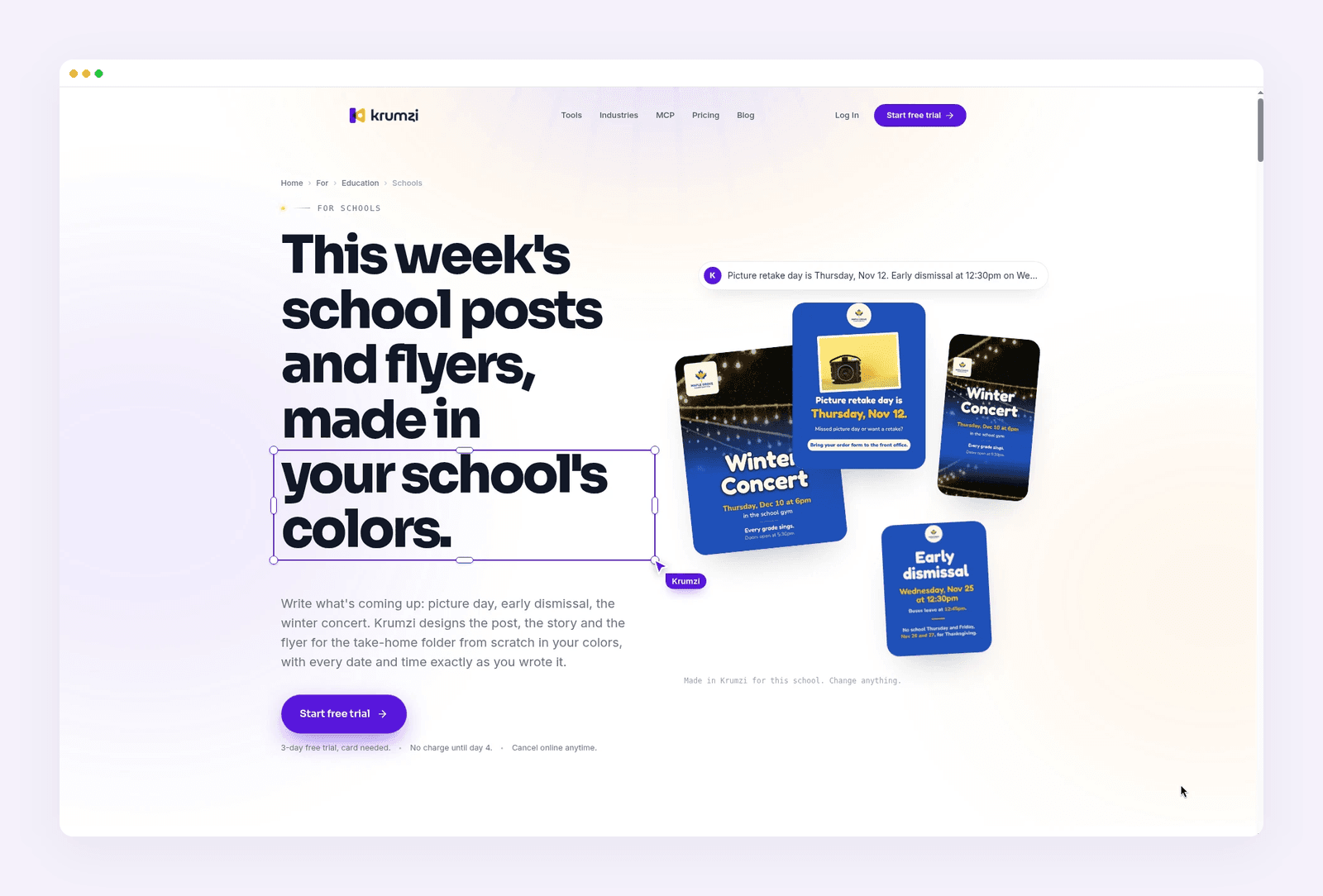
Best for: School offices and PTA volunteers who need flyers, posters, newsletters and social posts from the same brief, with editable dates.
Key features: Text-to-design from a plain brief. Full layer editor. Brand Mind on every plan, and a Brand Kit on Pro and up, including a separate look for the PTA or a team. Print-ready PDF. Instagram and Facebook scheduling. Opens Publisher .pub files.
Pricing: Starter is $19 a month. Pro is $39 a month (Brand Kit, video, 3 brands). Studio is $89 a month. Agency is custom. Starter, Pro and Studio include a 3-day free trial with 500 credits. A card is required, trial exports are watermarked, and you are charged on day 4 unless you cancel. See current plans.
2. Canva
Canva is still the template tool most school staff already know. For eligible K-12 teachers and schools, Canva Education is free and includes most Pro features, education templates, and classroom sharing. That is the right starting point if you have a school email and you are in an eligible role.
It is the wrong assumption for a PTA parent. Parents are not eligible for Canva Education. A PTA that is a registered 501(c)(3) (or the equivalent in its country) may apply for Canva Nonprofits instead, which can provide Pro features for up to 50 users. If the PTA is not a registered charity, you are on the regular free plan or a paid Pro seat ($120 a year for one person).
Canva is strong at collaboration and at "pick a flyer template and swap the text." It does not open Publisher .pub files on its own, and the same templates are available to every other school that uses Canva.
Best for: Eligible K-12 staff on Canva Education, or a PTA that qualifies for Canva Nonprofits.
Key features: Drag-and-drop editor. Large template library. Brand Kit on Pro and on the education and nonprofit plans. Shared folders. Classroom tools on Canva Education.
Pricing: Canva Education is free for eligible K-12 teachers, students and qualified schools. Canva Nonprofits is free Pro for eligible registered charities, up to 50 users. Otherwise, a free plan is available, and Canva Pro is $120 a year for one person.
3. Adobe Express
Adobe Express is the other major template tool with a free K-12 path. Adobe Express for Education includes Premium features, age-appropriate search, and school-owned accounts, at no cost for eligible K-12 institutions, teachers and students. It is a good fit if your district already deploys Adobe, or if you want short video as well as flyers.
As with Canva, the education licence is for the school, not for a parent volunteer. Eligible PTAs that are 501(c)(3) organizations can look at Adobe Express for Nonprofits, which offers Premium free for one year, for up to 50 people. That is a one-year subscription, not an open-ended classroom program, so put a reminder on the calendar.
Best for: Schools already in the Adobe ecosystem, and classrooms that want Premium Express at no cost.
Key features: Templates for flyers, posts and short videos. Brand tools. Education privacy and safe-search features on the education plan. Web and mobile apps.
Pricing: Adobe Express for Education is free for eligible K-12 schools, staff and students. Regular Premium is from around $9.99 a month. Qualified 501(c)(3) organizations can get Premium free for one year, for up to 50 people.
4. Marq
Marq is a browser design tool built around brand-locked templates. A communications lead sets the school colors, the logo and the parts of a flyer or letterhead that volunteers may not move. Then a PTA editor or a building secretary fills in this week's details without drifting off brand. That is useful in a district where every campus flyer has started to look different.
It is not an AI designer, and it is not free for schools in the way Canva Education is. The free plan is limited to 3 projects. There is no separate education or nonprofit price on the public pricing page.
Best for: Districts and large PTAs that want locked templates so every flyer stays on brand.
Key features: Brand-locked template regions. Shared brand assets. Print and social export. Team roles and locking on the Team plan.
Pricing: Free plan with a 3-project limit. Pro is from around $15 a month for one user, billed monthly. Team is from around $12 a month, billed monthly, and includes a second license. Enterprise is custom.
5. Google Workspace (Docs and Slides)
Most schools already have Google Workspace for Education. Google Docs is fine for a text-heavy newsletter that has to be translated, read by a screen reader, or pasted into an email. Google Slides can stand in for a simple one-page flyer, the same way PowerPoint often did next to Publisher.
Neither one is a substitute for a designed carnival poster or a folded program. You will spend your evening nudging text boxes. If your only job is the monthly letter, and families read it as email text, stay in Docs and spend your energy on the writing. For a PTA flyer that has to look like a poster, use a design tool and keep Docs for the words.
Best for: Text-first newsletters and simple slides in an account the school already pays for.
Key features: Real-time collaboration. Comments and sharing with school accounts. Easy to paste into email. Slides for simple one-pagers.
Pricing: Included with the school's Google Workspace for Education account for eligible institutions. Personal Google accounts have separate limits.
6. Smore (a newsletter tool, not a design tool)
Smore is a school newsletter platform. You build an issue, email it, and see opens and clicks. Higher individual plans add automatic translation, a logo, and more monthly sends. Online newsletters are described as following WCAG 2.1 AA. You can export a PDF or a JPG, and you can print an issue.
That is delivery and measurement. It is not a PTA flyer maker, and it is not a substitute for a concert poster. Use Smore when the job is "get this newsletter in front of families and see who opened it." Use a design tool when the job is "hang this on the door and send a matching social post."
Best for: School and PTA newsletters you need to email, track and, on higher plans, translate.
Key features: Newsletter templates, email sends, analytics, PDF and JPG export, translation on Pro and up. Teams plans add brand kits and collaboration.
Pricing: A free trial is available, with no credit card required. Individual plans are $99 a year (Basic, 5,000 monthly sends), $179 a year (Pro), and $299 a year (Premium, 30,000 sends). Teams starts at 5 users and is quoted. Prices as of November 2026.
How the tools compare
| Tool | Main job | Who gets it free | Starts from | Paid price (from) |
|---|---|---|---|---|
| Krumzi | Flyers, posts and newsletters from a written brief | 3-day trial, then paid | Your description, editable layers | $19/mo |
| Canva | Templates and team editing | Canva Education (eligible K-12 staff); Canva Nonprofits (eligible charities) | Templates | $120/year if you do not qualify |
| Adobe Express | Templates, posts and short video | Express for Education (eligible K-12); 1-year nonprofit Premium | Templates or a prompt | Around $9.99/mo if you do not qualify |
| Marq | Brand-locked templates | Free plan, 3 projects | Locked templates | Around $15/mo |
| Google Docs / Slides | Text newsletters and simple slides | School's Workspace account | A blank doc or a theme | Included with many school accounts |
| Smore | Email newsletters and analytics | Free trial | Newsletter templates | $99/year |
Prices as of November 2026.
How to make a PTA fundraiser flyer
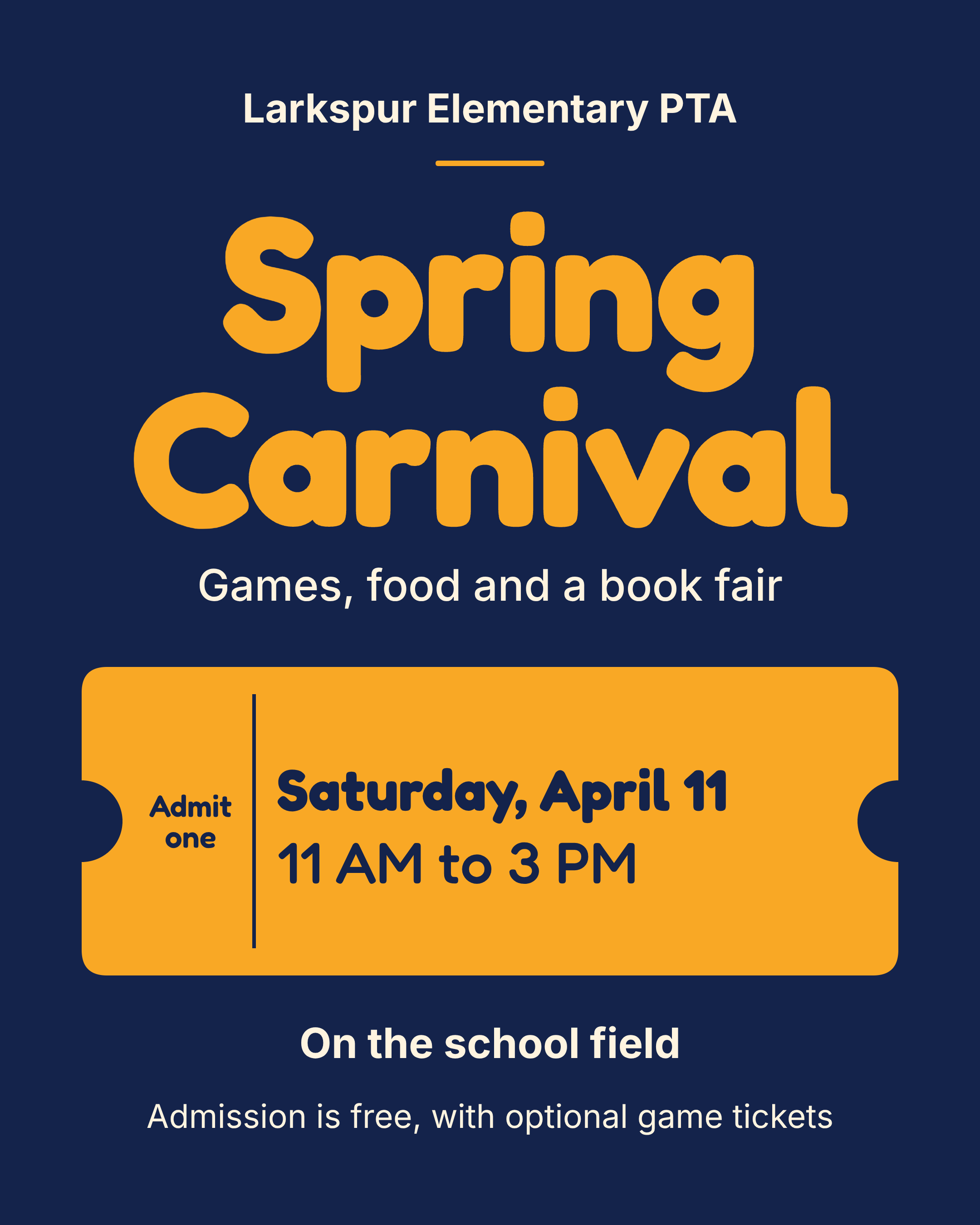
The walkthrough uses Larkspur Elementary PTA, a made-up school group, and a Spring Carnival on Saturday, April 11, from 11 AM to 3 PM on the school field. Admission is free, with optional game tickets. The same steps work for a concert poster or a meeting flyer.
For what belongs on a meeting flyer or a join-PTA flyer, use the checklists in the PTA newsletter article. This section is only about making the graphic.
1. Write the facts in one brief
Put the event name, the date written out, the start and end time, the place, the cost, and one reason to come. "Saturday, April 11, 11 AM to 3 PM, school field" should be in the brief, not left for the tool to invent.
2. Design the flyer, then fix the words first
Generate or open a layout at a printable size (US Letter, or half letter if you want two copies per sheet). Read every date, time and price before you touch the decoration. These are the lines that get a family to the field.
3. Make the matching post from the same brief
The carnival also needs a square post and a story. Keep the same colors and type as the flyer, so a parent who sees the post and then the paper copy knows it is the same event. If you also need a stack of event posters, our AI flyer makers guide covers that format in more detail.
The flyer below is the Larkspur carnival piece, designed in Krumzi from that brief.
4. Export for the folder and for the feed
Download a print-ready PDF for the take-home folder and the noticeboard. Export the post at the size you actually use. Scan any QR code from two phones before you print a class set.
What to use now that Publisher is retired
For Microsoft 365 subscribers, Publisher was removed on or shortly after October 1, 2026. Perpetual Publisher 2021 can still run, but support ended on October 13, 2026. The University of Washington's IT notice is a clear, non-vendor summary: inventory your .pub files, save PDFs for archives, and pick a replacement for anything you still edit.
Microsoft points people to Word and PowerPoint. In a school that already uses Google, Docs and Slides play the same role. They are fine for text. They do not open a Publisher file with the layout intact, and Microsoft Designer is not a print replacement for a folded program.
If you still update last year's carnival flyer or a concert program saved as .pub, open it in a tool that reads the file, or rebuild the living version once in Affinity (now free with a Canva account), Krumzi, or your new template system. For the full replacement list by job, use our Microsoft Publisher alternatives guide.

Frequently Asked Questions
What is the best graphic design tool for schools in 2026?
It depends on who is signing in and what you are making. Eligible K-12 teachers should start with the free education plan they already qualify for, usually Canva Education or Adobe Express for Education. PTA volunteers should not assume those plans apply to them. For flyers and posts you want to describe and then edit, use Krumzi. For a text-only newsletter, Google Docs is often enough.
Can PTA volunteers get Canva Education for free?
No. Canva Education is for eligible K-12 teachers, students and qualified schools. Parents are not eligible. If the PTA is a registered charitable nonprofit, it may apply for Canva Nonprofits instead. Approval is not automatic.
Are Smore, ParentSquare and ClassDojo design tools?
No. ParentSquare and ClassDojo are parent-messaging platforms. Smore is a newsletter and email tool with templates, sends and analytics. Use them to reach families. Use a design tool for PTA flyers, posters and social graphics.
What should I use for a PTA flyer?
Use a design tool that keeps the date and the price as real text, then export a print-ready PDF. Krumzi, Canva and Adobe Express all can do that job. Do not start in a messaging app, and do not use an image generator that paints the date into the picture.
What happened to Microsoft Publisher, and what should schools use instead?
Microsoft 365 subscribers lost Publisher on or shortly after October 1, 2026. Save PDFs of files you only need to read. For files you still edit, use a tool that opens .pub files, or rebuild them in your new design tool, Word, or Google Docs, depending on how visual the layout is.
Want the design part done for you? Start a free trial and describe this week's flyer or newsletter.
3-day free trial, card needed. No charge until day 4. Cancel online anytime.
A month of posts, designed before your coffee cools
Describe the post. Krumzi designs it from scratch, on your brand, fully editable.
Start free trial3-day free trial, card needed. No charge until day 4. Cancel online anytime.


