On this page
- What to Include in a PTA Newsletter
- How Long and How Often
- Print, Email or PDF?
- The Monthly Routine: Write Once, Make Three Pieces
- PTA Meeting Flyer: What to Put On It
- Join PTA Flyer for the Membership Drive
- Add a QR Code to Every Sign-Up
- Make It Easy for Every Family to Read
- Photos of Children: Get Permission First
- This Month's Newsletter, Flyer and Post in One Sitting
- Frequently Asked Questions
The PTA newsletter is due Friday. The meeting is in two weeks and nobody has made the flyer yet. You already know the news. What you don't have is a layout, or a free evening to build one.
This guide is for the volunteer who puts out the PTA or PTO newsletter every month, next to a day job. It covers what goes in each issue, length and frequency, print vs email, and the two flyers you'll make most: the meeting flyer and the "join PTA" flyer. The trick is one monthly routine: write the month's news once, then make the newsletter, the flyer and a matching social post from it.
What to Include in a PTA Newsletter
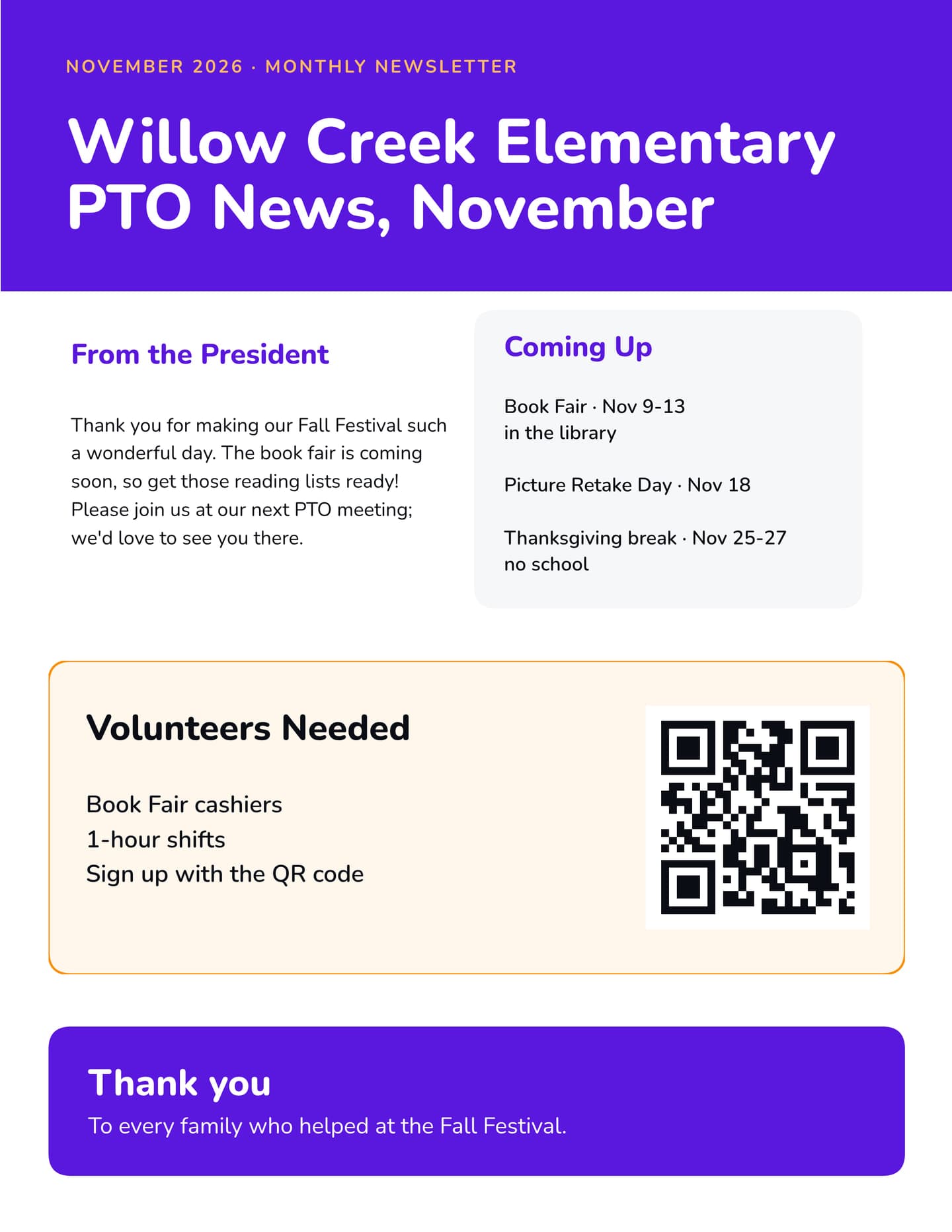
A PTA newsletter should carry the same core sections every issue: a short note from the president, the PTA and school calendar, the next meeting, contact details and a link to join. Then add three or four sections for this month's news: upcoming events, volunteer asks, what the PTA paid for, and thank-yous.
That "in every issue" core comes from National PTA's newsletter guidance.
In every issue
- A short message from the president (three or four sentences, not a letter)
- The PTA calendar, plus the school calendar if your PTA is school-based
- The next meeting: date, time, room and one agenda item worth showing up for
- PTA and school contact details
- A link or QR code to join the PTA
This month (pick three or four)
- Upcoming events, each with one clear thing to do: buy, sign up, show up
- Volunteer asks: one task, one date, one sign-up link
- What the PTA paid for and what it changed for the kids, like new library books or a bus for a field trip
- Thank-yous to volunteers, teachers and local sponsors
- Photos from last month's event, only with permission (more on that below)
If you're searching for a PTA newsletter template or a PTO newsletter template, this checklist is the part worth copying. Keep the same section headings in the same order every month. PTA UK recommends the same thing, with headings like "Save the date" and "Meet the team", because families learn where to look. The design can change with the season. The skeleton shouldn't.
How Long and How Often
Keep it to one page, two at most. If a section needs more than that, it belongs on the school website with a link from the newsletter. PTA UK suggests giving every contributor a word cap of 100 words or fewer per item. That one rule saves more editing time than anything else in this guide.
Monthly lines up with a monthly meeting, and National PTA's sample editorial calendar runs one issue a month. Its advice is to ask families what they want (monthly, every other month or quarterly) and then stick to the schedule you pick. Choose a fixed send day, such as the first Monday of the month, so families start to expect it and contributors know their deadline.
Print, Email or PDF?
You'll probably use all three, each for a different job.
| Format | Good for | Watch out for |
|---|---|---|
| Email, with the text in the body | Reading on a phone, open tracking, screen readers and translation tools | Layout looks different in every inbox |
| Keeping the design, printing at home, posting on the school site | Attachments can land in junk folders (PTA UK's warning), and a designed PDF can be hard for screen readers | |
| Families who don't read email or don't have reliable internet | Printing costs, and the district's rules on sending paper home with students |
National PTA lists the questions to ask before choosing: is internet access an issue for some families, what does printing cost, and do you have a volunteer who can keep it going? A setup that works for most schools: put the text in the email body, link to the designed PDF, and print a short run for the families who asked for paper. To keep printing cheap, lay it out at half letter size, so one letter sheet gives you two copies.
The Monthly Routine: Write Once, Make Three Pieces
The newsletter, the meeting flyer and the social post say the same things: what's coming up, what you need, when the meeting is. So write the month's news once and make all three from it, in this order.
Step 1: Collect the month's news by a set date
Send one shared form to committee chairs and the principal, with the 100-word cap at the top. Set the deadline a week before send day. Late items wait for next month.
Step 2: Write the newsletter from the checklist
Fill in the same headings as last month. Lead with the one thing you most want families to do, like signing up for the book fair, and cut what doesn't help them do it.
Step 3: Make the meeting flyer from the same notes
Copy the meeting details and the agenda item straight from the newsletter, add a QR code to RSVP, and make the meeting flyer. The next section lists what goes on it.
Step 4: Turn the top story into a social post
Take the month's biggest ask and make one post for the school's Facebook Page or Instagram account. Use the same colors and fonts as the newsletter and point to the same sign-up link, so a parent who sees the post and then the paper copy knows it's the same thing.

Step 5: Check, send and post on the same day
Run the readability and translation checks below, then send the email, post the social graphic and pin the flyer on the same day. Print last, once you've caught the typos.
PTA Meeting Flyer: What to Put On It
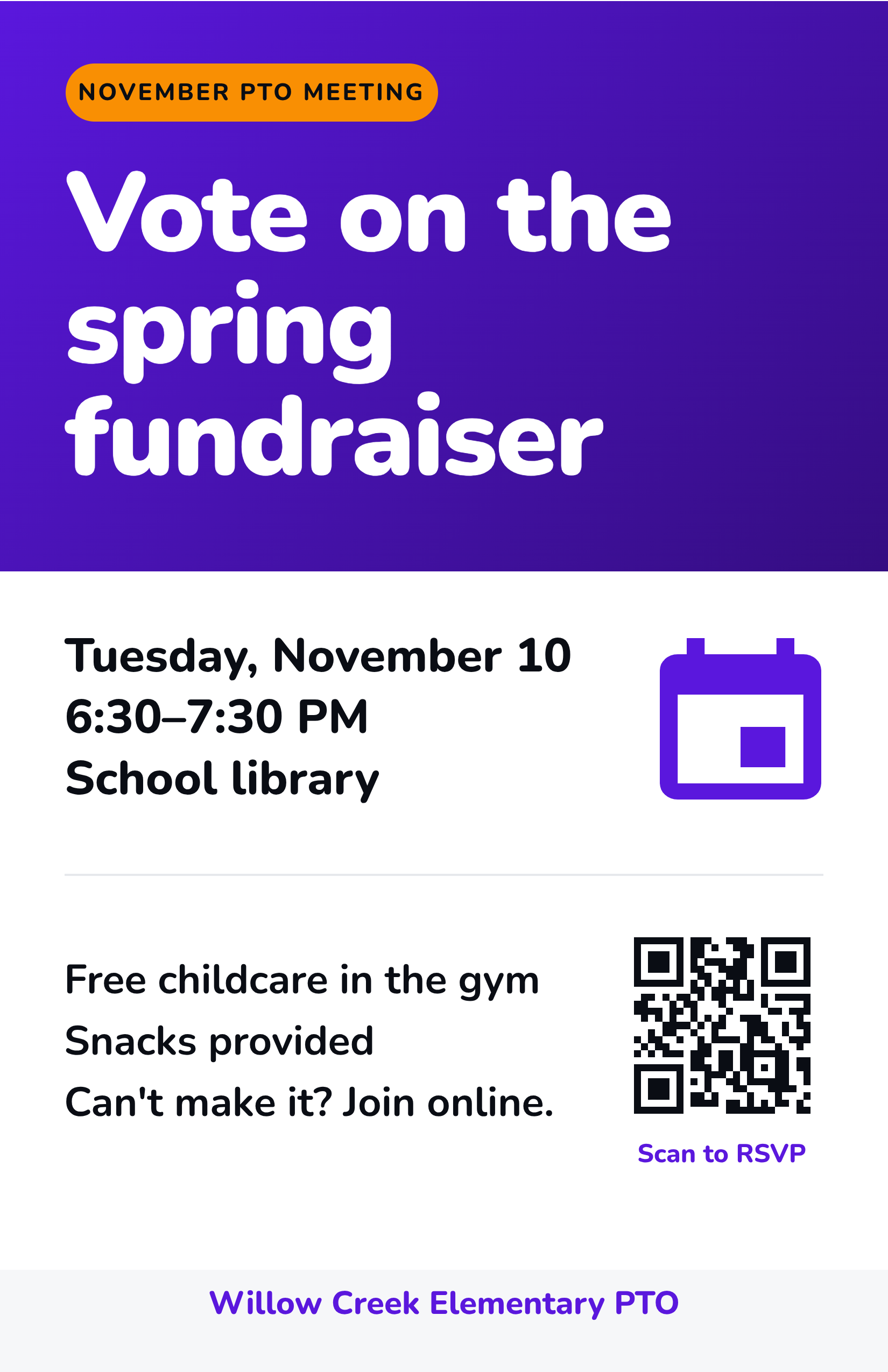
A PTA meeting flyer or PTO meeting flyer has one job: get parents into the room. "General Meeting" doesn't do that. A reason does.
- The reason to come, as the headline: "Vote on the spring fundraiser" beats "November PTA Meeting"
- Date and day, written out: Tuesday, November 10
- Start and end time, so parents can plan the evening
- The room, and which door to use after hours
- Childcare and food, if you offer them. For parents with young kids, childcare often decides whether they can come
- The online link if you stream the meeting
- A QR code to RSVP, with a short label under it
Post it at the office and the front door, and put it on the newsletter's back page.
Join PTA Flyer for the Membership Drive
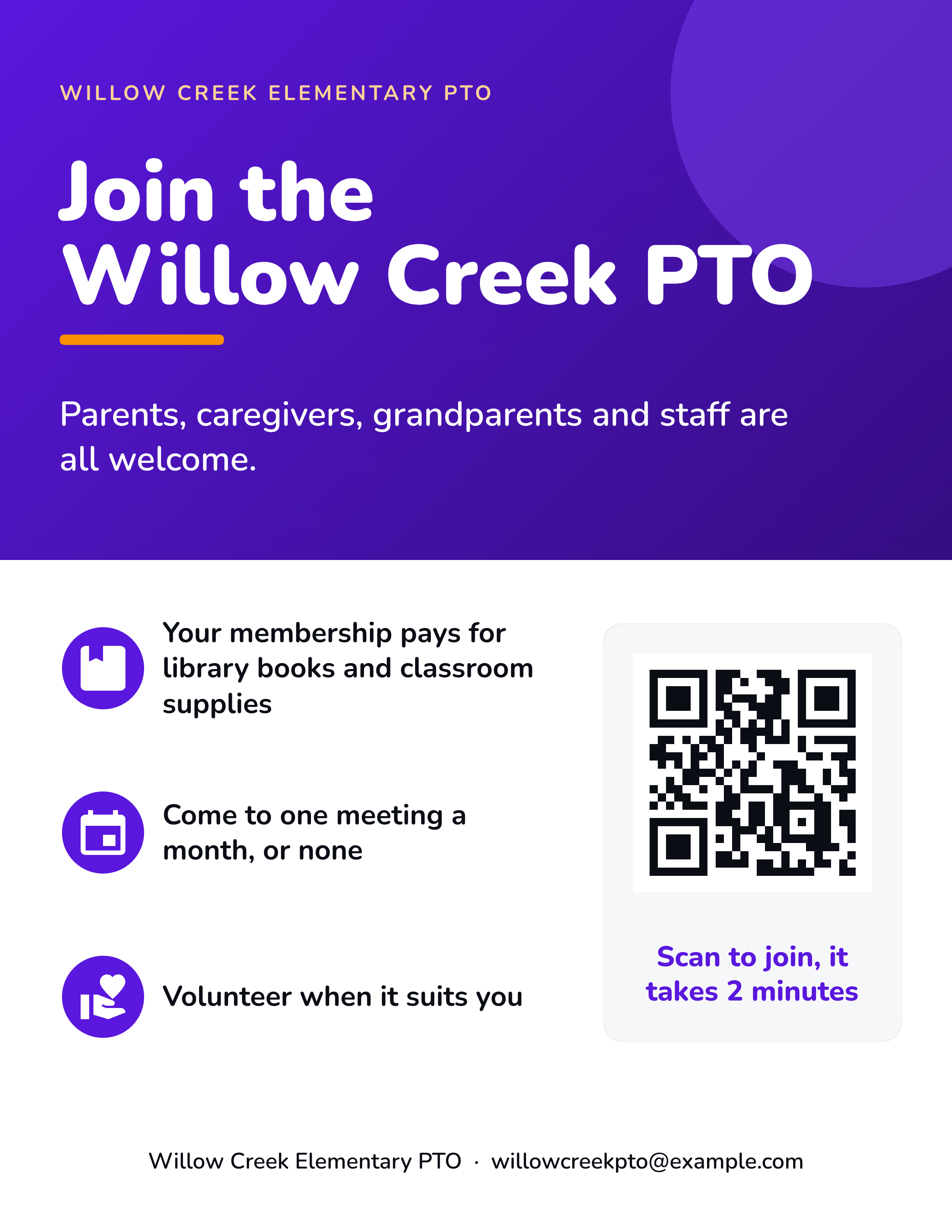
A join PTA flyer works when it answers the three questions parents actually have: who can join, what it pays for, and how much time it takes.
- Who can join. Parents, caregivers, grandparents, teachers and staff. List them all on the flyer.
- What membership pays for this year, in plain words: library books, classroom supplies, the spring carnival
- The time commitment. "Come to one meeting a month, or none" lowers the bar
- A big QR code to the join page, and a deadline if you're running a drive
If your group is a PTA unit, the name is protected. National PTA's branding guidance says only PTAs established by a state PTA or National PTA can use the PTA name, and it links the logo rules. If you're an independent PTO, the same flyer works with your own name.
Add a QR Code to Every Sign-Up
A QR code turns a flyer on the fridge into a sign-up. Put one wherever you ask for action: the meeting RSVP, volunteer shifts, the join page and the PDF version of the newsletter.
- Make it big enough to scan from arm's length
- Put a short label under it: "Scan to sign up"
- Always print the plain link too, for the email version and for anyone without a camera
- Scan it with two different phones before you print
There's a step-by-step guide to add a QR code to the flyer, and you can make one with our free QR code generator.
Make It Easy for Every Family to Read
Readability
- Use plain words and short sentences. Skip school jargon and acronyms, or spell them out once.
- Keep body text large enough to read on a phone and in print, dark text on a light background.
- Put the newsletter text in the email body so families can use screen readers and translation tools without relying on image recognition.
- Add alt text to every image in the email.
Translation
- Ask the school office which languages families read at home.
- Schools have to share information about their programs and activities with parents who have limited English in a language they can understand (US Department of Education fact sheet). So the school or district may already have a family liaison or translators. Ask whether they can help with the PTA newsletter too.
- Recruit a bilingual volunteer for each of the top languages, and keep the same layout for every version so families recognize it.
- Machine translation of the email text is a fallback. Have a person check the dates, times and anything about money.
Photos of Children: Get Permission First
Photos of kids at the fall festival make a newsletter. They also need permission. National PTA's photography guidance recommends getting a signed release form for pictures with children, keeping the forms for as long as you use the photo, and notes that school release forms don't replace PTA forms. The same page links a sample release form you can adapt.
A few habits that make this easy:
- Collect a release form once a year, at registration or the first meeting
- Keep a "no photos" list and check it before every issue
- Never print a child's full name next to their face
- If you're unsure whether you have permission, leave the photo out until you've checked.
This isn't legal advice. Your school district may have its own photo rules, and those come first.
This Month's Newsletter, Flyer and Post in One Sitting
You have the notes. Turning them into a newsletter that looks right is the part that eats the evening. You open a template. Delete half the boxes. Retype the dates. Fight the text that won't fit. Krumzi does the layout part for you.
-
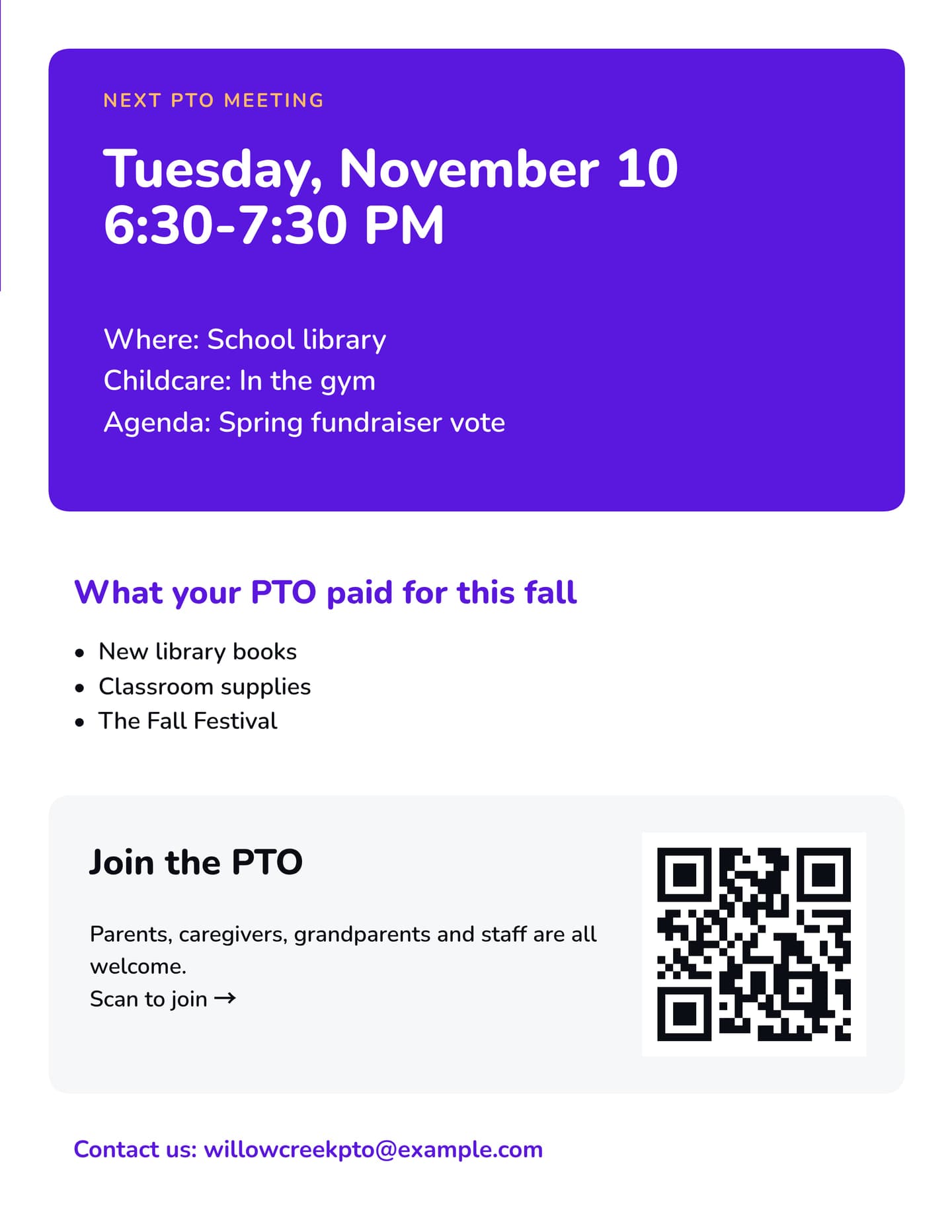
Paste the month's notes. Choose a Document, set it to 2 pages at US Letter or Half Letter, and paste your notes as the prompt. The AI lays out every page and gives each one its own job. In the example below, page 1 carries the month's news, the volunteer ask and a thank-you, and the back page holds the meeting box, what the PTO paid for, the join box and the contacts.
-
Edit by chatting. Ask for a bigger meeting box, a new date or a different photo, and every element stays editable if you'd rather change it by hand.
-
Export the PDF. Download one multi-page PDF at real paper size, for the email link and the print run.
-
Make the flyer and the post in the same look. Use the same notes for the meeting flyer and the social post. With the Brand Kit (Pro and above), your colors, fonts and logo carry across every design. QR codes are elements you add and edit on the design.
-
Schedule the post. Connect your Facebook Page or Instagram professional account and schedule the post for send day.
It works for the rest of the year too, with the same steps for newsletter graphics, event flyers and the spring carnival poster.
Start free trial. Card needed, no charge until day 4. Downloads during the trial carry a watermark until your plan starts, so make the design during the trial and print once you're on a plan.
Frequently Asked Questions
What should be in a PTA newsletter?
A short president's message, the PTA and school calendar, the next meeting, contact details and a link to join, plus three or four sections of this month's news. Keep the headings the same each month.
How often should a PTA send a newsletter?
Monthly is a good default because it lines up with a monthly meeting. National PTA suggests asking families what they prefer, then sticking to the schedule with a fixed send day.
How long should a PTA newsletter be?
One page, two at most. Cap each item at about 100 words and link to the school website for anything longer.
What should a PTA meeting flyer include?
Lead with the reason to come, such as a vote, then the date, start and end time, room, childcare and food if offered, the online link and a QR code to RSVP.
Do you need permission to put children's photos in a PTA newsletter?
Yes. National PTA recommends a signed photo release form for pictures with children, and says school release forms don't replace PTA forms. Collect them once a year and keep a "no photos" list.
A month of posts, designed before your coffee cools
Describe the post. Krumzi designs it from scratch, on your brand, fully editable.
Start free trial3-day free trial, card needed. No charge until day 4. Cancel online anytime.