On this page
- Is there a Canva MCP?
- What "Canva MCP alternative" really means
- Canva MCP alternatives compared
- Best for each job
- What we got back from one sentence
- How to connect Krumzi to Claude, ChatGPT or Cursor
- Pricing at a glance
- When you should use something else
- One honest limitation
- The takeaway
- Frequently Asked Questions
You asked Claude for a flyer. It wrote great copy, then handed you a flat picture, or sent you off to a template gallery. Now you're searching "Canva MCP" to find out whether your AI agent can do the design part properly, and what else it could plug into.
Here's the short answer, so you can stop reading if that's all you need.
Yes, Canva has an official MCP server. It's the safest pick if your team already lives in Canva and you want the agent to search, edit and export your existing Canva designs. If you want the agent to design a new flyer, menu or post from one sentence and hand back a file where every line is still editable text, use a brief-to-layout design MCP such as Krumzi. If your work lives in Figma files, use Figma's MCP. If you only need the same template filled a thousand times, use a template API like Bannerbear.
The rest of this guide shows what each one actually returns, what it costs, and the real output from a one-sentence flyer brief we ran through an MCP on 19 November 2026.
Is there a Canva MCP?
Yes. Canva runs an official remote MCP server, and Canva's help center lists connection steps for ChatGPT, Claude, Gemini and Microsoft Copilot through what it calls the Canva AI Connector. Canva says the connector works on every Canva account, including Canva Free and Canva Education. Brand Templates, autofill, brand kits and resizing to new dimensions need Canva Pro or above.
Under the hood, the agent gets tools such as generate-design, which returns a few design candidates for you to pick from, create-design-from-candidate, which turns your pick into a real Canva design, editing tools that work as open, edit and commit transactions, and export-design, which exports PDF, PNG, JPG, PPTX or MP4. Canva's own developer docs tell agents to hand you an "Open in Canva" link at the end. That tells you how Canva sees it: the chat starts the design, and Canva's editor finishes it.
That's a good fit for a lot of people. It's a poor fit if you never want to open Canva at all.
What "Canva MCP alternative" really means
MCP (the Model Context Protocol) is an open standard that lets an AI assistant call tools in another product. Lots of design products now ship an MCP server. They don't do the same job.
When you look for an alternative, ask one question first: what does the agent hand back? There are four answers in 2026.
- A design you pick and finish in a design suite. Canva's MCP generates design candidates for you to pick and finish in Canva, and Adobe Express starts from matching templates. Fast and familiar, and you finish in their editor.
- An editable layout built from your brief. Krumzi designs the layout from scratch from what you typed, then saves it with live text, shapes and images as separate layers.
- A file in a UI design tool. Figma's MCP reads and writes Figma frames, components and variables. It's built for product teams, not for a Saturday flyer.
- A filled template or a flat image. Bannerbear fills a template you built once. Image MCPs, and Kittl's generation tools, return pictures.
Pick the row that matches the file you need on Friday. Everything else is detail.
Canva MCP alternatives compared
| Tool | Best for | What the agent returns | Print export | Works in | Price (as of 19 Nov 2026) |
|---|---|---|---|---|---|
| Canva MCP | Teams already working in Canva | Canva designs from candidates or templates | PDF, PNG, JPG, PPTX, MP4 | ChatGPT, Claude, Gemini, Copilot | Free plan; Canva Pro from around $120 a year |
| Krumzi MCP | A new flyer, menu or post from one sentence | Layered design built from the brief | PNG, JPG, WebP, PDF with 0.125 in bleed on print sizes | Claude, ChatGPT, Cursor, Claude Code, any remote MCP client | Five free designs a month; plans from $19 a month |
| Figma MCP | Product and UI teams | Figma frames, components and code context | Not the job | Claude Code, Cursor, VS Code, Codex and more | Write to canvas free during beta, Full seat needed |
| Adobe Express | Template customizing inside chat | A matching Adobe Express template you fill in | Through Adobe Express | ChatGPT, Claude, Copilot, Gemini | Premium from around $9.99 a month |
| Kittl MCP | Merch, mockups, vectors and image sets | Generated images and mockups, saved to Kittl | Upscale for print | Claude, ChatGPT, Claude Code, Codex | Connecting is free; generations use Kittl credits |
| Bannerbear MCP | The same template at scale | Images, videos or PDFs from your own templates | PDF from a template | Claude, Cursor, any MCP client | From around $49 a month |
Krumzi prices verified on krumzi.com/pricing on 19 November 2026. Other prices as of November 2026.
Best for each job
Best if your designs already live in Canva: Canva MCP. You keep your Brand Templates, your folders and your team's permissions. The agent can find last month's flyer, edit it and export it, which no outside tool can do for files it never saw.
Best for a new, editable flyer, menu or post from one sentence: Krumzi. You describe the job, and the agent gets back a finished layout with real text layers. You fix a date by changing one text layer, not by asking for a whole new image.
Best if your files live in Figma: Figma MCP. Figma's MCP gives coding agents the design context to build from your frames, and it can now write native Figma content back to the canvas. If your "design" is an app screen, stop here.
Best for filling one template thousands of times: Bannerbear. You design the template once in Bannerbear, then the agent swaps the text and images per row. It's the right tool for 400 product cards. It won't invent a new layout.
Best for merch, mockups and image sets: Kittl. Kittl's MCP chains image generation, background removal, upscaling, vectorizing and mockups. The output comes back as images, saved in your Kittl workspace.
What we got back from one sentence
Here's a real run. We connected an AI client to the Krumzi MCP server and sent this one-sentence brief to the generate_design tool, at A5 size (874 x 1240 pixels at 150 dpi):
An A5 flyer for Saturday's free bike repair day at Elm Street Library, 10am to 2pm, in teal and sunflower yellow.
The agent called generate_design, then polled get_design every 20 to 30 seconds, as the tool tells it to. The finished flyer was ready in under 2 minutes and cost 129 AI credits. It came back as 22 separate layers: 7 live text layers (headline, day, time, venue, call to action and the two clock numbers) and 15 shapes that draw the wheel.
Then we did the thing that breaks flat images. We asked for the date to be added. The agent read the layers with get_canvas_state, found the one named "Day", and changed it with update_elements. That took about 5 seconds, used 0 credits, and touched nothing else on the page.

We didn't run the same brief through Canva's MCP, because Canva's flow ends with you picking a candidate and finishing in Canva's editor. So we won't put a stopwatch number on it. What Canva documents is the difference that matters: it shows you candidates first, and its edits run as transactions you commit.
How to connect Krumzi to Claude, ChatGPT or Cursor
Setup takes about a minute. The server URL is https://www.krumzi.com/api/mcp, and the connection is secured with OAuth 2.1, so you approve it on Krumzi rather than pasting a password.
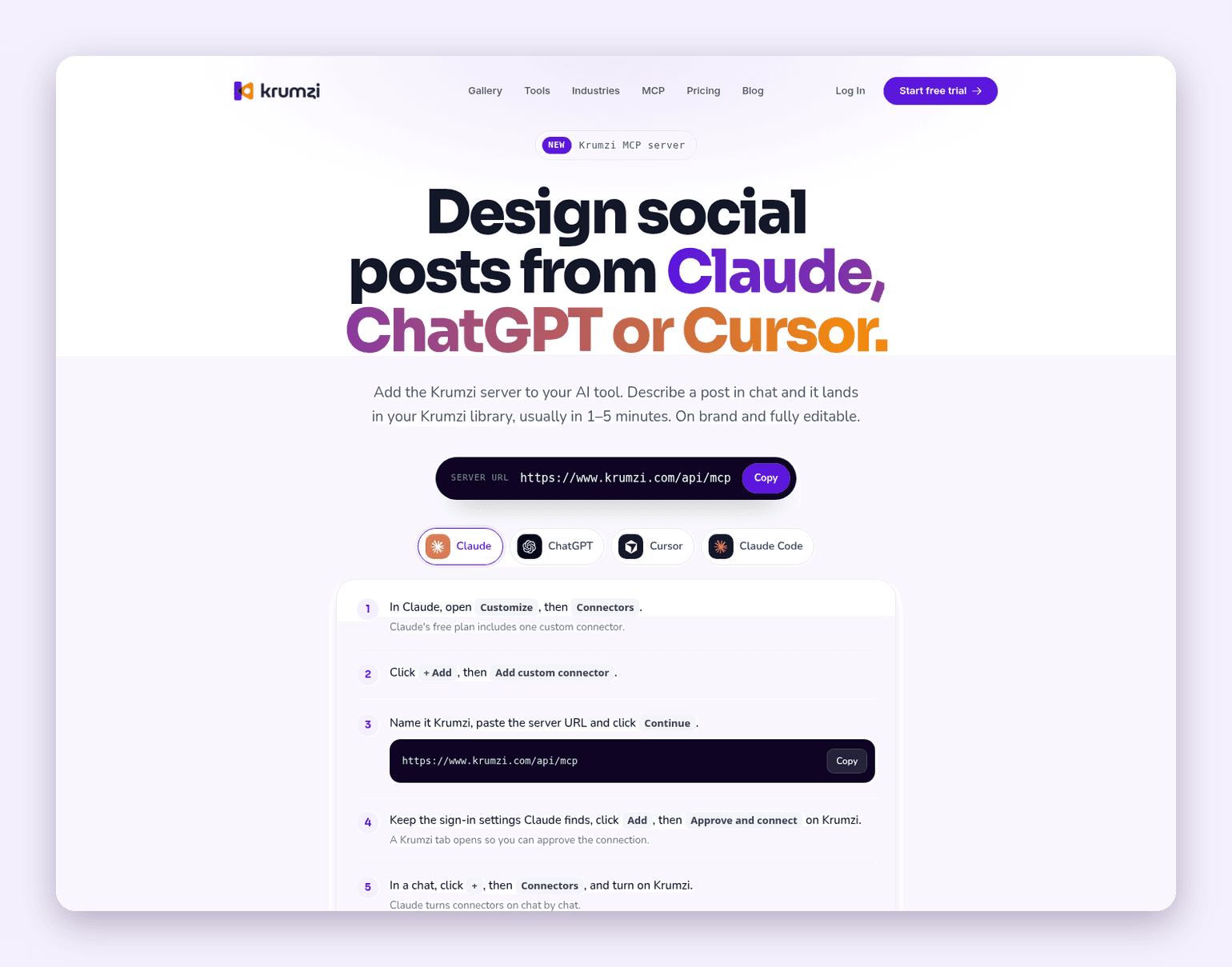
- Claude. Open Customize, then Connectors. Click + Add, then Add custom connector. Name it Krumzi, paste the server URL, click Continue, then Add, then Approve and connect on Krumzi. In a chat, click +, then Connectors, and turn Krumzi on. Claude's own guide to custom connectors using remote MCP covers the same flow.
- ChatGPT. Follow the ChatGPT tab on the Krumzi MCP page, sign in to Krumzi and click Approve and connect, then start your message with "Krumzi". OpenAI also documents how to add any custom MCP server as a plugin.
- Cursor. Open Cursor Settings, then Tools & MCP, click Add custom MCP, and add Krumzi to
mcp.jsonwith the server URL. Save, then approve the request on Krumzi. - Claude Code. Run
claude mcp add --transport http krumzi https://www.krumzi.com/api/mcp, then type/mcpin Claude Code, pick krumzi and choose Authenticate.
Once it's connected, ask the way you'd brief a designer: format, size, every word of copy, and the colors. Then edit in the same chat, or open the design in the Krumzi editor. If you want the whole tour first, our guide to Claude connectors explains how connectors work, and What Is an MCP Server? covers the protocol in plain English.
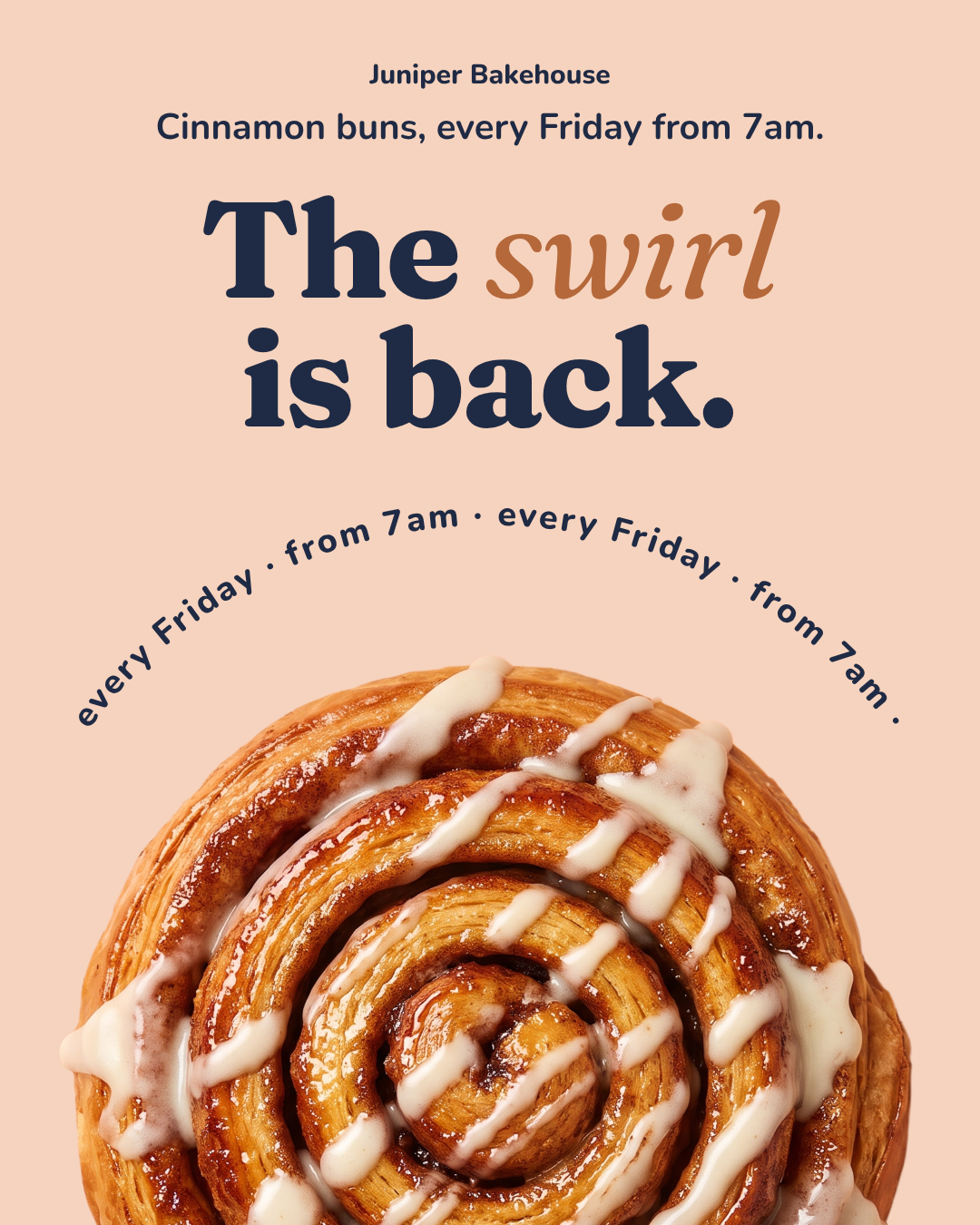
The same connection makes social posts. Here's an Instagram post from a single brief for a made-up bakery, in navy and soft peach:
Pricing at a glance
Krumzi (verified on krumzi.com/pricing, 19 November 2026): Starter $19 a month or $190 a year, Pro $39 a month or $390 a year, Studio $89 a month or $890 a year, and Agency priced with you. Need it for one event? A month pass gives you everything in Pro for 30 days for $49 once, and nothing renews. Starter, Pro and Studio start with a 3-day free trial with 1,000 AI credits; a card is needed and there's no charge until day 4. The MCP page adds that any Krumzi account can make five designs a month through the connection without the Krumzi badge, with no card.
Canva says its MCP is available on all Canva plans, with Brand Templates, autofill and admin controls varying by plan. Canva Pro is from around $120 a year for one person.
Figma says writing to the canvas through its MCP is free during the beta and will become a usage-based paid feature. Writing outside your drafts needs a Full seat.
When you should use something else
Krumzi isn't the answer to every agent design question. Use something else when:
- Your team's designs already live in Canva. Use the Canva MCP. It can open, edit and export the files you already have, and keeps your Brand Templates and permissions.
- You're designing an app or website. Use the Figma MCP, or a UI canvas tool. A marketing-layout tool is the wrong shape for frames, components and code.
- You need one layout filled at scale. Use Bannerbear's MCP. Template fill beats fresh design when every output must look identical.
- You want merch mockups or vector logos. Use Kittl's MCP for mockups, upscaling and vectorizing.
- You need a video. Krumzi's MCP makes still designs only. Video stays in the Krumzi app on Pro and above, so use a video tool or the app.
One honest limitation
Krumzi isn't listed in the Official MCP Registry or in Claude's connector directory yet. Canva and Figma are in both. In practice, that means you connect Krumzi by pasting its server URL as a custom connector, while Canva shows up in the directories your AI client browses. The setup is one paste and one approval, but it's a step you take yourself.
The takeaway
If you're asking "is there a Canva MCP?", the answer is yes, and it's the right choice when the agent's job is to work inside your Canva account. If the job is to design something new that you can still edit, the better question is what the agent hands back. A layered, editable layout beats a flat image every time a date changes.
Want the design part done in the chat you already have open? Start free trial and ask your agent for your first flyer. 3-day free trial, card needed. No charge until day 4. Cancel online anytime.
Frequently Asked Questions
Is there a Canva MCP?
Yes. Canva runs an official remote MCP server, and its AI Connector links Canva to ChatGPT, Claude, Gemini and Microsoft Copilot. Canva says it works on every Canva account, while Brand Templates, autofill, brand kits and resizing need Canva Pro or above.
What is a Canva MCP alternative for Claude?
It depends on the file you need. For a new flyer, menu or post that comes back as editable layers, connect Krumzi as a custom connector in Claude. For Figma files, use Figma's MCP, and for filling one template many times, use Bannerbear's MCP.
What design tools can Claude or ChatGPT use to create graphics?
Canva, Adobe Express, Kittl and Krumzi all connect to Claude and ChatGPT, and Figma's MCP works in Claude and many coding tools. They return different things: templates you customize, generated images, Figma frames, or layouts built from your brief. Our list of the best MCP servers for marketers covers the wider stack.
What is the best MCP server for creating graphic designs?
For editable marketing designs built from a sentence, a brief-to-layout MCP such as Krumzi is the best fit, because every line stays live text. For work inside an existing Canva library, the Canva MCP wins. For product design, use Figma's MCP.
Can the Canva MCP make a print-ready flyer?
It can generate a flyer design and export it as a PDF, and Canva's create tool accepts formats such as "Flyer (Landscape A4)". Canva's free plan exports at standard quality, while Pro and above export at Pro quality. For a flyer you'll send to a printer, check bleed and size in Canva's editor before exporting.
Is ChatGPT image generation a Canva MCP alternative?
Not for anything you'll edit. ChatGPT's built-in image tool returns a flat picture, so a typo means a new image. Our comparison of Canva vs ChatGPT shows where each one fits, and how to design in ChatGPT walks through the connector route.
A month of posts, designed before your coffee cools
Describe the post. Krumzi designs it from scratch, on your brand, fully editable.
Start free trial3-day free trial, card needed. No charge until day 4. Cancel online anytime.