
On this page
- The short version
- What should I post on Instagram?
- Instagram post ideas that show your work
- Teach one thing
- Prove it
- Sell without a hard pitch
- Stay in touch
- A week of posts from this list
- What every Instagram post needs
- How we made the 12 example posts
- Turn these ideas into posts with Krumzi
- When you should use something else
- Your next post
- Frequently Asked Questions
You have to post on Instagram this week. You open the app, tap the plus and stare at an empty box. You know you should post more. What you need is a few Instagram post ideas that fit your business and take minutes, not an afternoon.
Here are 25 Instagram post ideas sorted by the job each post does: show the work, teach one thing, prove it, sell without a hard pitch and stay in touch. Each idea has one line on why it works, a caption starter and a one-sentence prompt you can copy. Twelve of them show the real post we made from that exact sentence, for twelve made-up businesses, so you can see what comes back.
Pick one idea from each group and you have a week of posts.
The short version
- Post by job, not by mood. Each post should do one job: show, teach, prove, sell or connect. A week with all five never feels repetitive.
- One point per post. If you need a second point, that's next week's post.
- Make the first line count. The words on the image and the first line of the caption do the work. Everything else is extra.
- Use your real stuff. Your shop, your customers, your numbers. Nobody else can post those.
- End with one next step. Comment, save, book, visit. Pick one.
What should I post on Instagram?
Post one thing from your real business that does a single job: show how you work, teach one useful tip, prove a result with a customer or a before-and-after, show a product in use, or ask your followers a question. Rotate those five jobs through the week and you won't run out of ideas or repeat yourself.
That's the system. The 25 ideas below fill it in.
Instagram post ideas that show your work
People follow businesses for the same reason they watch cooking shows. They like seeing how things get made. These posts cost nothing but a phone photo.
1. The work in progress
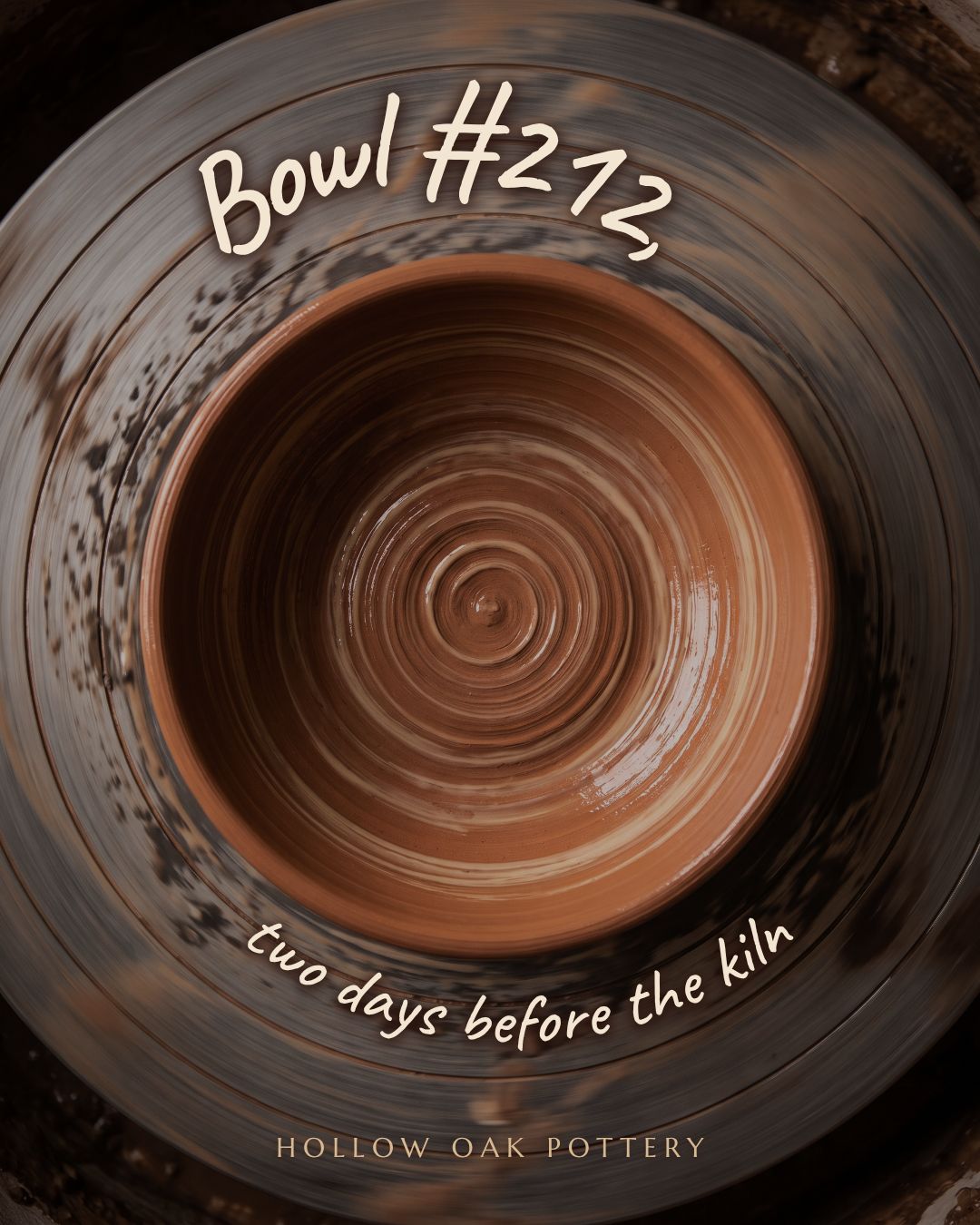
Show something halfway done. A half-built cake, a bowl before the kiln, a room mid-paint. Unfinished work makes people curious about the finished version, which gives them a reason to come back.
Caption starter: "Two days until this goes in the kiln. Guess the glaze color."
Prompt: An Instagram post for Hollow Oak Pottery showing a photo of a wet clay bowl on a spinning wheel with "Bowl #212, two days before the kiln" as a handwritten caption, earthy terracotta and cream.
2. Your tools
One photo of the tools you use every day, laid out flat. It says "we take this seriously" without a word of bragging.
Caption starter: "Every haircut starts with these five things. The comb is older than our shop."
Prompt: An Instagram post for Sharp & Co. Barbers showing a flat lay of scissors, clippers, a comb and a brush on a dark wood counter with "The tools behind every cut" as the headline, black and brass.
3. A day in 6 photos
Six moments from one ordinary day, from unlocking the door to closing up. This is a natural carousel. Our list of Instagram carousel ideas has more ways to structure one.
Caption starter: "6:40 am to 7:15 pm. Here's what a Tuesday looks like."
Prompt: An Instagram post for Northside Bike Repair titled "A Tuesday at the shop" with a timeline of six times from 7:00 am to 6:00 pm down the side, safety yellow and black.
4. How it's made in 3 steps
Three steps, three short lines. Keep it to the steps a customer would find surprising, not every step you take.
Caption starter: "Three steps, 48 hours. This is why our sourdough costs what it costs."
Prompt: An Instagram post for Rise Bakery showing "How our sourdough is made" in three numbered steps: "Feed the starter", "Rest 24 hours", "Bake at dawn", warm peach and cocoa brown.
5. The thing that went wrong
Show a mistake and how you fixed it. It's the most human post you can make, and it proves you care about getting it right.
Caption starter: "This batch cracked in the oven. Here's what we changed."
Prompt: An Instagram post for Hollow Oak Pottery with a photo of a cracked mug and "What went wrong, and what we changed" as the headline, terracotta and cream.
Teach one thing
Teaching posts get saved, and a save means someone wants to see it again. The rule: one tip per post, stated so plainly that someone could act on it today.
6. One tip in big type
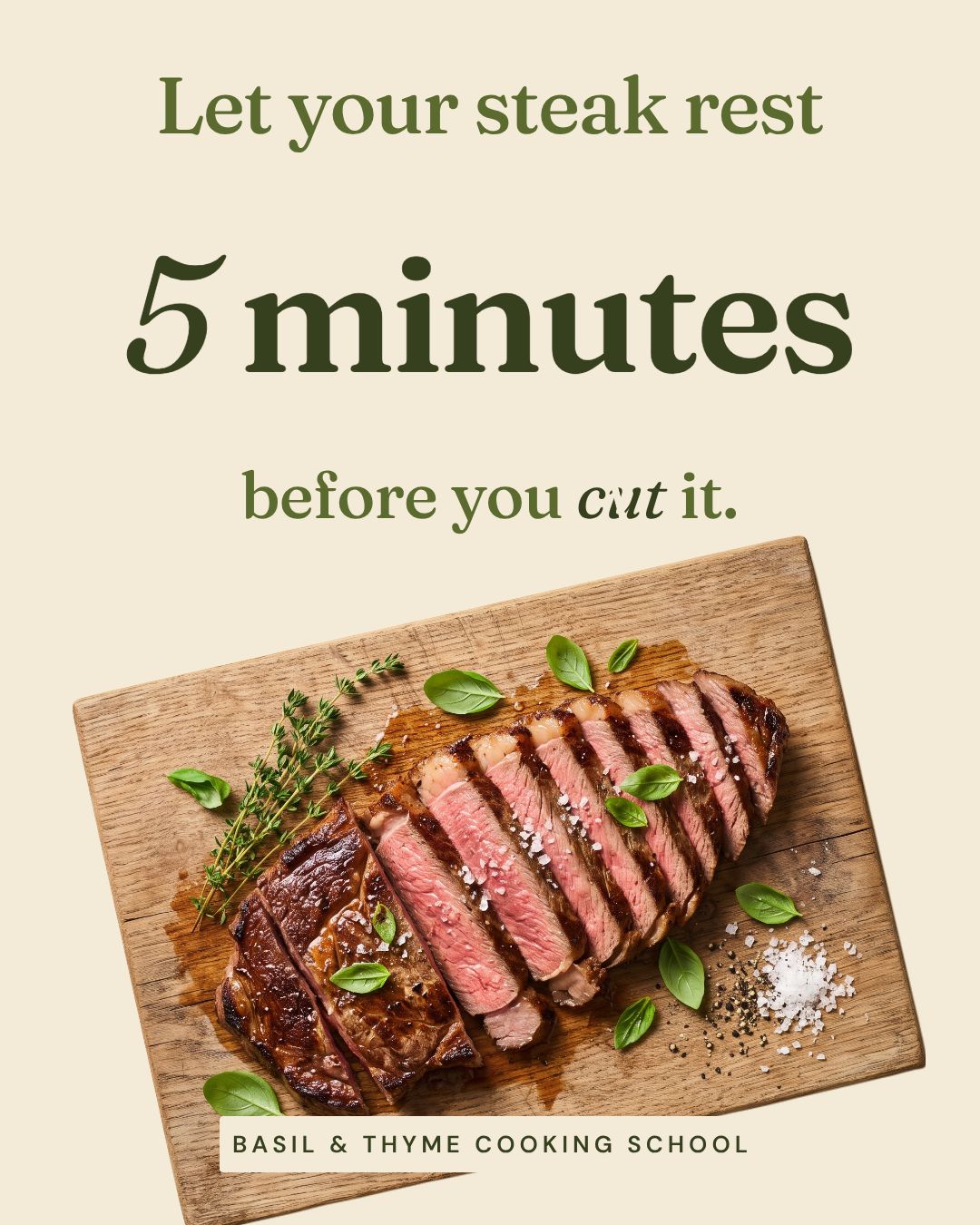
Put the tip on the image in large type so it reads in the feed without opening the caption. Then use the caption to explain why.
Caption starter: "The juices need time to settle. Cut early and they end up on the board."
Prompt: An Instagram post for Basil & Thyme Cooking School with one tip in big type, "Let your steak rest 5 minutes before you cut it", over a photo of a sliced steak on a board, olive green and cream.
7. Myth vs fact
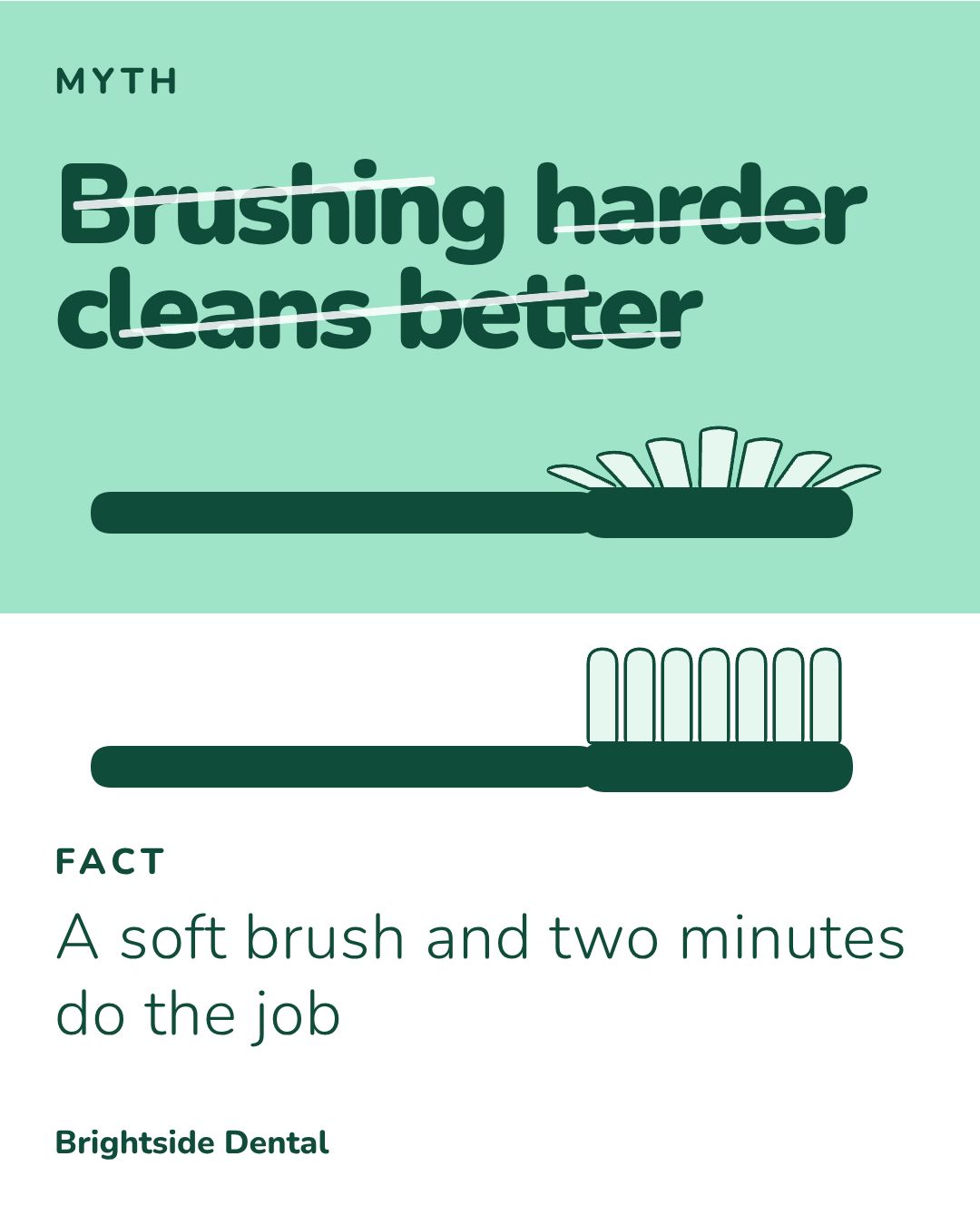
Split the post in two: the thing people believe, and what's true. Keep the fact to one line you can back up. For example, the American Dental Association recommends a soft-bristled toothbrush and two minutes of brushing, twice a day.
Caption starter: "We hear this one every week. Here's what actually protects your gums."
Prompt: An Instagram post for Brightside Dental split in two halves: "Myth: Brushing harder cleans better" on top and "Fact: A soft brush and two minutes do the job" below, mint green and white.
8. The mistake to avoid
Name one mistake your customers make, then the fix. People who make the mistake will see themselves in it and keep reading.
Caption starter: "If you throw out receipts after you pay, read this before April."
Prompt: An Instagram post for Ledger Lane Bookkeeping that reads "Don't toss that receipt" with a crumpled receipt illustration and "Snap a photo first, it takes 3 seconds" below, navy and coral.
9. The 5-point checklist
A short checklist people can screenshot. Keep it to five points so it still reads on one phone screen. If you need more, make it a carousel with our AI carousel maker.
Caption starter: "Save this for your next move. Five things to do before the truck arrives."
Prompt: An Instagram post for Easy Haul Movers with a five-point checklist titled "Before the truck arrives": "Label every box", "Pack a first-night bag", "Defrost the fridge", "Photograph the TV cables", "Reserve parking", in blue and orange.
10. The question you get every week
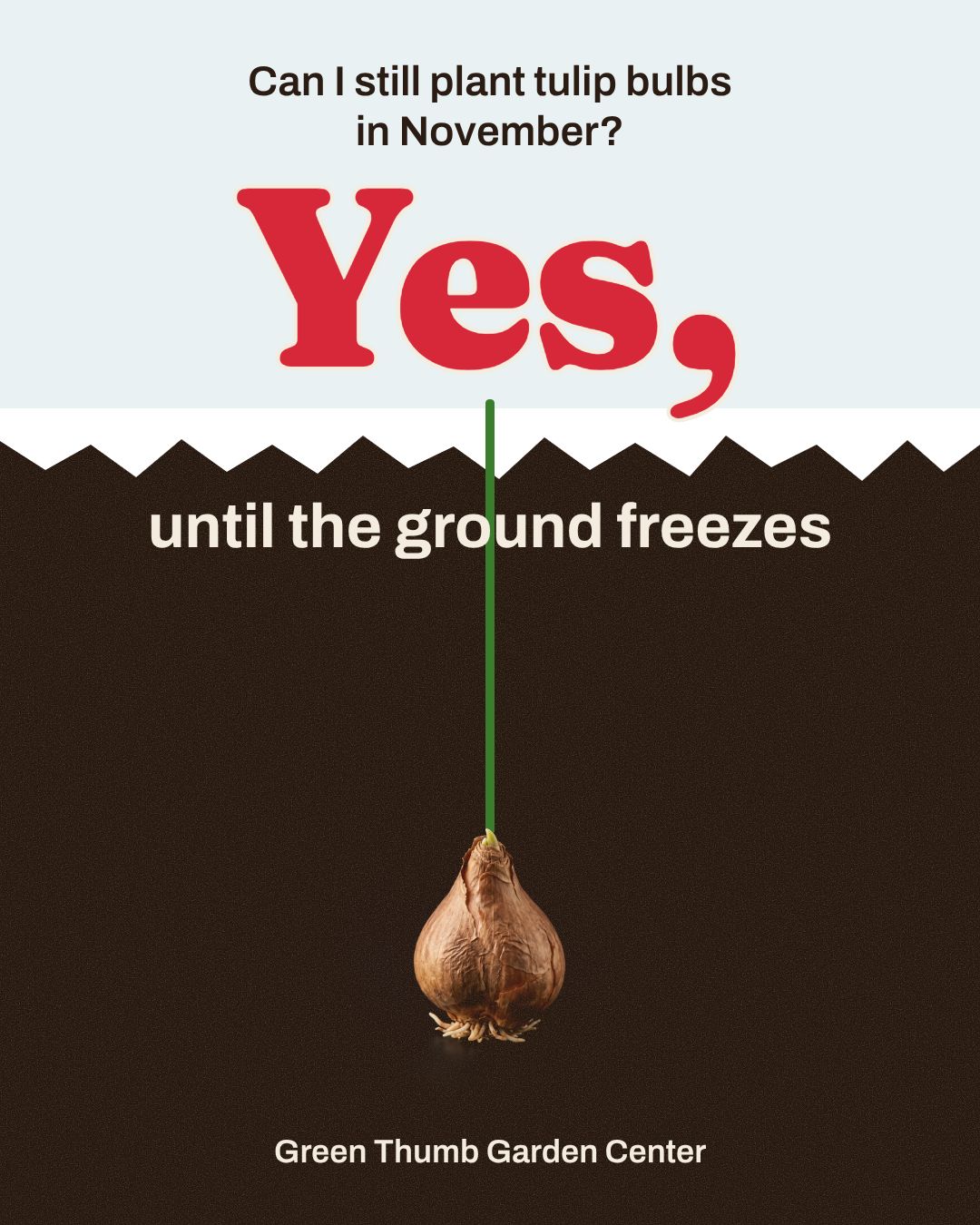
Answer the question your customers ask most. You already know the answer, and the post saves you typing it again in your DMs.
Caption starter: "Short answer: yes. Long answer below."
Prompt: An Instagram post for Green Thumb Garden Center answering a customer question, "Can I still plant tulip bulbs in November?", with "Yes, until the ground freezes" in large type, tulip red and leaf green.
Prove it
You can say you're good. A customer saying it lands harder. These posts turn your real results into proof.
11. The customer quote
One short quote, big quote marks, the customer's first name. Use real words from a real review, with the customer's permission. The FTC's rule on consumer reviews and testimonials bans fake ones, so never write a quote yourself.
Caption starter: "Dana sent us this after Biscuit's first groom. We're framing it."
Prompt: An Instagram post for Paws & Suds dog grooming with the customer quote "Biscuit came home calmer than he left" from Dana R. in big quote marks, warm yellow and charcoal.

12. Before and after
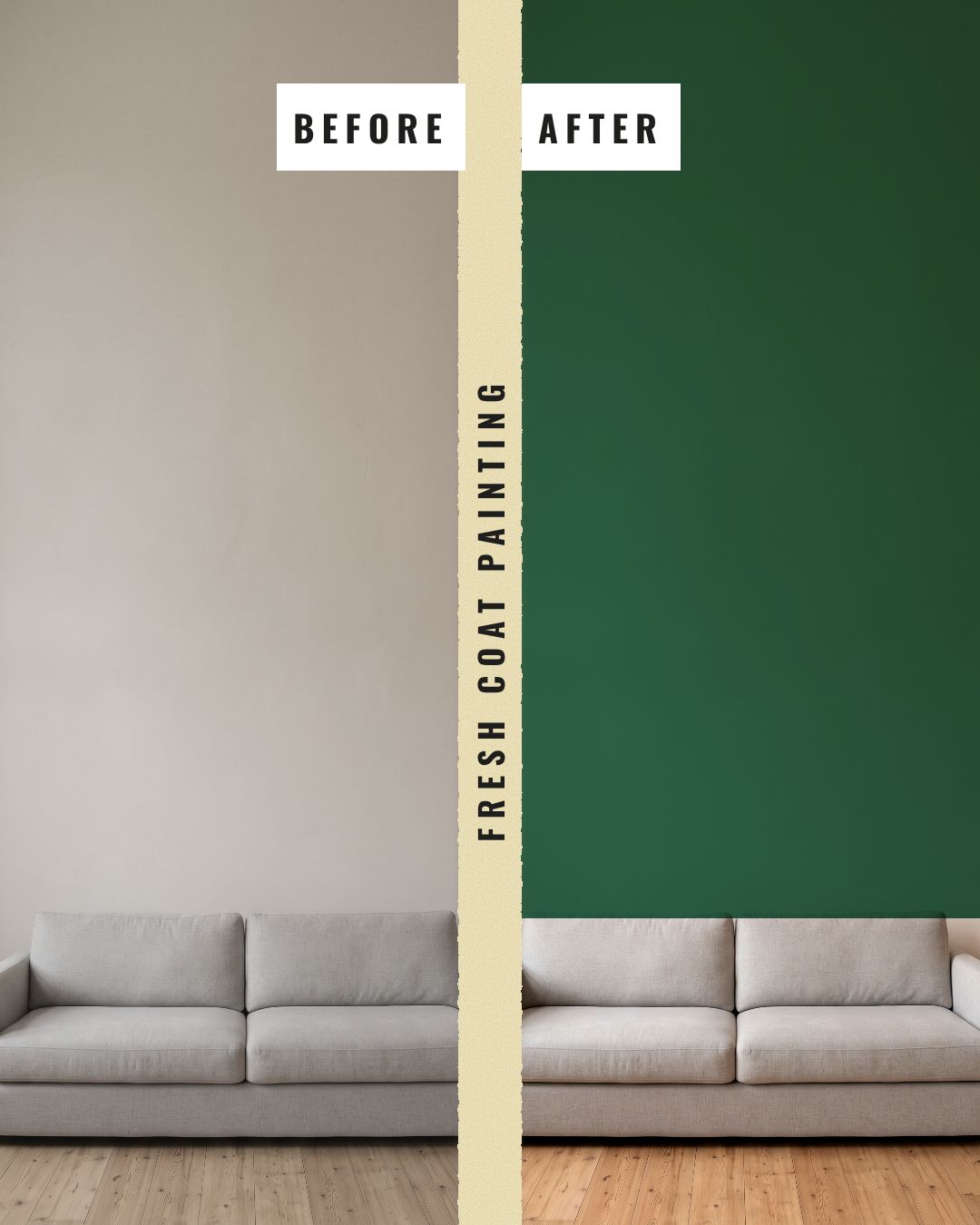
Same angle, same light, split down the middle. Nothing proves your work faster. Shoot the "before" every time, even when you're not sure you'll post it.
Caption starter: "One wall, one afternoon. Swipe the slider in your head."
Prompt: A before-and-after Instagram post for Fresh Coat Painting, split down the middle, with a dull beige living room labeled "BEFORE" and the same room with a deep green accent wall labeled "AFTER", clean white labels.
13. Your own number
A real number from your own records: orders shipped, bikes fixed, years open, cakes baked this month. It's proof nobody else can copy. Only post numbers you can back up.
Caption starter: "We counted. That's a lot of flat tires."
Prompt: An Instagram post for Northside Bike Repair with "1,200 flat tires fixed this year" as one huge number and "Thanks for riding with us" underneath, safety yellow and black.
14. A customer's own photo
Repost a photo a customer took of your product, with their permission and their tag. It shows real people use what you sell.
Caption starter: "@yourcustomer turned our planter into this. We had to share it (with permission)."
Prompt: An Instagram post for Green Thumb Garden Center with a space for a customer's photo of a balcony garden and "Your gardens, our favorite posts" as the headline, leaf green and cream.
15. Your reply to a review
Post a review alongside your answer. It shows you listen, and a calm reply to a so-so review builds more trust than another five-star one.
Caption starter: "Fair point, Sam. Here's what we changed."
Prompt: An Instagram post for Corner Copy Shop showing a three-star review, "Great prints, slow line", and the reply "You're right. We added a second counter on Saturdays.", red and white.
Sell without a hard pitch
Sales posts work when they show the product in someone's life instead of shouting about it. Keep the price and the deadline honest and clear.
16. The product in a moment
Show the product where it's used, at the moment it matters. A candle lit on the first cold night sells better than a candle on a white background.
Caption starter: "First frost tonight. Cedar & Smoke is back on the shelf."
Prompt: An Instagram post for Ember Candle Co. showing the Cedar & Smoke candle lit on a nightstand with "For the first cold night" as the headline, warm amber and dark brown.

17. This or that
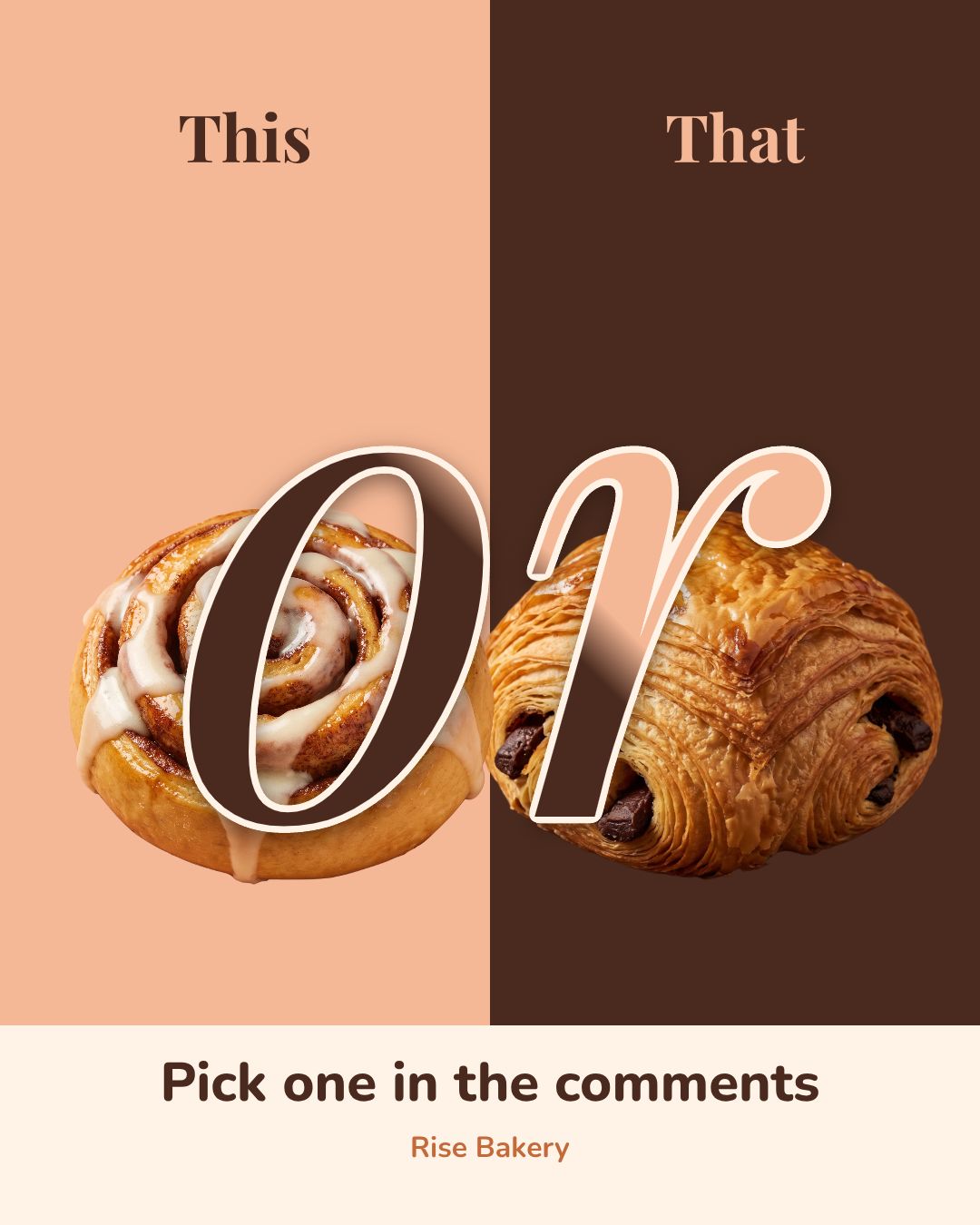
Two products side by side and one question: which one? It's easy to answer, so people comment, and the comments tell you what to bake more of.
Caption starter: "Settle this for us. The team is split 50/50."
Prompt: A "This or That" Instagram post for Rise Bakery with a cinnamon roll on the left, a chocolate croissant on the right and "Pick one in the comments" at the bottom, warm peach and cocoa brown.
18. The offer with a real end date
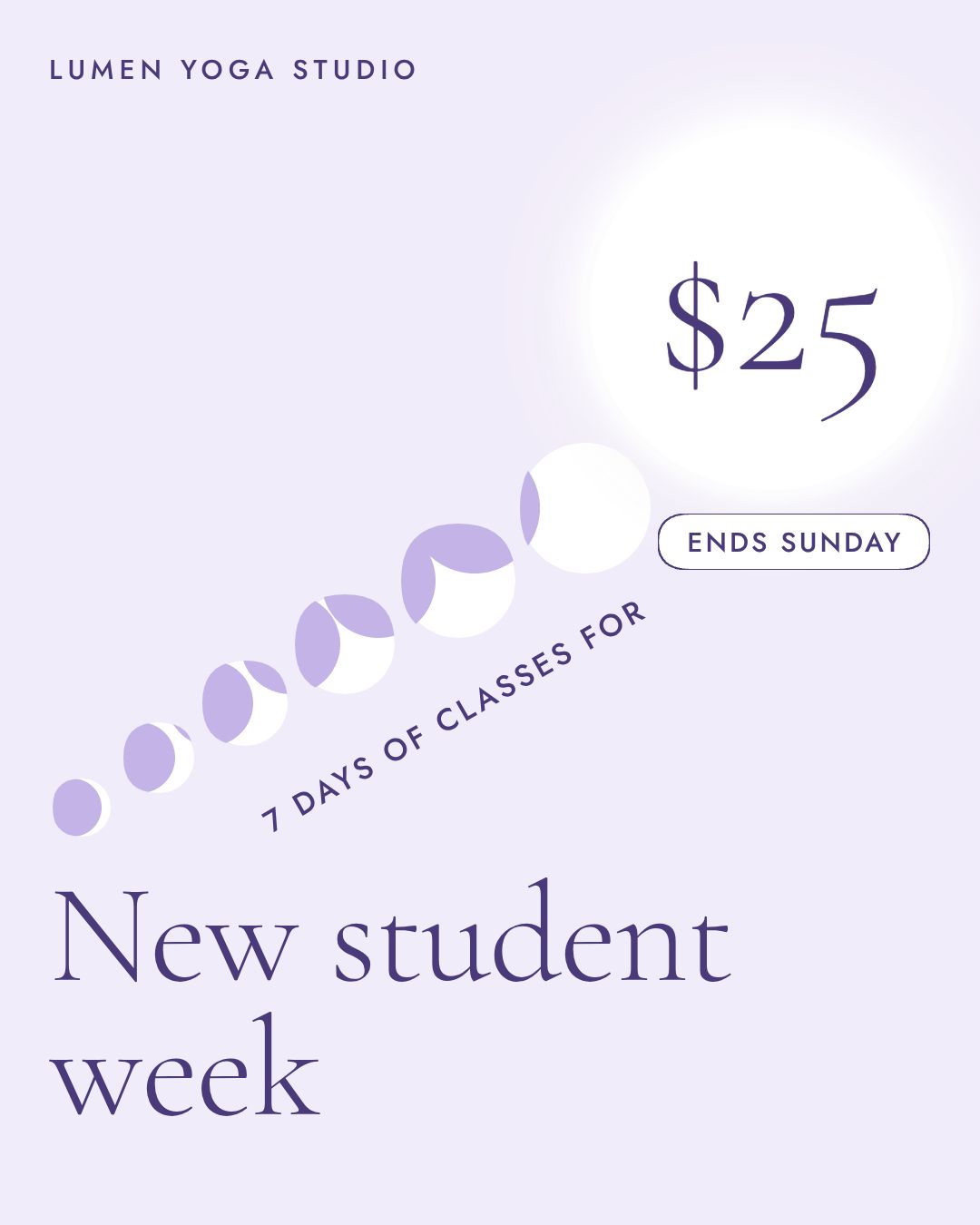
One offer, one price, one end date. A real deadline gives people a reason to act now. Never invent one.
Caption starter: "Never tried yoga? Seven days, $25, every class on the schedule."
Prompt: An Instagram post for Lumen Yoga Studio announcing "New student week: 7 days of classes for $25" with "Ends Sunday" in a small tag, calm lavender and white.
19. What's new this week
New stock, a new menu item, a new service. Keep it to one item so it doesn't read like a catalog.
Caption starter: "New this week: the one you kept asking for."
Prompt: An Instagram post for Maple & Main Florist announcing "New this week: dried flower wreaths" with a photo of a round wreath on a door, soft pink and sage green.
20. The gift idea
Name the person it's for, not just the product. "For the friend who has every plant" sells better than "Plant gift set".
Caption starter: "For the person who's impossible to buy for. Ready to wrap."
Prompt: An Instagram post for Ember Candle Co. with "For the friend who's impossible to buy for" as the headline over three candles in a gift box, warm amber and cream.
If you run a giveaway instead, Instagram's promotion guidelines say you're responsible for the official rules, and each post has to say the promotion isn't sponsored by Instagram.
Stay in touch
These posts keep your account feeling like people, not a store. They're also the easiest to make.
21. The milestone
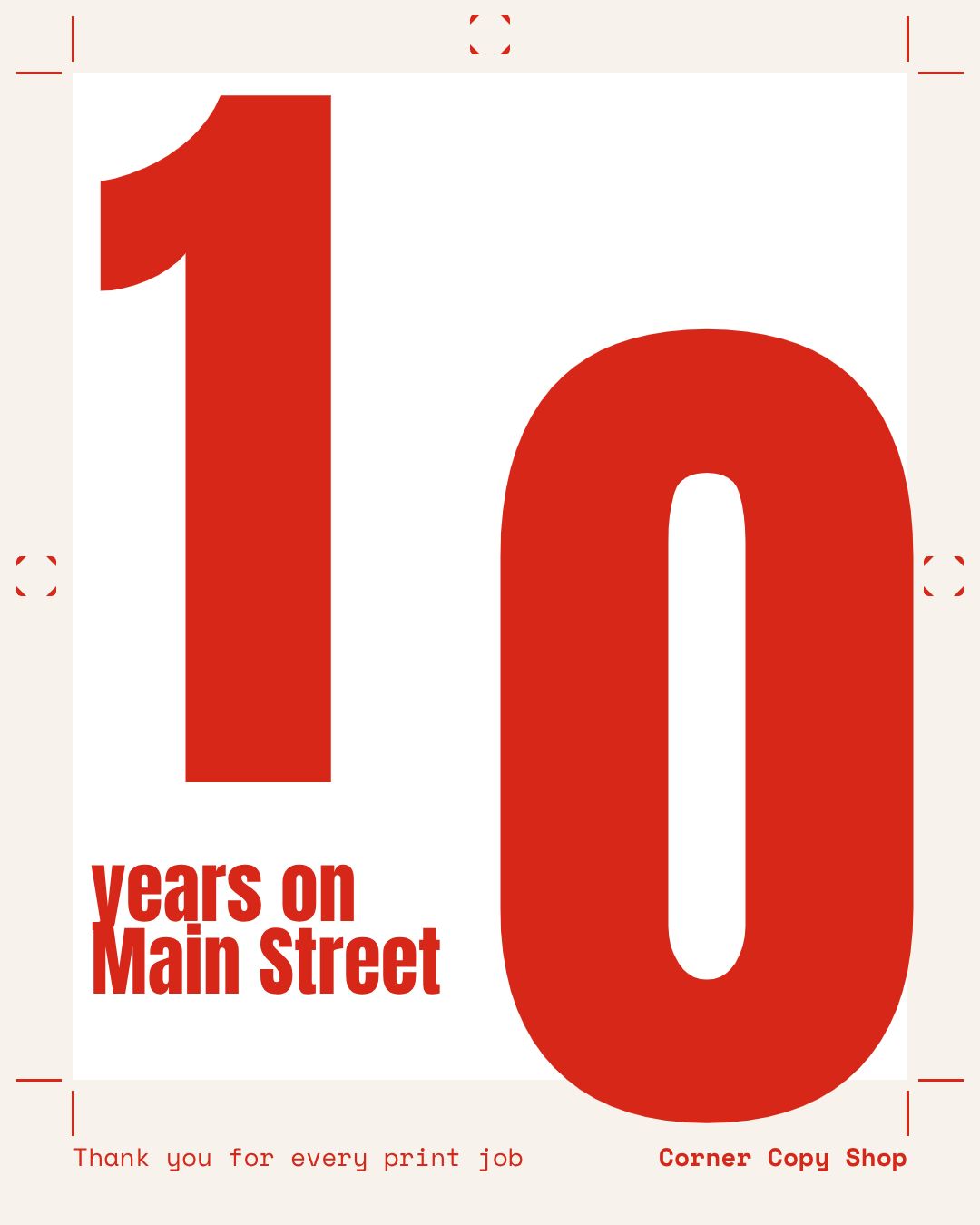
Years open, your 1,000th order, a new location. Celebrate it and thank the people who got you there.
Caption starter: "Ten years ago we opened with one printer and a lot of hope."
Prompt: An Instagram post for Corner Copy Shop celebrating "10 years on Main Street" with a huge number 10 and "Thank you for every print job" underneath, classic red and white.
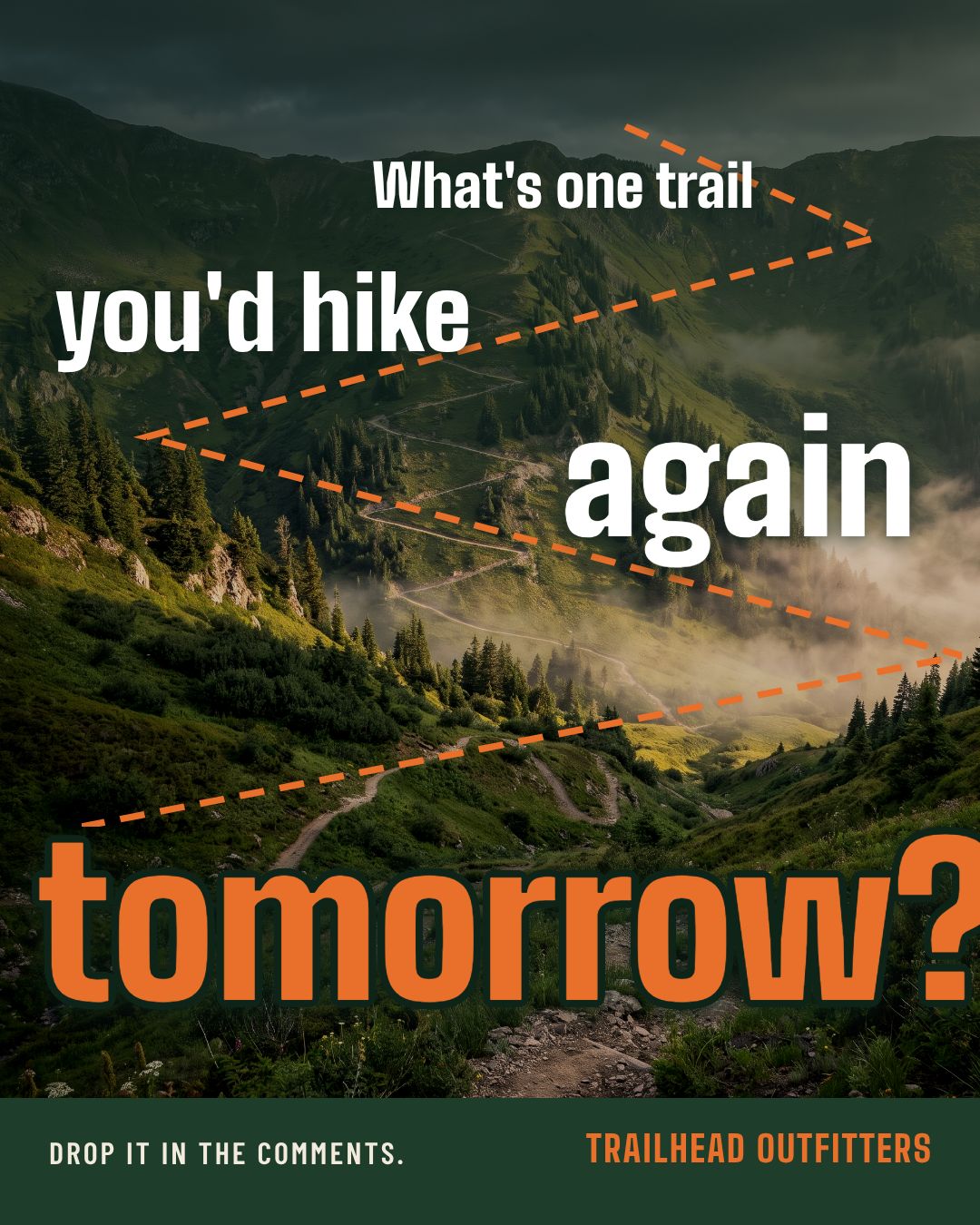
22. The open question
Ask something people want to answer, about them, not about you. Specific questions get more replies than "What do you think?"
Caption starter: "Ours is the Ridge Loop. Tell us yours, we're building a list."
Prompt: An Instagram post for Trailhead Outfitters asking "What's one trail you'd hike again tomorrow?" in big type over a mountain trail photo, forest green and orange.
23. Meet the team
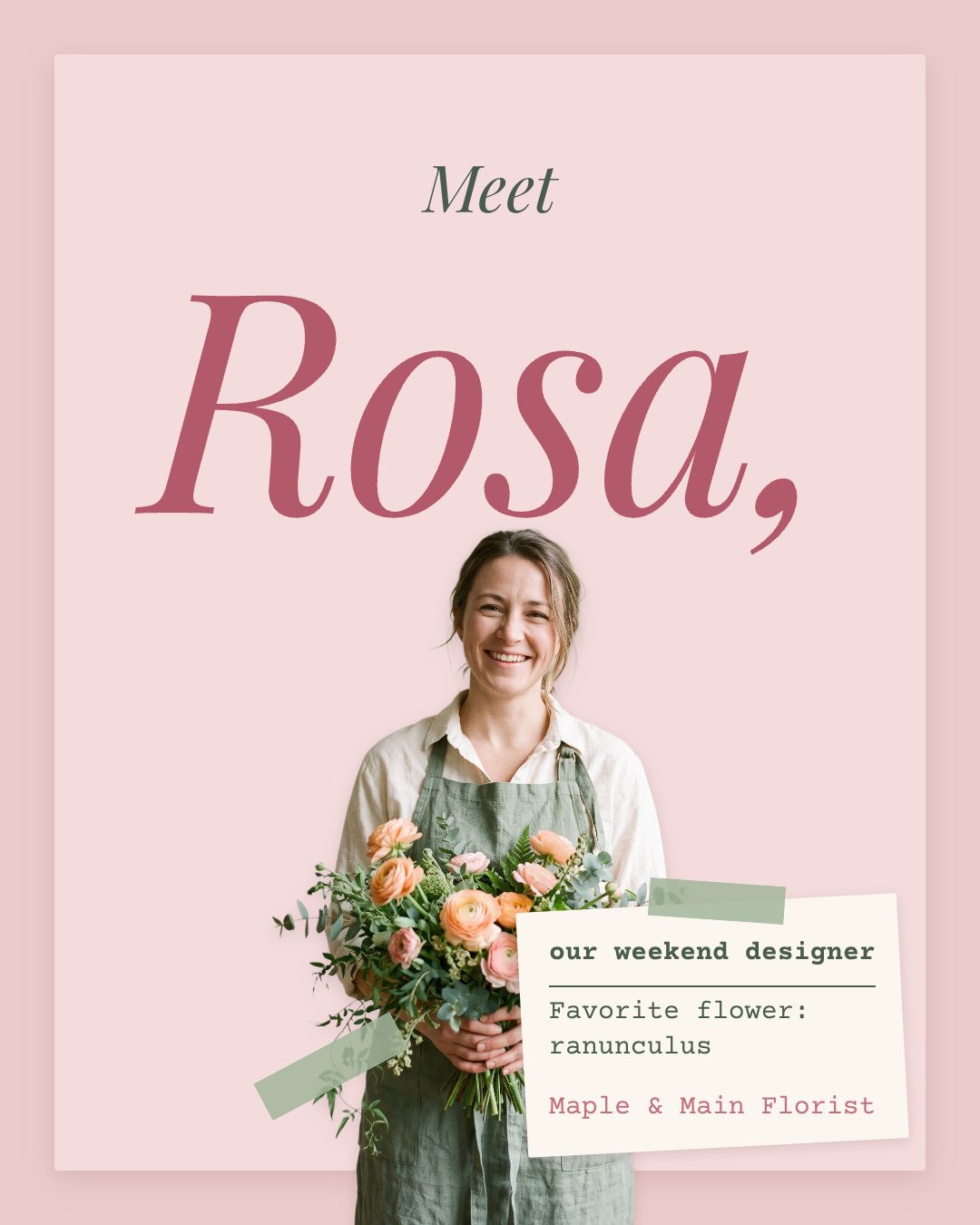
One person, one photo, one fun fact. Customers like knowing who's behind the counter, and your team likes being seen.
Caption starter: "If your Saturday bouquet looked amazing, thank Rosa."
Prompt: An Instagram post for Maple & Main Florist introducing "Meet Rosa, our weekend designer" with a photo of a florist arranging flowers and "Favorite flower: ranunculus" in small type, soft pink and sage green.
24. The neighbor shoutout
Spotlight a business near you. They'll likely share it, and their followers live where your customers do.
Caption starter: "Our favorite coffee is 40 steps from our door. Go say hi to the team at Daybreak."
Prompt: An Instagram post for Northside Bike Repair giving a shoutout to "Daybreak Coffee, our neighbor at 14 Elm Street" with a photo of a coffee cup on a café counter, warm brown and safety yellow.
25. Hours and thank-yous
Holiday hours, a closing for repairs, a thank-you after a busy season. Useful posts count too, and people do look for them.
Caption starter: "Closed Thursday for Thanksgiving. Open Friday from 8 am."
Prompt: An Instagram post for Rise Bakery with "Thanksgiving hours" as the headline, "Thursday: closed" and "Friday: 8 am to 2 pm" below, warm peach and cocoa brown.
A week of posts from this list
Here's one way to use the five jobs. Swap in any idea from the same group.
| Day | Job | Idea |
|---|---|---|
| Monday | Teach one thing | One tip in big type (6) |
| Tuesday | Show the work | The work in progress (1) |
| Wednesday | Prove it | Before and after (12) |
| Thursday | Stay in touch | The open question (22) |
| Friday | Sell without a hard pitch | This or that (17) |
Five posts a week is a lot for some businesses. Three works fine if you keep the mix. If you want to make a full month in a few sittings, our guide to making 30 social media posts a month shows the batching system.
What every Instagram post needs
Run any idea through this before you post.
- One point. If someone can't tell you what the post says after two seconds, cut it down.
- Text that reads on a phone. Big type, strong contrast, few words on the image. Our guide to designing social media posts that stand out covers type size, contrast and layout.
- The right size. 1080 x 1350 pixels (4:5) takes up the most room in the feed. The Instagram post size guide has every other format.
- Alt text. Instagram lets you write your own alt text under Accessibility before you share. One sentence describing the image helps people who use screen readers.
- One next step. Comment, save, book or visit. One.
- A clear label on paid posts. If someone gave you something to post about it, the FTC's Endorsement Guides expect the relationship to be disclosed clearly in the post itself.
How we made the 12 example posts
Every example above came from the single sentence printed above it. We typed that sentence into Krumzi, waited and exported what came back. No templates and no hand-built layouts.
Ten of the 12 sentences gave a post we'd publish on the first try. Two didn't. The pottery post came back with the caption but no photo of the bowl, and the trail question was stacked so it read bottom to top. We ran the exact same sentences again and both came out right; those second versions are the ones above.
Across all 14 runs, the median post used 100 AI credits (the cheapest used 53, the priciest 175). At that median, the 1,000 credits in Krumzi's free trial cover about 10 posts.
Turn these ideas into posts with Krumzi
If you'd rather not design every post by hand, Krumzi turns your sentence into a finished, editable post. The AI lays it out from scratch, so it doesn't look like the same template everyone else is using.
- Get ideas that fit your business. Krumzi's post ideas start from what it knows about your brand and sort suggestions into your themes, so a week can hold a tip, a story and an offer instead of three offers.
- Turn one into a post. Pick an idea or write your own sentence like the prompts above. The free AI Instagram post maker makes one post a week with no signup, with a small watermark.
- Fix it, then post. Every word stays editable, so you change a price in a second. Schedule it to Instagram or Facebook from Krumzi, or download it and post it yourself.
Here's the honest limit: Krumzi can't take the photo of your real work. The posts that do best on this list, like the work in progress, the customer's photo and the meet-the-team post, need a real photo from your phone. Upload it and Krumzi designs around it. And a list of ideas doesn't create reach by itself. Posting good work every week does.
Comparing tools first? We tested nine in our roundup of the best AI Instagram post generators.
Krumzi pricing (Verified November 19, 2026, on krumzi.com/pricing): Starter is $19 a month with 1,000 AI credits. Pro is $39 a month with 2,500 credits, 3 brands, the Brand Kit and video. Studio is $89 a month. Yearly billing gets two months free. Starter, Pro and Studio start with a 3-day free trial with 1,000 AI credits and watermarked exports; a card is needed and the plan renews after 3 days unless you cancel. Need it for one launch or one busy month? The month pass gives you everything in Pro for 30 days for $49 once, and nothing renews.
When you should use something else
Krumzi isn't the right tool for every post on this list. Here's when something else wins.
- When the post is a Reel you film. For a day-in-the-life video or a trending sound, film on your phone and edit in Instagram's own editor or a video app like CapCut. A designed graphic isn't the point there.
- When the photo is everything. For product launches and food, a good photographer or a well-lit phone photo matters more than any layout. Post it as is.
- When you want to browse templates. If you'd rather scroll thousands of ready-made looks and pick one by eye, Canva or Adobe Express suits you better.
- When you need one calendar for every network. If you post to TikTok, LinkedIn and Pinterest too, a dedicated scheduler like Buffer or Later keeps all of them in one place.
- When you have no time at all. If you can't spare an hour a week, a freelance social media manager who knows your business will post more consistently than any tool.
Your next post
Pick one idea from each of the five groups, write your sentence with your real business in it and make the first post today. Next week, pick five more.
Want the design part done for you? Start free trial and describe your first post.
3-day free trial, card needed. No charge until day 4. Cancel online anytime.
Frequently Asked Questions
What should I post on Instagram as a small business?
Post a mix of five jobs: show your work, teach one tip, prove it with a customer or a before-and-after, show a product in use, and ask your followers a question. Use real photos of your business wherever you can. For niche ideas, see our lists for nonprofits and real estate agents.
What can I post on Instagram when I have nothing to post?
Answer the question customers ask you most, share a tip, or show what you're working on today. You always have something going on in your business, and a work-in-progress photo is enough. A "this or that" question between two of your products also takes five minutes.
How often should I post on Instagram?
Post as often as you can keep up with good posts, and stay consistent. Three posts a week with a mix of jobs beats seven rushed ones. If you want a system for batching a month at once, read our guide to 30 social media posts a month.
Should I post a photo, a carousel or a Reel?
Use a single image for one point, a carousel for steps, lists and before-and-afters, and a Reel when the idea needs motion or sound. The idea decides the format, not the other way round. Our guide to what an Instagram carousel is explains when slides work best.
Can AI make Instagram posts for me?
Yes. Tools like Krumzi, Canva and Adobe Express can make an Instagram post from a short description. Krumzi designs it from scratch and keeps every word editable, and it can schedule the post to Instagram. You still need real photos of your business for the posts that build the most trust.
A month of posts, designed before your coffee cools
Describe the post. Krumzi designs it from scratch, on your brand, fully editable.
Start free trial3-day free trial, card needed. No charge until day 4. Cancel online anytime.