On this page
- The short version
- Food truck menu design basics: what goes on the board
- How big should the letters be?
- The four formats every food truck needs
- How many items should a food truck menu have?
- Prices that are easy to scan
- Add an allergen line
- 4 food truck menu examples, with the briefs
- How to design a food truck menu in Krumzi, step by step
- Design it yourself or hire it out?
- When you should use something else
- Mistakes to avoid
- Your food truck menu checklist
- Your next menu
- Frequently Asked Questions
You've got a line forming at the window. People are squinting at your board, asking "what's in the special?" and holding up the line while they decide. Meanwhile, your best seller is written in the same small font as the soda.
Most food truck menu design advice stops at "make it eye-catching." That doesn't help when the real problems are distance, glare and a 30-second decision. A truck menu is a sign first and a menu second.
This guide gives you the letter heights that read from the line, the four menu formats a truck needs, what to put on each, an allergen line, and four real examples with the briefs that made them. By the end, you'll have a menu people can read from 10 feet away and order from in one go.
The short version
- Keep the main board to about six to eight items, plus one combo.
- Make item names at least 1 1/8 inches tall if people read them from 10 feet.
- Put prices in one straight column so eyes can scan them.
- Use dark text on a light board or light text on a dark one. Nothing in between.
- Add one allergen line and how people can pay.
- Make four versions: the window board, an A-frame, a handout and a phone-sized post.
Food truck menu design basics: what goes on the board
A good food truck menu shows your truck's name, six to eight items with one-line descriptions only where needed, prices in a single aligned column, one combo or special, payment methods and an allergen note. Every word must be readable from where your line stands, which means big type and strong contrast.
Here's what each part does:
- The name. Your truck name at the top tells people they're in the right line, and it's what they'll search for later.
- The items. Write the dish the way customers say it: "Al pastor taco", not "Marinated pork, pineapple, cilantro on a corn tortilla." Save the details for the handout.
- The prices. One column, right-aligned, same size as the item names or bigger.
- One combo. "3 tacos + drink $14" turns a decision into one sentence.
- The fine print. How to pay, and a line about allergens.
Anything else, such as your story, catering info or social handles, goes on the handout or the side of the truck.
How big should the letters be?
Most menu guides guess at this. There's a better yardstick: the ADA standard for visual characters on signs, Table 703.5.5. It's written for permanent signs in buildings, not menus, but it's the clearest public rule for "how big must letters be to read from here?"
For letters mounted between 40 and 70 inches above the ground, the minimum is 5/8 inch at up to 6 feet, plus 1/8 inch for every foot beyond that. For letters mounted 70 to 120 inches high, the minimum is 2 inches when read from under 15 feet, plus 1/8 inch per foot beyond 15.
Here's what that means for a truck:
| Where the board sits | Reading distance | Minimum letter height |
|---|---|---|
| A-frame or counter, 40 to 70 in high | 6 ft | 5/8 in |
| A-frame or counter, 40 to 70 in high | 10 ft | 1 1/8 in |
| A-frame or counter, 40 to 70 in high | 15 ft | 1 3/4 in |
| Above the window, 70 to 120 in high | Under 15 ft | 2 in |
| Above the window, 70 to 120 in high | 20 ft | 2 5/8 in |
Treat these as floors, not targets. Item names and prices should hit them. Your truck name and the combo can go much bigger. Descriptions can drop below, because people read those once they're close.
One more rule: contrast. The WCAG contrast guidance asks for at least 4.5:1 between text and background on screens. Outdoors in direct sun, aim higher. White or yellow on black and black on white both pass easily. Red on brown doesn't.
The four formats every food truck needs
One menu won't do every job. A truck needs four versions, each sized for where it's seen. The board sizes below are standard poster sizes, which any sign shop prints; our poster size guide lists the pixel dimensions for each.
| Format | Common size | Where it's read | What goes on it |
|---|---|---|---|
| Window board | 18 x 24 in or 24 x 36 in | From the line, 6 to 15 ft | Full menu, combo, payment |
| A-frame sign | 24 x 36 in insert | From the sidewalk, 10 to 20 ft | One hero item, price, hours |
| Handout | 5.5 x 8.5 in (Half Letter) | In the hand | Full menu with descriptions, schedule, social |
| Phone post | 1080 x 1350 px | On Instagram or Facebook | This week's stops, three favorites |
Window board. This is your main menu. Mount it at eye level or just above the window, and size the type to the table above.
A-frame. This one isn't a menu. It's a hook. One item, one price, big enough to read across a parking lot. It's what stops people walking past.
Handout. People take it home, stick it on the fridge and order catering later. It's the one place where descriptions, your story and your schedule belong. Our guide on how to make a menu covers handout layout in more depth.
Phone post. Most trucks move. Your followers need to know where you'll be this week, so this post leads with the schedule and keeps the menu short.
How many items should a food truck menu have?
Six to eight on the main board, plus one combo. That's our view, not a rule, and it's built on two facts of truck life. Your kitchen is small, so fewer items mean faster tickets. And every extra line on the board is another thing someone reads while the line waits.
If you have more, rotate them. Put your core items on the board and a "this week" special on a clip-on strip or a chalk panel.
Prices that are easy to scan
Line them up. Right-align every price in one column. People scan prices first, then read the item.
Keep the format consistent. If one price is "$4.50", don't write another as "4.5". Pick one style.
Show the combo price clearly. A combo with its own price saves a conversation at the window.
Update without reprinting. If prices change often, print the board without prices and use a clip-on price strip, or design the board so the price column can be reprinted on its own.
Add an allergen line
The FDA names nine major food allergens: milk, eggs, fish, crustacean shellfish, tree nuts, peanuts, wheat, soybeans and sesame. Federal labeling rules for those apply to packaged foods, not to a menu board, but customers with allergies will ask anyway.
A single line at the bottom covers it: "Ask about allergens. Our kitchen uses wheat, milk, eggs and sesame." If a dish is free of a common allergen, you can say so next to it. Your local health department may have its own rules, so check with them when you get your permit.
4 food truck menu examples, with the briefs
Each example below was designed by Krumzi's AI from a short brief like the one shown. The trucks are made up. All four came back with every required line in place on the first try, at a median of 103 credits each (76 to 146).
1. Taco truck: the window board
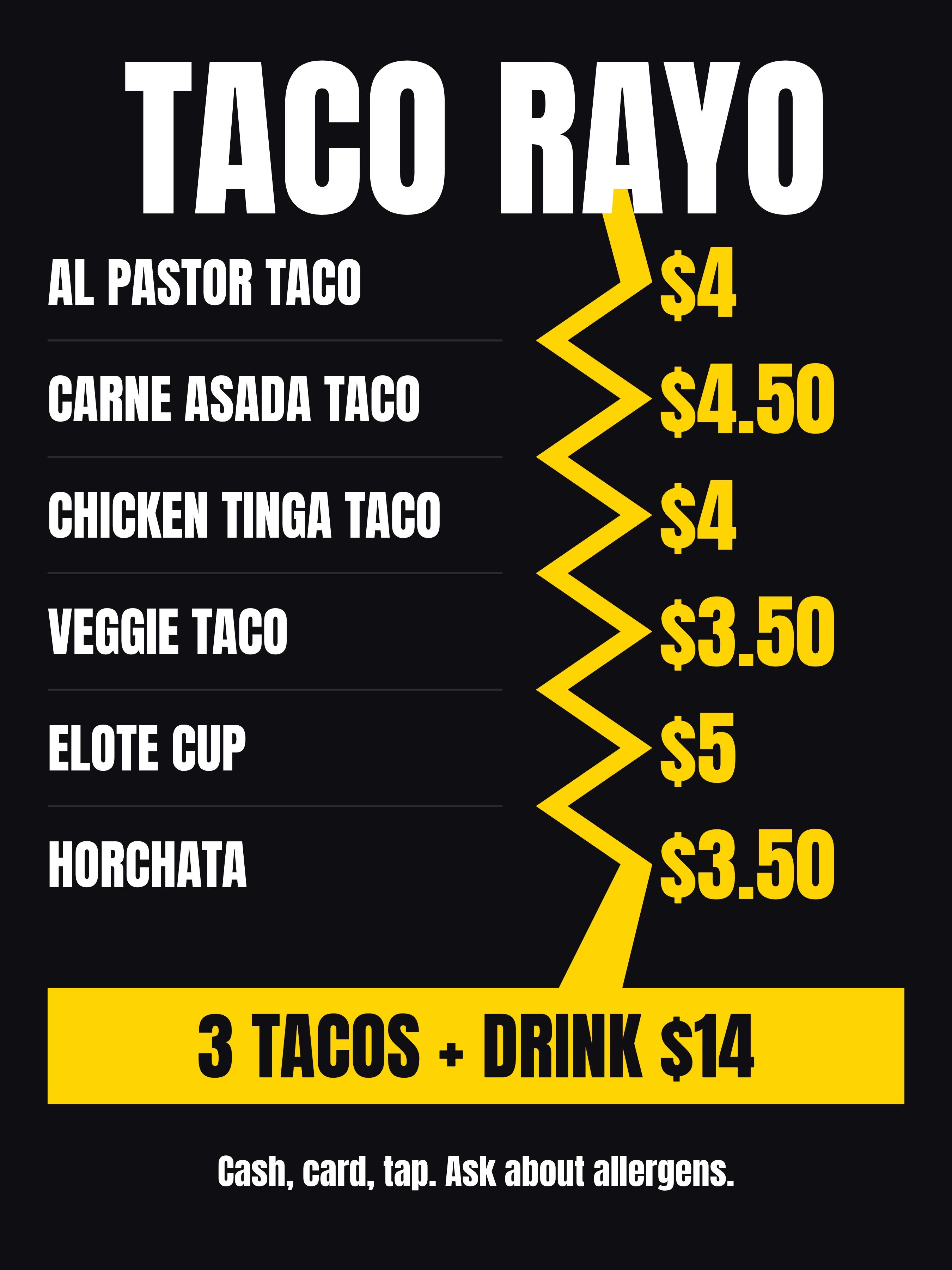
A dark board with bright yellow prices reads well in sun and at night. The combo sits in its own band at the bottom, where the eye lands last.
Food truck window menu for Taco Rayo, 18 x 24 inch portrait. Items with prices: Al pastor taco $4, Carne asada taco $4.50, Chicken tinga taco $4, Veggie taco $3.50, Elote cup $5, Horchata $3.50. Combo band: 3 tacos + drink $14. Footer: Cash, card, tap. Ask about allergens. Black background, bold yellow prices, readable from 10 feet.
2. BBQ truck: the A-frame hook
The A-frame sells one thing. Here, the brisket sandwich and its price take up half the board. Three other items sit below, and the hours sit at the bottom.
A-frame sidewalk sign for Smoke Lane BBQ, 24 x 36 inch portrait. Hero item: Brisket sandwich, $13, huge. Below: Pulled pork $11, Smoked wings $12, Mac and cheese $5. Banner: Sold out = we close. Footer: Open today 11 AM to 3 PM. Dark charred wood look, warm red and cream text.
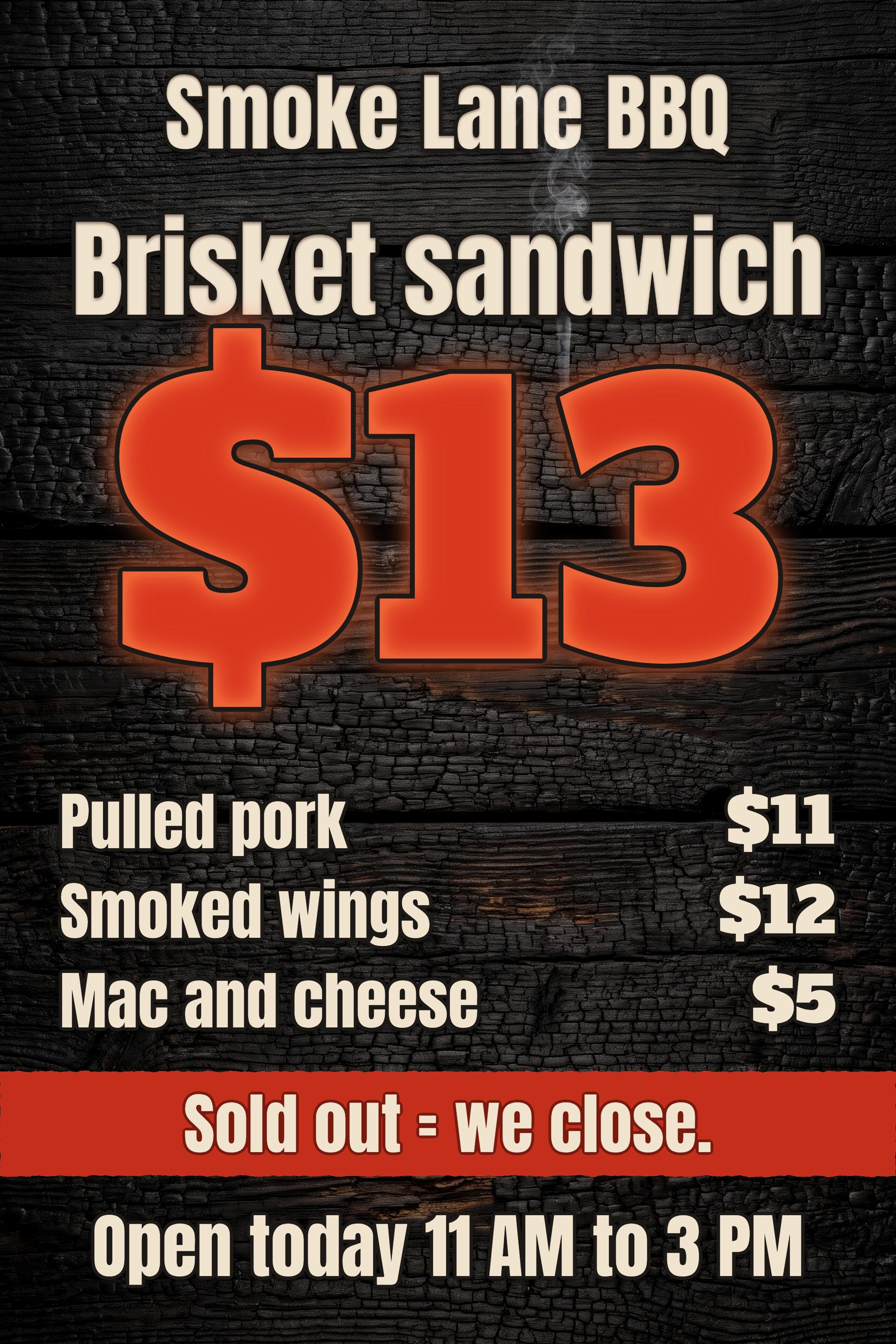
"Sold out = we close" is a nice touch for a smoker truck. It tells people to come early, without a countdown or a fake deadline.
3. Coffee trailer: the handout
The handout can be quieter, because it's read up close. Grouped sections, Coffee, Tea, Bakery and Add-ons, keep a long list easy to scan.
Half Letter handout menu for Little Bean Coffee, a coffee trailer. Sections: Coffee: Drip $3, Latte $5, Cold brew $5. Tea: Chai latte $5. Bakery: Butter croissant $4, Banana bread $3.50. Add-ons: Oat milk +$0.75, Extra shot +$1. Footer: Find our weekly spots on Instagram @littlebeantrailer. Soft cream and sage, calm and modern.
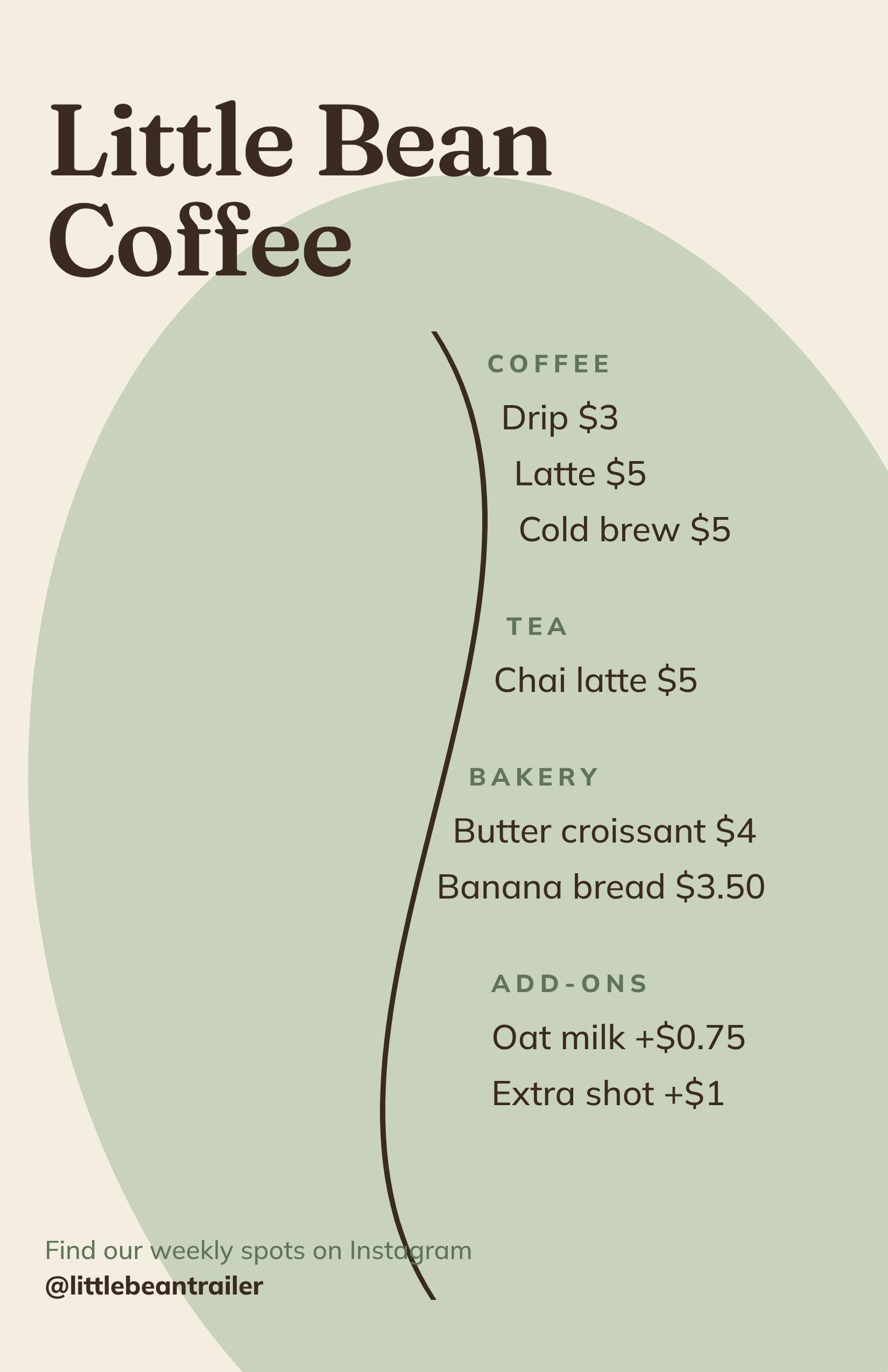
The type on this one is small. That's fine for a handout, but it wouldn't work on a board. If you reuse a handout as a window menu, cut it to the core items and scale the type up.
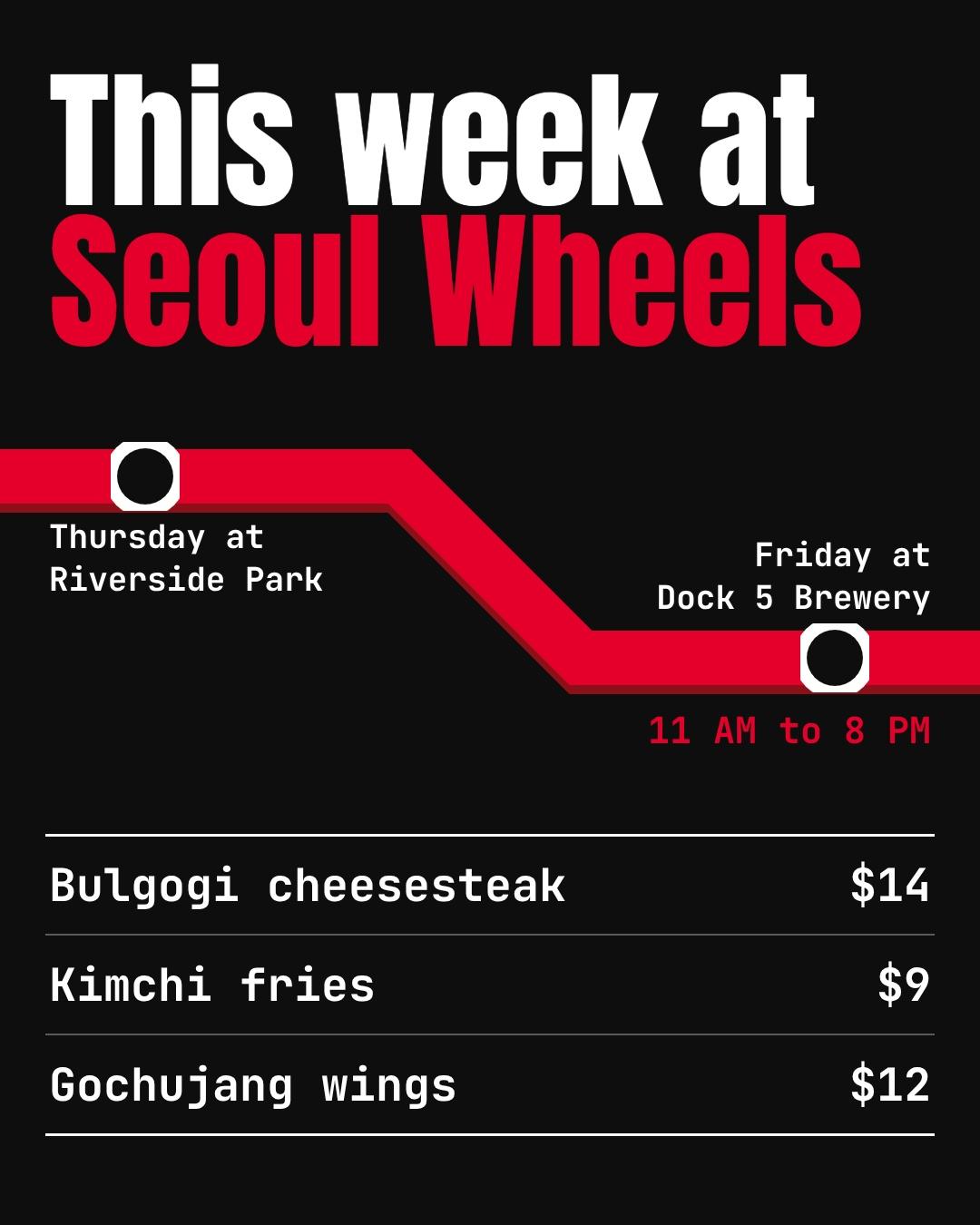
4. Korean fusion truck: the weekly post
Trucks move, so the post leads with where you'll be. The route line turns the schedule into a picture, and three favorites sit underneath.
Instagram post, 1080 x 1350, for Seoul Wheels, a Korean fusion food truck. Headline: This week at Seoul Wheels. Stops: Thursday at Riverside Park, Friday at Dock 5 Brewery, 11 AM to 8 PM. Menu: Bulgogi cheesesteak $14, Kimchi fries $9, Gochujang wings $12. Black and bold red, a subway-map style route line.
How to design a food truck menu in Krumzi, step by step
Templates give you a pretty layout and leave the letter sizes to you. If you'd rather start from your dishes and get a finished, editable menu, Krumzi designs the layout from your list. Here's the path.
Step 1: Write your menu as a list
Type every item and price exactly as they should appear. Add the combo, payment methods and the allergen line. This list is the whole brief.
Step 2: Name the format and size
Say "18 x 24 inch window board" or "Half Letter handout" or "1080 x 1350 Instagram post". The size shapes the layout, so put it in the first line.
Step 3: Describe the look in plain words
"Black background, bold yellow prices, readable from 10 feet" tells the AI everything it needs. Name your colors if you have them. On Pro and above, the Brand Kit holds your logo, colors and fonts, so every format starts on-brand.
Step 4: Fix anything by chatting or clicking
Ask "make the prices bigger" or "move the combo to the top". Or click any text to retype it. Text and shapes stay editable, so a price change doesn't mean a new design.
Step 5: Make the other three formats
Ask for the same menu as an A-frame, a handout and a phone post. Each one gets a layout built for its size, not a squashed copy. Need a QR code that links to your online ordering page? Our free QR code generator makes one, and here's how to add a QR code to a flyer so it scans.
Step 6: Export and print
Download a PDF or PNG and send it to your sign printer. For large boards, ask what resolution and file type they want before you export.
Here's the honest limit. Krumzi exports RGB files with no crop marks and no CMYK option, and it has no built-in preset for every board size, so you type the size you need. Most sign shops convert RGB files, but look at the printer's proof before you approve a big board, because bright reds and yellows can shift on press.
Design it yourself or hire it out?
Hiring is cheaper than you might think, but it's slow to change. When we collected 43 Fiverr menu-design gigs on 12 November 2026, the median starting price was $55. A starting price buys the basic package, and a truck needs four formats and a new price every few months.
If your menu changes often, owning an editable file is worth more than a one-off design. Every price change you can make yourself is one you don't wait or pay for.
When you should use something else
Krumzi isn't the right pick for every truck. Use something else when:
- You need a digital menu screen. A TV menu that changes by time of day needs a digital signage app, not a print design.
- You want online ordering built in. If customers order and pay from their phones, a point-of-sale system with its own QR menu is the better fit.
- Your wrap designer is doing the truck. If you're wrapping the whole truck, let the wrap designer lay out the permanent menu panel so it matches the wrap.
- You just want a chalkboard. A hand-lettered board has charm, and it costs a marker. Use the letter-height table and you're set.
Mistakes to avoid
- Too many items. The line slows down and your kitchen does too.
- Tiny prices. Prices are what people scan first. Make them as big as the item names.
- Low-contrast colors. Red on brown or gray on black disappears in sun.
- Descriptions on the board. Save them for the handout.
- No allergen line. Someone will ask. A printed line saves the conversation.
- One menu for every job. A handout scaled up to a board is unreadable from the line.
Your food truck menu checklist
- Six to eight items, plus one combo.
- Item names and prices meet the letter heights for your reading distance.
- Prices are in one aligned column.
- Text and background contrast strongly in sunlight.
- Payment methods and an allergen line are on the board.
- You have four formats: window board, A-frame, handout and phone post.
- A test print, read from where your line stands.
Your next menu
Start with the window board. Write your items and prices as a list, size the letters to your line, and add one combo. Then make the A-frame, the handout and the post from the same list.
If you'd rather start from a blank slate in your browser, the free AI menu maker builds one from a short description. And if you're comparing tools, see our roundup of the best AI menu makers.
What it costs (Verified 19 Nov 2026 on krumzi.com/pricing):
- Starter: $19 a month, or $190 a year, with 1,000 credits.
- Pro: $39 a month, or $390 a year, with 2,500 credits, three brands and the Brand Kit.
- Studio: $89 a month, or $890 a year, with 6,000 credits.
- Month pass: $49 once for 30 days of everything in Pro. Nothing renews, so it suits a season opener or a new menu launch.
Want the design part done for you? Start free trial and describe your first menu.
3-day free trial, card needed. No charge until day 4. Cancel online anytime.
Frequently Asked Questions
How big should letters be on a food truck menu?
At least 1 1/8 inches tall for item names and prices read from 10 feet, using the ADA sign standard as a yardstick. Boards mounted above 70 inches need at least 2 inches when read from under 15 feet. Your truck name and combo can go much bigger.
How many items should be on a food truck menu?
Six to eight items plus one combo works well for most trucks. It keeps tickets fast in a small kitchen and keeps the line moving. Rotate extra dishes as weekly specials.
What size is a food truck menu board?
Window boards are commonly 18 x 24 inches or 24 x 36 inches, and A-frame inserts are commonly 24 x 36 inches. Measure the space on your truck first, then ask your sign printer for its exact sizes.
What should be on a food truck menu?
Your truck's name, six to eight items, prices in one column, one combo, payment methods and an allergen line. Keep descriptions and your story for the handout.
How do I make a food truck menu for free?
Write your items and prices as a list, then use a free design tool or a hand-lettered chalkboard. Krumzi's free AI menu maker, Canva's templates or a printer's own templates all work. Whatever you use, check the letter heights against your reading distance before you print.
A month of posts, designed before your coffee cools
Describe the post. Krumzi designs it from scratch, on your brand, fully editable.
Start free trial3-day free trial, card needed. No charge until day 4. Cancel online anytime.