On this page
Yes, your AI agent can make a restaurant menu you can edit and print. Connect a design MCP such as Krumzi to Claude or ChatGPT, paste your dishes and prices, and ask for a print-sized, editable menu. Don't settle for a flat image from a chatbot, because you can't fix one price on a picture. And don't use a QR-ordering tool for a printed sheet; that's a different job.
Prices change. The salmon goes up a dollar, the soup of the day rotates, the kitchen adds a gluten-free option. If your menu is a flat picture, each change means starting over, and the new version never quite matches the old one.
The fix is to have your agent build the menu as a real design, with every dish and price as live text. Then a price change takes seconds. This guide shows you how, step by step, using a test menu we ran through the Krumzi MCP on 19 November 2026.
Which tool for which menu job
Menu tools don't all do the same job. Pick by what you need to ship:
- Best for a printed menu or a social special you can edit later: a layered design tool your agent can drive, such as Krumzi.
- Best if guests should order from a QR code: MENU TIGER.
- Best if allergen labels and translations are the main job: Menutech.
- Best if the menu has to stay in sync with Toast or Square: MustHaveMenus.
- Best if your team already works in templates: Canva or Adobe Express.
We compare these tools side by side in our guide to the best AI menu makers. This article is about the agent path: getting Claude, ChatGPT or another AI client to design the menu for you.
What our test menu showed
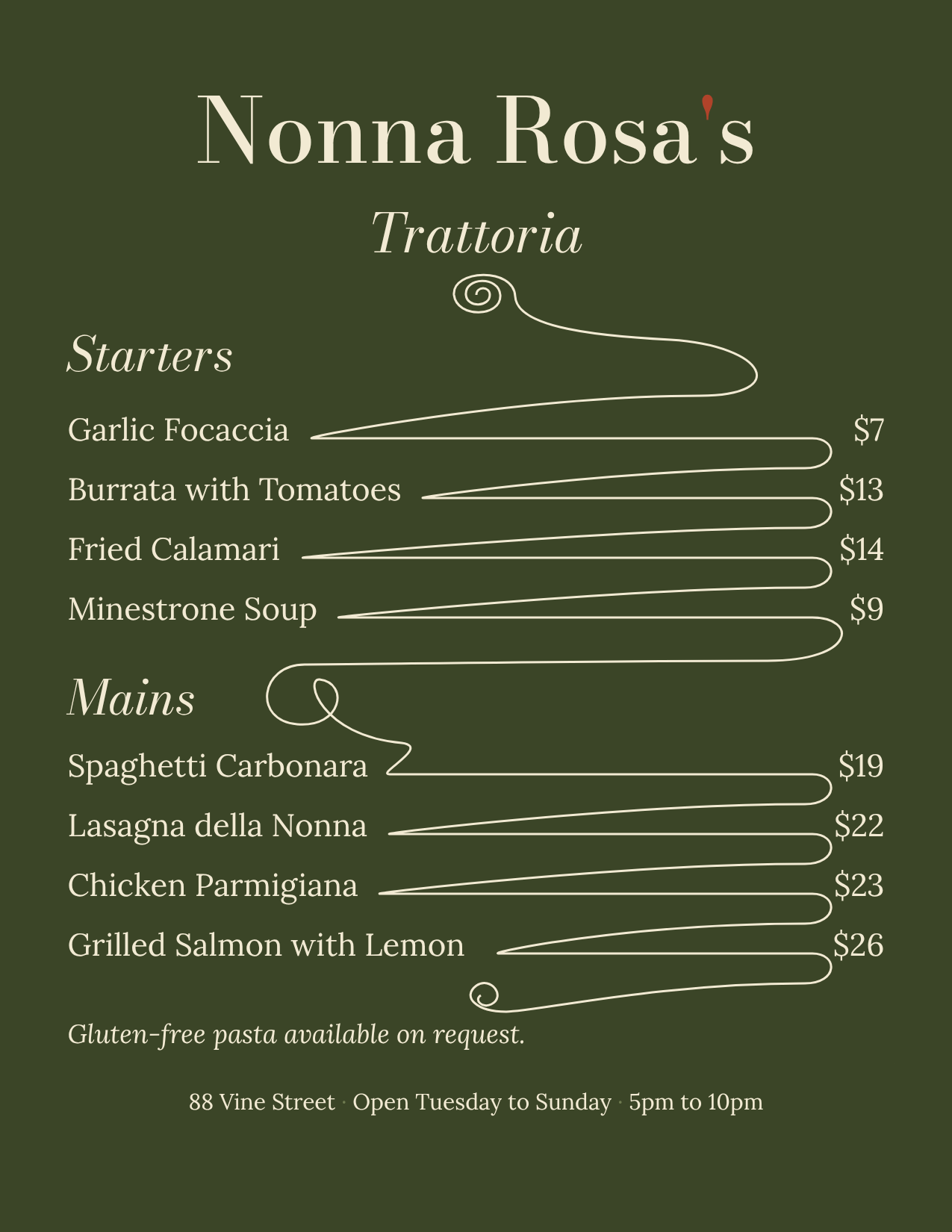
We asked the agent for a one-page US Letter dinner menu for a made-up restaurant, Nonna Rosa's Trattoria, in deep olive green and cream. It had four starters and four mains, each with a price, and we pinned all 17 lines of copy (the name, 8 dishes and 8 prices) as required text.
Here's what came back:
- The first version was ready in about 4 minutes, for 142 AI credits.
- All 17 required lines were on the menu, checked by the tool itself.
- All 8 dish names came back as their own text layers.
- All 8 prices were live text you can edit, set in two price columns: one for starters, one for mains.
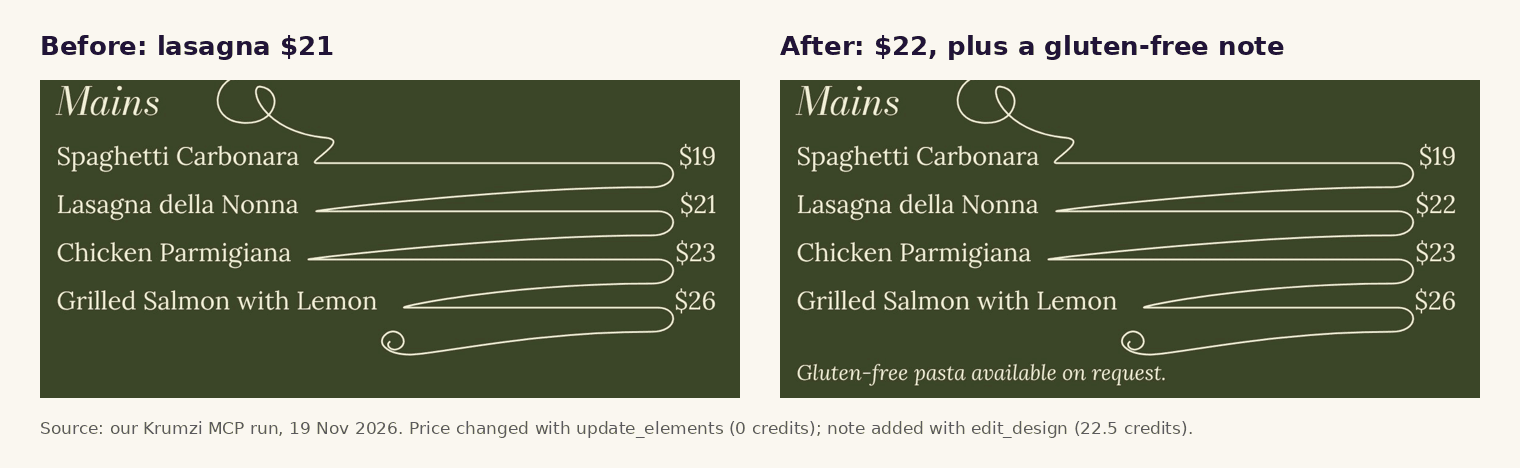
- Changing one price took 0 credits and no regeneration. We changed the lasagna from $21 to $22 by editing one line in the mains price column. Nothing else moved.
- Adding a new line took about a minute and 22.5 credits. We asked, in plain words, for a gluten-free pasta note under the mains, and the agent placed it.
Here's how to get the same result for your own menu.
How to make a restaurant menu with your AI agent
Step 1: Connect a design tool to your AI client
Your agent needs a design tool to draw with. MCP, the Model Context Protocol, is the open standard that connects AI clients to tools like this. For Krumzi, the server URL is https://www.krumzi.com/api/mcp.
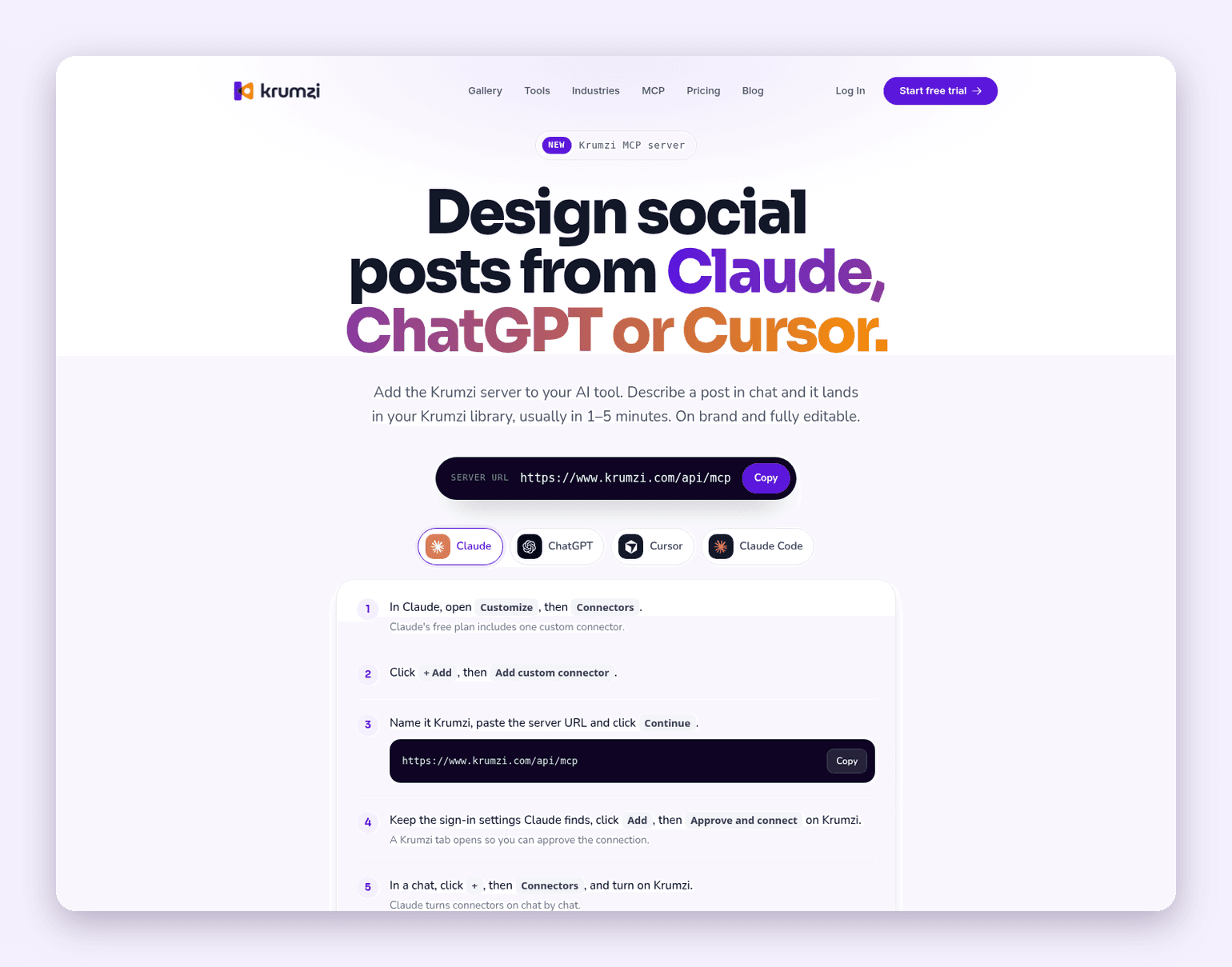
- Claude: go to Customize, then Connectors, click + Add, then Add custom connector. Name it Krumzi, paste the URL, approve the connection on Krumzi, then turn Krumzi on from the + menu in your chat. Anthropic's guide to custom connectors has the details.
- ChatGPT: follow the ChatGPT tab on the Krumzi MCP page, approve the connection, then start your message with "Krumzi". OpenAI's docs explain how ChatGPT uses custom MCP servers.
- Claude Code or Cursor: add the same URL as a remote server, then approve it.
Krumzi's MCP page says setup usually takes 1 to 5 minutes, and any Krumzi account can make five designs a month through the connection without the Krumzi badge, without adding a card.
Step 2: Write your menu down as plain text first
Before you ask for a design, get the words right. List every section, every dish and every price exactly as it should print. Add your restaurant name, address and opening hours.
This is the part a chatbot is great at. Ask it to tighten your dish descriptions, then copy the final list. Keep descriptions short; a printed menu is read in seconds.
Step 3: Ask for a print-sized, editable menu
Now give the agent the brief. Name the size, the colors and the mood, and tell it which lines must appear word for word. Here's a prompt you can copy and fill in:
Use Krumzi to design a one-page US Letter dinner menu for [restaurant name]. Colors: [your two colors]. Mood: [for example, warm and classic]. Sections: Starters and Mains. Use this text exactly, including every price: [paste your list]. Footer: [address and hours]. Keep every dish and price as editable text.
Behind the scenes, the agent calls Krumzi's generate_design tool with your brief and a required_text list. When the design is ready, get_design reports whether each required line made it onto the menu. On our test, it reported 17 of 17.
Don't have the menu's words yet? Our guide on how to make a menu covers sections, order and pricing.
Step 4: Check every dish and price
Ask the agent to read the menu back to you, line by line. It uses get_canvas_state to list each text layer by name, such as "Dish 6: Lasagna della Nonna" or "Prices mains". Compare that list with your own. A wrong price on a printed menu costs you money every night it's on the table.
Then ask it to run check_safe_area after you set the print size in Step 7. It flags any text too close to the trim line.
Step 5: Change a price without starting over
This is where an editable menu pays off. Tell the agent: "Change the lasagna price to $22." It edits that one line with update_elements. On our test menu, that cost 0 credits, and nothing else on the page moved.
One detail to know: our test menu set the prices in two column blocks, one per section, not one layer per price. Every price is still live text you can change. If you'd rather have each price as its own layer, ask for that in your brief.
Step 6: Add a note, a special or an allergen line
Need a new line? Describe it in plain words: "Add one small line under the Mains list that says: Gluten-free pasta available on request." The agent uses edit_design for this, and the design keeps its layout. Ours took about a minute and 22.5 credits.
If you run a chain with 20 or more locations in the US, the FDA's menu labeling requirements say calorie information must be on your menus. Check that before you print.
Step 7: Export a print PDF and a social image
For print, ask the agent to set a print size first. Krumzi's print presets include US Letter, A4 and A5, and they add bleed when you export. We used the US Letter preset, and our PDF came out at the exact trim size with bleed around it and the artwork at 300 ppi.
Then export twice:
- PDF for the printer.
- PNG or JPG for your website, Google Business Profile or an Instagram post about the new menu.
Want a QR code on the printed menu that points to your online menu? You can make one with our free QR code generator and ask the agent to place it in a corner.
Print checklist
| Check | What to look for |
|---|---|
| Words | Every dish, price, address and hour matches your list |
| Size | The print preset matches your paper: US Letter, A4 or A5 |
| Bleed | The PDF has bleed if the background color runs to the edge |
| Safe area | No text sits close to the trim line |
| Color | The printer takes RGB PDFs, or converts them for you |
| Proof | You've printed one copy at home and read it at arm's length |
When you should use something else
An agent-made menu is the right pick for a printed menu, a specials board or a social post. It's the wrong pick when:
- Guests should order and pay from their phones. Use a QR ordering system such as MENU TIGER, connected to your kitchen.
- Allergens and translations are the main job. Use Menutech, which is built around them.
- Your menu has to match your POS every day. Use MustHaveMenus if you run Toast or Square.
- Your printer demands PDF/X files in CMYK. Krumzi's PDF is a 300 ppi RGB file with trim and bleed, so use a tool with press export, such as Adobe InDesign.
- You'd rather design it yourself, without an agent. Use the AI menu maker in the Krumzi app.
One honest limitation
An MCP design tool makes and updates a printed or image menu. It doesn't replace a POS-connected QR ordering system. Your agent won't take orders, sync stock or mark a dish as sold out across your systems. If you change a price on the printed menu, update your POS and online ordering yourself.
What it costs
Krumzi prices, verified on krumzi.com/pricing on 19 November 2026:
| Plan | Monthly | Yearly | AI credits a month | Brands |
|---|---|---|---|---|
| Starter | $19 | $190 | 1,000 | 1 |
| Pro | $39 | $390 | 2,500 | 3 |
| Studio | $89 | $890 | 6,000 | 10 |
| Month pass | $49 once, 30 days of Pro | n/a | 2,500 for the 30 days | 3 |
Our test menu used 142 credits for the first version and 22.5 for the added note; the price change was free. A month pass suits a one-off menu refresh, because nothing renews. Starter, Pro and Studio start with a 3-day free trial with 1,000 AI credits.
Ready to put your menu in your agent's hands? Start free trial and send it your dishes and prices. 3-day free trial, card needed. No charge until day 4. Cancel online anytime.
Frequently Asked Questions
How can my AI agent make a restaurant menu?
Connect a design tool to your AI client through MCP, paste your dishes and prices, and ask for a print-sized menu with editable text. With Krumzi, the agent designs the menu from your brief, checks that every line made it on, and exports a print PDF with bleed. Our test menu was ready in about 4 minutes.
What is the best AI tool to make a restaurant menu I can print?
For a printed menu you can edit later, use a layered design tool such as Krumzi. Use MENU TIGER for QR ordering, Menutech for allergens and translations, and MustHaveMenus if your menu has to stay in sync with Toast or Square. Our best AI menu makers guide compares them.
Can Claude or ChatGPT design a menu I can edit?
On their own, they write great menu copy but give you a flat image or code. Connected to a design MCP like Krumzi, they hand back a real design with every dish and price as live text. You can change a price later without redrawing the menu.
Can I change one price later without redoing the whole menu?
Yes, if the menu is a layered design. Ask your agent to change the price, and it edits that one line. On our test menu, a price change took 0 credits and nothing else moved.
Can the agent make a QR code menu?
It can place a QR code on a printed menu that links to your online menu. It isn't a QR ordering system, though. For ordering and payment from a phone, use restaurant software built for that.
A month of posts, designed before your coffee cools
Describe the post. Krumzi designs it from scratch, on your brand, fully editable.
Start free trial3-day free trial, card needed. No charge until day 4. Cancel online anytime.