On this page
- The short answer
- What counts as a design tool for AI agents
- Four kinds of tools your agent can connect to
- What it looks like when it works: three briefs, three editable files
- How the agent actually drives the tool
- How to connect a design tool to Claude, ChatGPT or Claude Code
- Best for each job
- When you should use something else
- One honest limitation
- Pricing
- Where this is heading
- Frequently Asked Questions
A design tool for AI agents is a design product your AI assistant can operate for you, through MCP or an app connector, that hands back a real, editable design file: a flyer, poster, menu or social post with live text you can change. It isn't an image generator that returns a flat PNG, and it isn't a Figma-to-code bridge for developers. If your agent can't fix one word without redrawing the whole thing, it's not using a design tool.
You've probably felt the gap already. Claude or ChatGPT writes your event copy in seconds, then the design part falls apart. You get a picture with a typo baked in, a page of HTML, or a link to go finish it yourself somewhere else.
This guide pins down what the category means, shows which tools actually design your files, and gives you a clear "best for" pick for each job. Every result in it comes from briefs we ran through a design MCP on 19 November 2026.
The short answer
- Best for a print flyer, poster or menu you can edit: a brief-to-layout design MCP such as Krumzi.
- Best if your designs already live in Canva: the Canva MCP.
- Best if your files live in Figma: the Figma MCP.
- Best for filling one template many times: Bannerbear's MCP.
- Best for raw images, mockups or merch: an image MCP such as Kittl's.
What counts as a design tool for AI agents
Plenty of products now say "works with AI agents." Most mean one of three different things. Here's the test we use. A real design tool for agents passes all five.
- It returns layers, not pixels. The headline, date and price come back as separate, live text. That's what lets you change "Saturday" to "Sunday" in seconds.
- It takes a brief and your exact words. You describe the job in a sentence, and you can pin the copy that must appear word for word, like an address or a price.
- It knows real sizes. US Letter and A5 flyers, 18 x 24 inch posters, 1080 x 1350 Instagram posts. Print sizes export with bleed.
- The agent can check its own work. It can look at a preview and run checks for text crossing the trim line, overlapping layers, or low contrast against the WCAG contrast guideline, before you ever see it.
- It saves the file somewhere you can open. The design lands in a library and an editor you can open yourself, not only in the chat.
The plumbing is usually MCP, the Model Context Protocol, an open standard for letting an AI assistant call tools in another product. If MCP is new to you, start with our plain-English explainer, What Is an MCP Server?
Four kinds of tools your agent can connect to
| What the agent gets back | Example tools | Best for | Where it breaks |
|---|---|---|---|
| A layered design built from your brief | Krumzi | Flyers, posters, menus, social posts | Not built for app UI or video through the MCP |
| A design suite file, from candidates or templates | Canva MCP, Adobe Express | Teams already working in those suites | You finish in their editor |
| A product design file or code context | Figma MCP | App and website design, design-to-code | Wrong shape for a print flyer |
| A filled template or a generated image | Bannerbear MCP, Kittl MCP, image models | The same layout at scale, mockups, artwork | No new layout, or no live text |
The first row is the narrow job this guide is about: marketing files a person will print or post, built by an agent from a sentence, and still editable afterwards. "AI design" in general is much broader. That's why you see design-to-code tools, UI canvases and image generators all wearing the same label.
What it looks like when it works: three briefs, three editable files
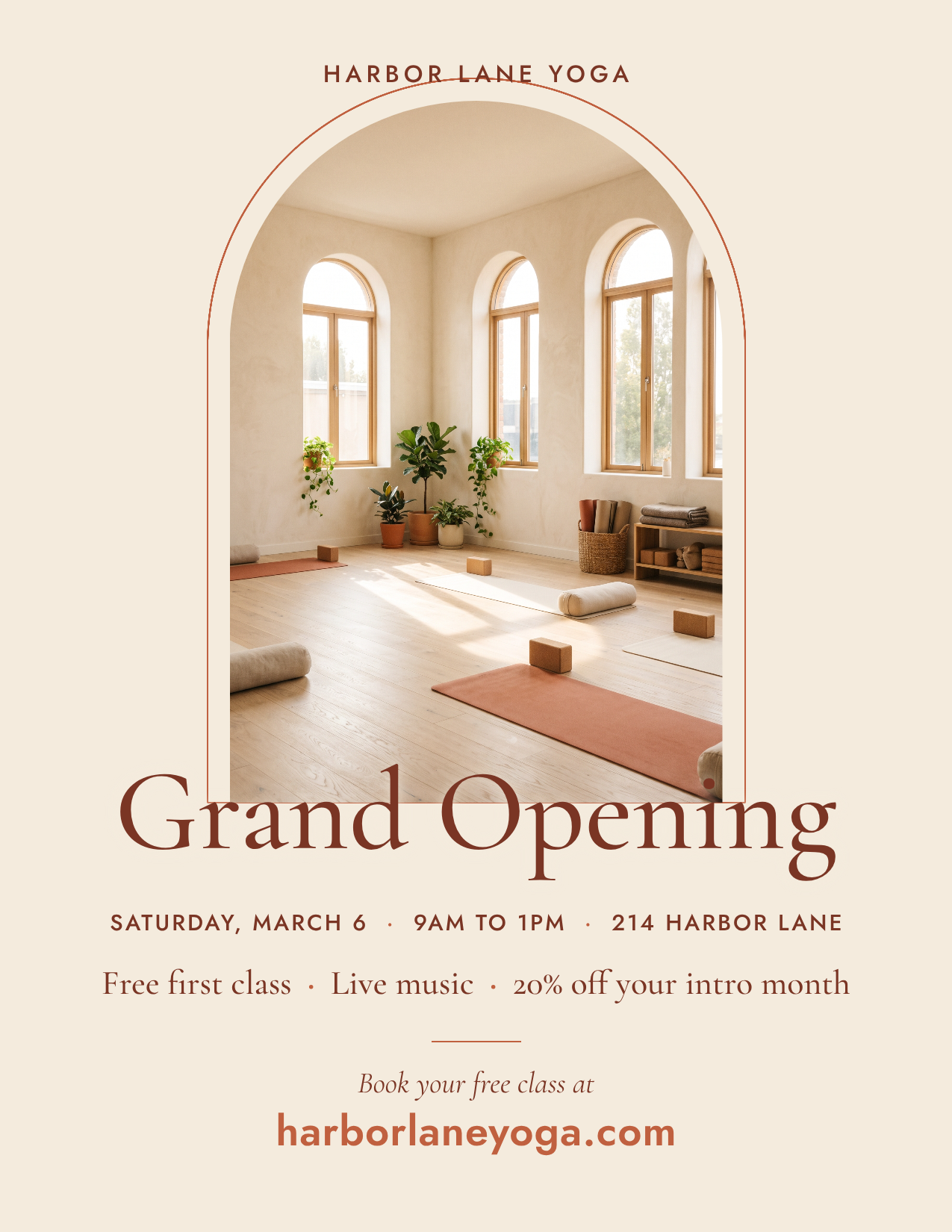
We connected an AI client to the Krumzi MCP server and sent three everyday briefs to its generate_design tool: a flyer, a restaurant menu and an Instagram post. Each one had its own colors. We also ran a fourth, a US Letter grand-opening flyer with seven required lines of copy.
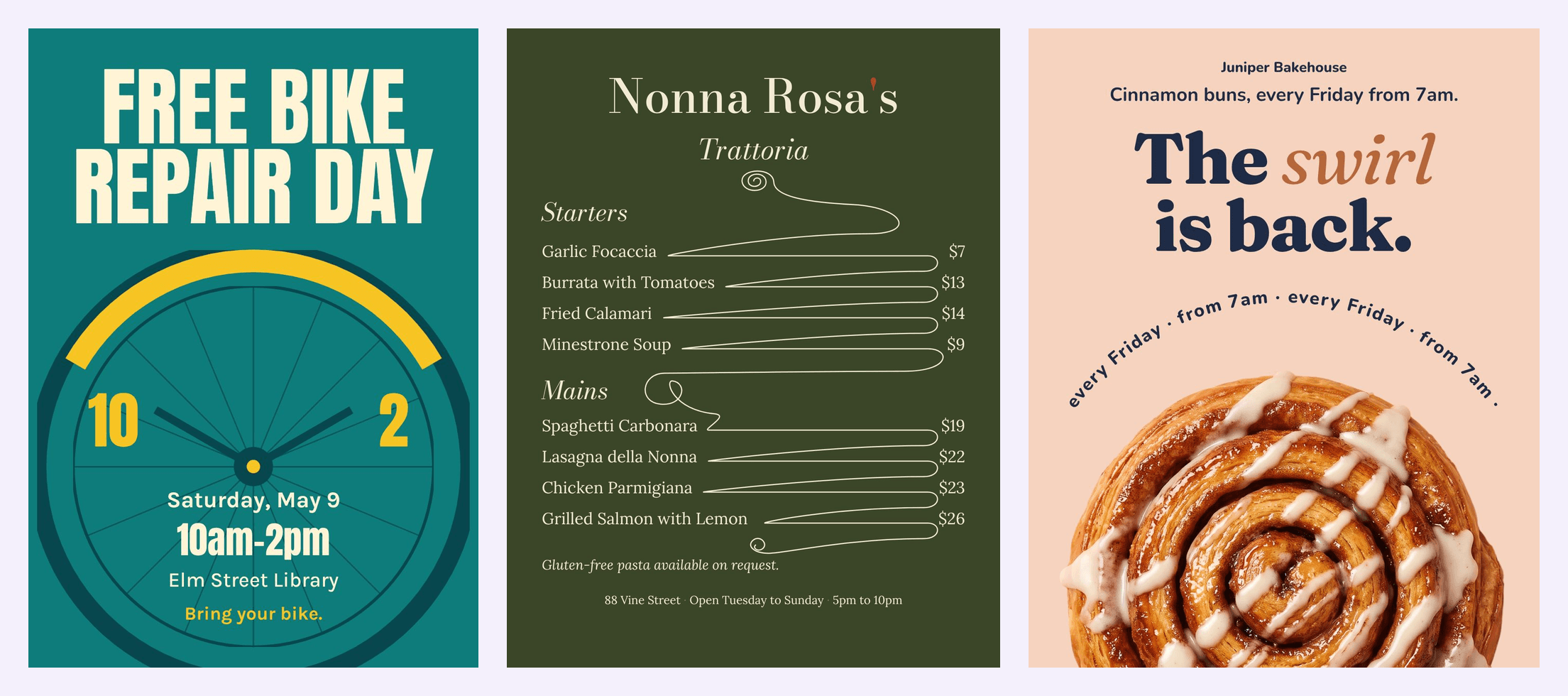
Here are the three briefs, word for word:
- Flyer: "An A5 flyer for Saturday's free bike repair day at Elm Street Library, 10am to 2pm, in teal and sunflower yellow."
- Menu: a one-page US Letter dinner menu for a made-up trattoria, in deep olive green and cream, with four starters and four mains, each with its price.
- Instagram post: "An Instagram post for Juniper Bakehouse, a made-up neighborhood bakery, announcing that cinnamon buns are back every Friday from 7am. Navy and soft peach, warm and friendly, a close-up photo of a cinnamon bun."
All 4 of 4 briefs came back as editable designs on the first try. The bike flyer had 7 live text layers, the menu 14 and the bakery post 4, alongside shapes, decoration and photos. On the two briefs where we pinned exact copy, every required string was found on the design: 17 of 17 on the menu and 7 of 7 on the grand-opening flyer.
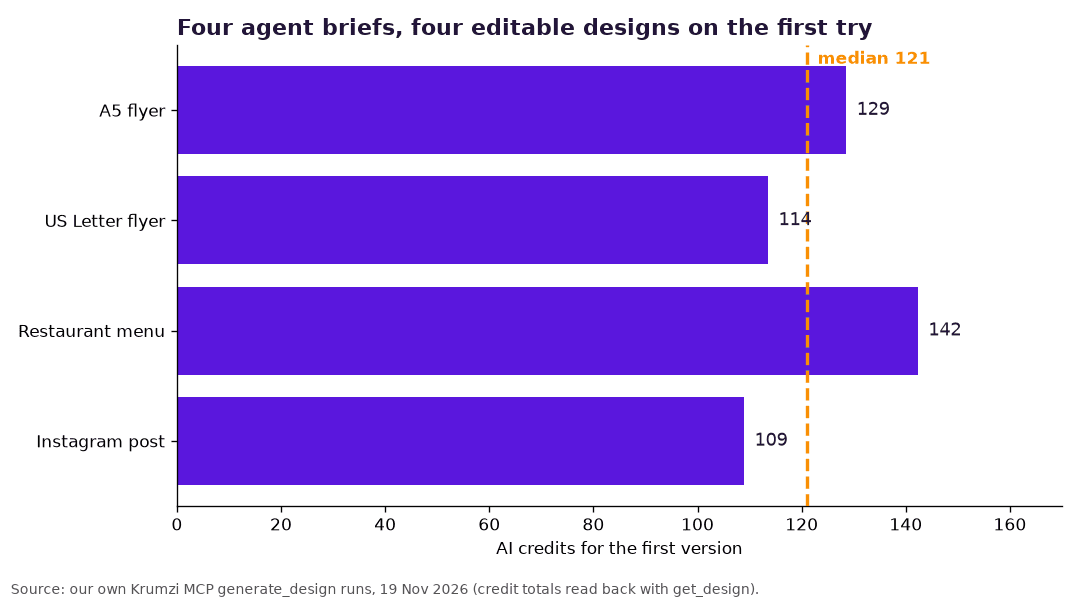
Each first version cost between 109 and 142 AI credits, with a median of 121. Each was ready in under 5 minutes, running side by side.
Then we tested the part that matters most in real life: changes. On the bike flyer, the agent added a date by editing the one text layer that held the day. It took about 5 seconds and 0 credits. On the menu, it changed one price the same way, then added a gluten-free note with a plain-language edit for 22.5 credits. Nothing else on either design moved.
How the agent actually drives the tool
You never see most of this, but it's worth knowing what a good design tool exposes. Here's the sequence our agent followed with Krumzi:
generate_designwith the brief, the size, the brand, and any required text. It returns a design ID and an editor link right away.get_designevery 20 to 30 seconds until the design is ready. It reports the preview, the credits used and whether each required string made it on.get_canvas_stateto read every layer by name, such as "Title", "Dish 6" and "Prices mains" on the menu.update_elementsfor exact edits to one layer, oredit_designfor a change described in plain words.check_safe_area,check_overlapsandcheck_text_contrast, plus a screenshot of the canvas, before export.resize_canvasto a print preset such as US Letter or A5, so the export adds bleed.export_designas PNG, JPG, WebP or PDF.
Here's the grand-opening flyer from that fourth brief, exported after a safe-area fix:
How to connect a design tool to Claude, ChatGPT or Claude Code
For Krumzi, the server URL is https://www.krumzi.com/api/mcp, and the connection uses OAuth 2.1, so you approve it on Krumzi.
- Claude: open Customize, then Connectors, click + Add, then Add custom connector, paste the URL, and approve. Anthropic's guide to custom connectors using remote MCP walks through it.
- ChatGPT: follow the ChatGPT tab on the Krumzi MCP page, approve the connection, then start your message with "Krumzi".
- Claude Code: run
claude mcp add --transport http krumzi https://www.krumzi.com/api/mcp, type/mcp, pick krumzi and choose Authenticate. Our guide to generating images with Claude Code covers the coding-agent side. - Cursor: add Krumzi to
mcp.jsonunder Cursor Settings, Tools & MCP.
For the other tools in this guide, connect them the way their own docs describe. Canva calls its version the Canva AI Connector. Figma's remote server is at mcp.figma.com/mcp. If you want the wider picture of how connectors work, our Claude connectors guide covers it.
Best for each job
Best for a print flyer, poster or menu: Krumzi. It designs the layout from your sentence, returns live text, and exports print sizes with bleed. You can fix a price in seconds instead of starting over.
Best if your designs live in Canva: Canva MCP. Canva says it can search your designs, generate content and export files, on every Canva account. Searching your Brand Templates needs a paid Canva plan.
Best if your files live in Figma: Figma MCP. It gives coding agents design context from your frames and can write native Figma content back to the canvas. Writing outside your drafts needs a Full seat, and Figma says it's free during the beta.
Best for the same layout at scale: Bannerbear. You build one template, and the agent fills it from data, as images, videos or PDFs.
Best for images, mockups and merch: Kittl. Its MCP chains image generation, background removal, upscaling, vectorizing and mockups, and saves everything to your Kittl workspace.
When you should use something else
A brief-to-layout tool is the wrong pick for some jobs. Use something else when:
- You're designing software screens. Use Figma's MCP. Marketing layouts and app UI are different crafts.
- Your brand team signs off Canva templates. Use the Canva MCP so the agent works inside the approved templates.
- You need hundreds of identical cards. Use Bannerbear and its template fill.
- You need a video. Krumzi's MCP makes still designs only; video stays in the Krumzi app.
- Your printer requires PDF/X with CMYK. Krumzi's PDF export is a 300 ppi RGB file with trim and bleed boxes, so use a tool with press export such as Adobe InDesign.
One honest limitation
Krumzi isn't listed in the Official MCP Registry or in Claude's connector directory yet. Canva and Figma are in both. So you won't find Krumzi by browsing inside Claude; you add it by pasting its server URL as a custom connector. It's one paste and one approval, but it's a step you take yourself.
Pricing
Krumzi prices, verified on krumzi.com/pricing on 19 November 2026: Starter $19 a month, Pro $39, Studio $89, and Agency priced with you. Yearly plans are $190, $390 and $890. A month pass gives you everything in Pro for 30 days for $49 once, with nothing to cancel. Starter, Pro and Studio start with a 3-day free trial with 1,000 AI credits; a card is needed and there's no charge until day 4. The MCP page adds that any Krumzi account can make five designs a month through the connection without the Krumzi badge, and you don't add a card.
Where this is heading
"Agentic design" is the broader idea that an AI plans and produces design work, not only suggests it. Our guide to agentic AI design covers that bigger picture. A design tool for AI agents is the practical piece of it: the thing your agent plugs into so the file it hands you is real.
Want your agent to hand you files you can edit? Start free trial and ask it for your first flyer, menu or post. 3-day free trial, card needed. No charge until day 4. Cancel online anytime.
Frequently Asked Questions
What is a design tool for AI agents?
It's a design product an AI assistant can operate through MCP or a connector, which returns a real, editable design file such as a flyer, poster, menu or social post. The text stays live, so you can change a word without redrawing the design. Image generators and design-to-code bridges are related, but they don't do this job.
Is there an MCP server for social media content creation and design?
Yes, several. Krumzi's MCP designs editable posts, carousels, flyers and documents from a brief, and the Canva MCP works with designs in your Canva account. Kittl's MCP focuses on images and mockups. See our list of the best MCP servers for marketers for the wider stack.
How do I connect a design tool to Claude Code?
Add the tool's remote MCP server with one command, then authenticate. For Krumzi, run claude mcp add --transport http krumzi https://www.krumzi.com/api/mcp, type /mcp, pick krumzi and choose Authenticate. Figma and Kittl document their own Claude Code setup.
Can an AI agent make a design I can edit later?
Yes, if it's connected to a design tool that returns layers. In our runs, 4 of 4 briefs came back as editable designs, and single-line changes took seconds without regenerating anything. A flat image from an image model can't be edited the same way.
Do I need to know how to code to use a design MCP?
No. In Claude and ChatGPT you add the connector in settings and approve it, then ask in plain words. Coding tools like Claude Code and Cursor use a one-line command or a config file instead.
A month of posts, designed before your coffee cools
Describe the post. Krumzi designs it from scratch, on your brand, fully editable.
Start free trial3-day free trial, card needed. No charge until day 4. Cancel online anytime.