On this page
- The short version
- Door hanger template sizes and hole specs
- What to put on a door hanger
- 8 door hanger ideas by trade, with prompts
- How to make a door hanger in Krumzi, step by step
- Design it yourself or hire it out?
- When you should use something else
- Common door hanger mistakes
- Your next door hanger
- Frequently Asked Questions
You run a local service. You know which streets you want, and a stack of door hangers is the cheapest way to knock on every door without knocking. Then you open a door hanger template, and it's a pretty shape with a hole at the top and no clue where the hole will land on the printer's die.
That's the part most templates skip. A door hanger template is really four numbers: the trim size, the bleed, the safe margin, and where the hole sits. Get those right and any design tool works. Get them wrong and your phone number gets punched out at the door.
This guide gives you the numbers from three printers' own spec pages, what to put on the hanger so it gets a call, eight ideas by trade with a prompt for each, and a step-by-step from one sentence to a print-ready file.
The short version
- Pick 4.25 x 11 inches for a full offer, 3.5 x 8.5 for one message. Vistaprint's large size is 4.5 x 11, so check before you design.
- Build your file 0.125 inch bigger on every side for bleed: 4.5 x 11.25 inches, or 1350 x 3375 pixels at 300 dpi, for the 4.25 x 11 size.
- Keep every word at least 0.125 inch inside the trim and out of the top 2 inches, where the hole and slit go.
- Lead with one offer, a deadline, and a phone number someone can read from a step away.
- Ask your printer for its die line before you finalize. Hole sizes differ.
Door hanger template sizes and hole specs
The two standard door hanger sizes are 4.25 x 11 inches and 3.5 x 8.5 inches. Add 0.125 inch of bleed on every side, keep text 0.125 inch inside the trim, and keep the top 2 inches clear for the hole. Hole diameters run from 1.18 to 1.75 inches, depending on the printer.
Here's what three printers publish on their door hanger pages and template guides, checked on 19 November 2026.
| Printer | Sizes offered (inches) | Hole | Other spec |
|---|---|---|---|
| Vistaprint | 3.5 x 8.5, 4.5 x 11 | 1.18 in (30 mm), with a slit | Optional perforation 2 in from the bottom |
| 4OVER4 | 3.5 x 8.5, 4 x 9, 4.25 x 11 | 1.75 in, centered 1.25 in from the top | 0.125 in bleed, 0.125 in safe margin |
| SinaLite | 3.5 x 8.5, 4.25 x 11 | 1.25 in die-cut hole | Leave die lines out; slit direction can vary |
Two things jump out. First, "standard" is looser than templates suggest: Vistaprint's large hanger is 4.5 inches wide, not 4.25, and 4OVER4 adds a 4 x 9 size. Second, the hole isn't standard at all. A 1.75-inch hole centered 1.25 inches down reaches 2.125 inches from the top edge, while a 1.18-inch hole leaves far more room. SinaLite also warns that the slit's direction isn't guaranteed, so don't design anything that depends on which side it opens.
So here's the rule we'd follow. Design to the printer you'll actually use, and treat the top 2 inches as background only. If you print with a shop that uses a big hole like 4OVER4's, push that clear band to 2.5 inches and check the proof.
Your template, in numbers
If you're building the file yourself, these are the canvas sizes to type in. The pixel figures are the inch figures times 300, the resolution SinaLite asks for, along with CMYK color.
| Finished size | File size with bleed | Pixels at 300 dpi | Live area inside the safe margin |
|---|---|---|---|
| 4.25 x 11 in | 4.5 x 11.25 in | 1350 x 3375 | 4 x 10.75 in |
| 3.5 x 8.5 in | 3.75 x 8.75 in | 1125 x 2625 | 3.25 x 8.25 in |
| 4.5 x 11 in (Vistaprint) | 4.75 x 11.25 in | 1425 x 3375 | 4.25 x 10.75 in |
Backgrounds and photos should run all the way to the edge of that file. Words, logos, prices and QR codes stay inside the live area and below the hole.
Paper and finish
Most printers default to thick card. SinaLite prints hangers on 14 pt stock with an aqueous coating, and 4OVER4 prints paper hangers on 14 pt or 16 pt gloss cover with UV coating. A hanger lives on a doorknob in the weather until someone comes home, so pick 14 pt or heavier for outdoor routes.
What to put on a door hanger
A door hanger gets read in the three seconds between the knob and the recycling bin. Treat it like a sign, not a brochure.
- One offer, stated as a number. "First mow free" or "$89 furnace tune-up" beats "Quality service you can trust." The offer is the headline. Most local advertisers skip this: in our study of 1,667 US home-services ads in Meta's Ad Library, only 19.4% showed a price and 21.5% named an offer. A number on the card already sets you apart. The full numbers are in our local Facebook ads study.
- A deadline. "Book by December 15" gives the reader a reason to call this week instead of someday.
- Proof that you're local. A street name, "licensed and insured", or "we're working on your block this week" tells them you're a neighbor, not a mailer.
- One way to respond. A phone number in big type. Add a QR code to a booking page if you have one, but never instead of the number.
- The back side does the details. Services, hours, a map, a coupon. The front sells, the back explains.
Two design rules carry most of the weight. Make the phone number one of the three biggest things on the front. The ADA sign standard sets 5/8 inch as the minimum letter height for signs read from under 6 feet, which is a sensible floor for a number someone reads at the door. And keep strong contrast between text and background: the WCAG contrast guideline asks for at least 4.5:1 for normal text on screens, and a card read in porch light deserves at least that much.
One rule about where they go. In the US, 18 U.S.C. 1725 fines anyone who knowingly puts unstamped mailable matter in a mailbox to avoid postage. That's why the hanger goes on the knob, not in the box. Check your town's rules on door-to-door distribution too, because local ordinances differ.
8 door hanger ideas by trade, with prompts
Each idea below comes with a prompt you can paste into Krumzi or brief a designer with. The businesses are made up. Swap in your own name, offer and number. We designed the first four in Krumzi from the prompts shown, at 1350 x 3375 pixels. Each one then got one follow-up edit to push every word below the top 2 inches, and we checked the layers afterward: on all four, the first line of text starts at least 2.1 inches below the trim.
1. Lawn care: the season sign-up
Spring is when homeowners decide who mows all summer. Lead with a free first visit tied to a full season, which pays for itself if they stay.
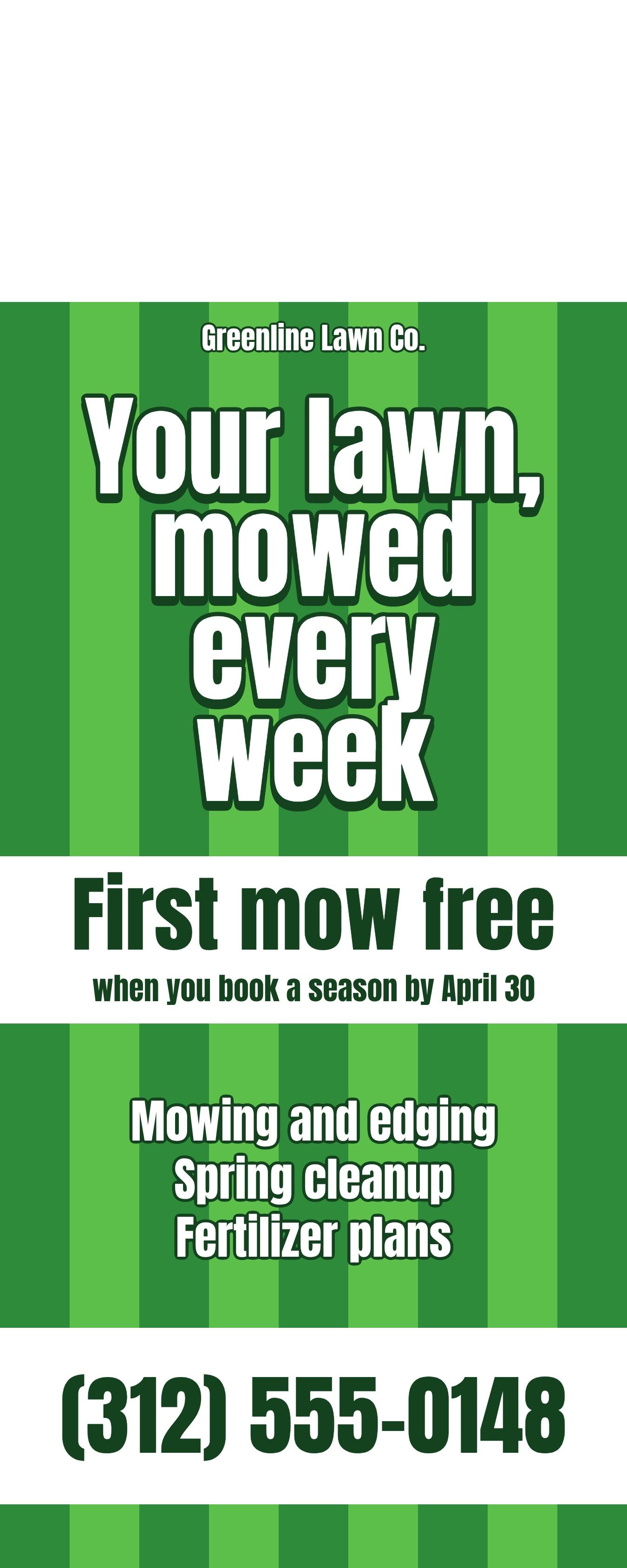
Door hanger for Greenline Lawn Co., a lawn care company. Headline: Your lawn, mowed every week. Offer: First mow free when you book a season by April 30. List: mowing and edging, spring cleanup, fertilizer plans. Phone (312) 555-0148. Keep the top 2 inches plain for the hanger hole. Fresh green and white, bold and readable from 3 feet.
2. House cleaning: the tear-off coupon
Cleaning is a trust purchase, so make the first step cheap and physical. Vistaprint offers a perforation 2 inches from the bottom, which turns the bottom strip into a coupon the reader can keep on the fridge.
Door hanger for Brightside Cleaning, a home cleaning service. Headline: Come home to a clean house. Offer: $25 off your first clean, this month only. List: weekly or biweekly visits, move-out cleans, supplies included. Phone (312) 555-0162. Add a tear-off coupon strip at the bottom with the $25 offer. Keep the top 2 inches plain for the hanger hole. Calm teal and white, friendly, clean layout.
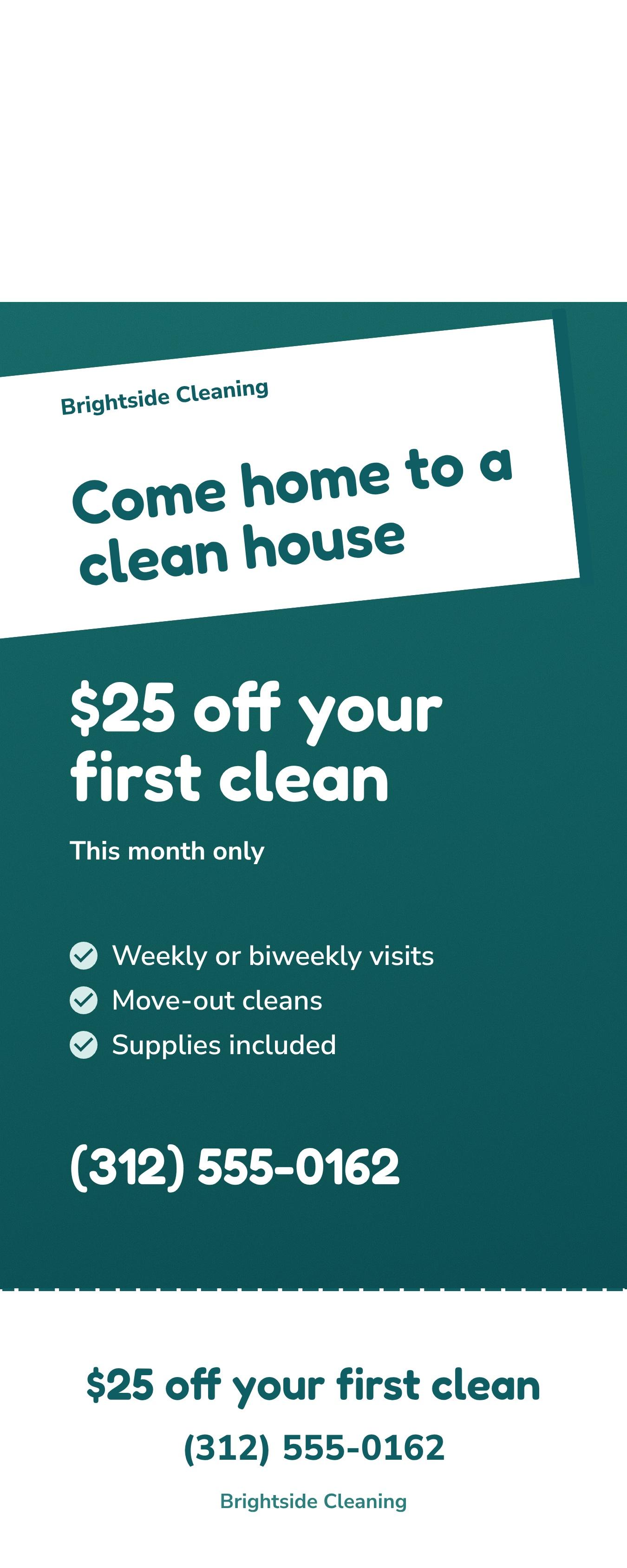
If you order perforation, keep the coupon's text inside that bottom 2 inches and repeat the phone number there. The top part may end up in the bin.
3. HVAC: the seasonal tune-up
Heating and cooling sell on timing. A furnace check before the first cold week, with a price and a cut-off date, is about as clear as an offer gets.
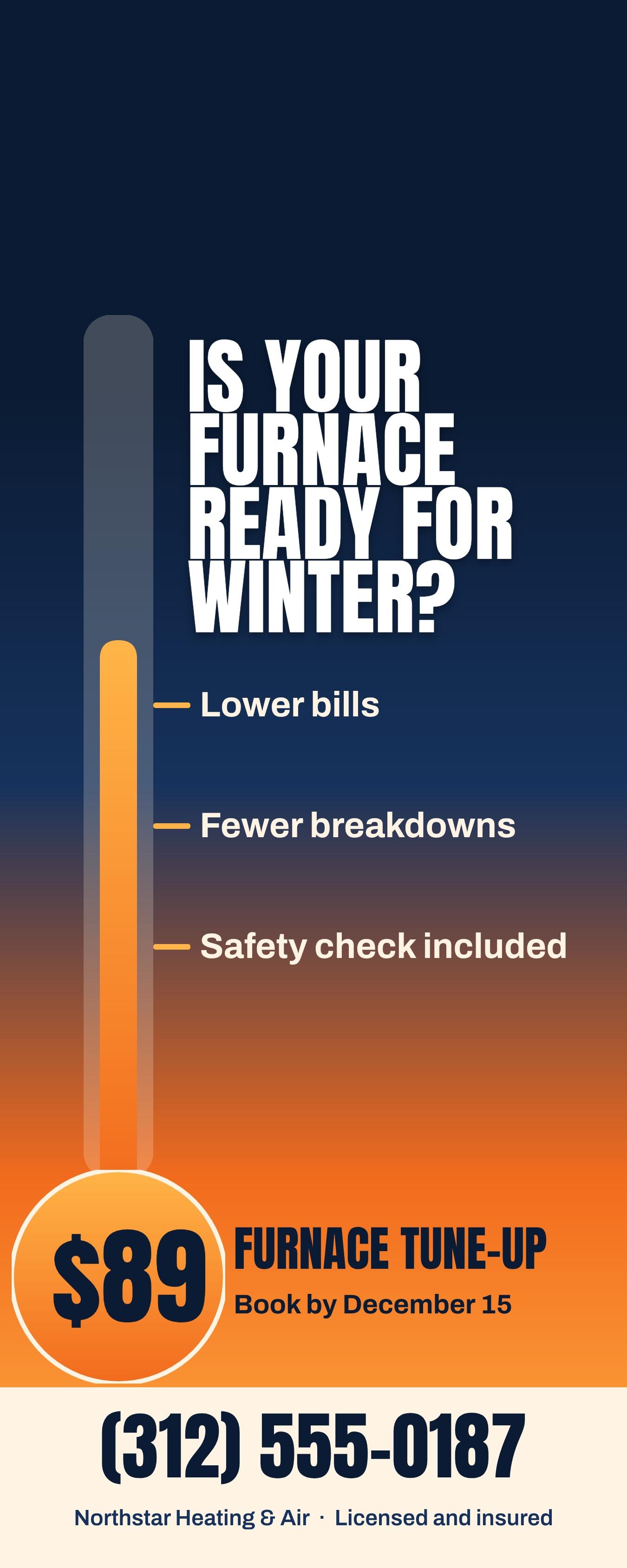
Door hanger for Northstar Heating & Air. Headline: Is your furnace ready for winter? Offer: $89 furnace tune-up, book by December 15. Three reasons: lower bills, fewer breakdowns, safety check included. Phone (312) 555-0187, licensed and insured. Keep the top 2 inches plain for the hanger hole. Navy and warm orange, strong and trustworthy.
4. Real estate: the home value offer
Agents use hangers to start conversations, not to sell a house on the spot. A free home value report is low-pressure and gives you a reason to follow up.
Door hanger for Dana Ruiz, a real estate agent with Oakmont Realty. Headline: Curious what your home is worth? Offer: free home value report for homes on this street. Short line: I help neighbors buy and sell in Westfield. Phone (312) 555-0119. Space for a headshot circle. Keep the top 2 inches plain for the hanger hole. Elegant charcoal and gold, lots of white space.
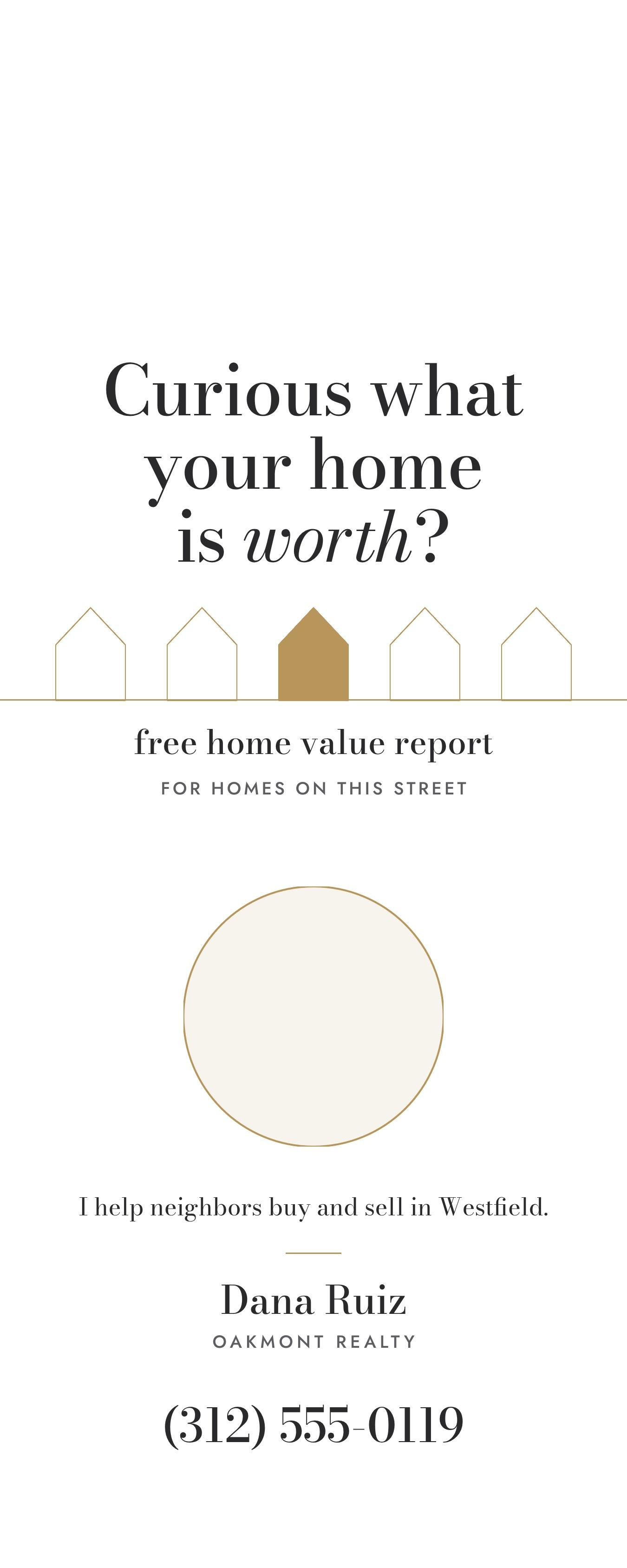
Drop your real headshot into the circle afterward. A face does more for an agent's hanger than any slogan.
5. Pest control: the quarterly plan
Pest control works best as a subscription, so sell the plan, not the spray.
Door hanger for ShieldPoint Pest Control. Headline: Keep bugs out all year. Offer: $50 off your first quarterly treatment. List: ants, spiders, mice, wasps. Line: Pet-safe options available. Phone (312) 555-0133. Keep the top 2 inches plain for the hanger hole. Clean white with forest green, calm and professional.
6. Pizza or takeout: the menu hanger
A restaurant hanger is a mini menu with a reason to order tonight. Use the back for the full list and keep the front to three favorites and a code.
Door hanger for Corner Slice Pizza, delivering to this neighborhood. Front: three favorites with prices, Large cheese $16, Pepperoni $18, Veggie supreme $19. Offer: Free garlic knots with code KNOB. Phone (312) 555-0176 and hours 11 AM to 11 PM. Keep the top 2 inches plain for the hanger hole. Warm red and cream, appetizing and bold.
7. Roofing or gutters: the neighbor notice
When you're already on a street, tell the neighbors. "We're working at a house nearby" is a reason to trust you that no ad can buy.
Door hanger for Summit Roofing. Headline: We're working on a roof on your street this week. Offer: free roof and gutter check while we're nearby. Line: Licensed, insured, local since 2012. Phone (312) 555-0124. Keep the top 2 inches plain for the hanger hole. Slate gray and safety orange, direct and no-nonsense.
Only claim a founding year that's true for your business. The prompt shows where it goes.
8. Pressure washing or window cleaning: the before and after
Visual services sell on contrast. Split the front into a dirty half and a clean half and let the picture make the case.
Door hanger for Clearview Exterior Cleaning. Split design showing a dirty driveway on the left and a clean one on the right. Headline: See the difference in one afternoon. Offer: 20% off driveway and siding washes booked this month. Phone (312) 555-0191. Keep the top 2 inches plain for the hanger hole. Bright blue and white, crisp and fresh.
If you have your own before-and-after photos, use them instead of generated ones. Real work from the reader's own area is the strongest proof you have.
How to make a door hanger in Krumzi, step by step
Templates hand you a layout and leave the hole math to you. If you'd rather start from your offer and get a finished, editable design, Krumzi designs the layout from one sentence. Here's the whole path with Greenline Lawn Co.
Step 1: Set a custom canvas at the printer's size
Start an image design. Krumzi supports any preset or custom canvas size, so type the bleed size from the table above: 1350 x 3375 pixels for a 4.25 x 11 hanger. If you started at another size, Resize at the top of the editor has a Custom size field where you type the width and height.
Step 2: Describe the hanger in one prompt
Paste a prompt like the ones above. Name the business, the headline, one offer, a deadline, the phone number, and the colors. Always include "keep the top 2 inches plain for the hanger hole", because Krumzi doesn't know where your printer's die will cut unless you tell it. Then look at the top of the result. If anything sits in that band, ask: "Move everything below the top 2 inches and keep the top as plain background." In our runs, that one edit cost between 16 and 25 credits per hanger.
Step 3: Fix anything by chatting or clicking
Ask in plain words: "make the phone number bigger" or "move the offer above the list". You can also click any element to move, resize or retype it. Every part stays editable, so a typo is a ten-second fix, not a redo.
Step 4: Add a QR code if you have a booking page
Open Assets, click Add QR Code, and paste the full link. Krumzi renders it as vector, so it stays sharp in print. Its help center suggests about 2 cm (0.8 inch) across as a floor for print. Scan it with your own phone before you order, and keep the phone number next to it.
Step 5: Make the back side
Start a second design at the same size for the back: services, hours, a map or the coupon. Krumzi can also make variations of a design if you want to test two offers on different streets.
Step 6: Export and send to the printer
Click Download, pick PDF or PNG, and leave the size at 1x, which equals your canvas: 1350 x 3375 pixels is 4.5 x 11.25 inches at 300 dpi. Exports don't use AI credits. Upload the file to your printer and check its proof against the die line.
Here's the honest limit. Krumzi has no door hanger preset and no die line, so you set the bleed size yourself and keep the hole area clear by prompt, then check it by eye. Its files are RGB, not CMYK, and its documents skip crop marks. Many printers convert RGB files on upload and some reject them, and very saturated blues and greens can shift on press, so look at the printer's proof before you approve a big run.
Design it yourself or hire it out?
Hiring a designer is cheaper than most people think, but it isn't instant. When we collected 75 Fiverr flyer-design gigs on 12 November 2026, the median starting price was $35. That's before revisions and before a second version for another street.
Printing is the bigger line item. On 19 November 2026, 4OVER4 listed paper door hangers from around $252 with a 250-piece minimum, and Vistaprint advertised a starting price of $0.07 each on an order of 2,000. So the design cost matters less than getting the file right the first time. A misprinted run costs more than any template.
When you should use something else
Krumzi isn't the right pick for every hanger. Use something else when:
- You want to pick from a gallery and order in one place. Vistaprint's own door hanger templates are already set to its 1.18-inch hole and its two sizes, and you check out in the same tab.
- Your printer sends a die line you must design on. Adobe Illustrator or Affinity let you place the printer's die line on its own layer and design around the exact cut. Affinity is now free with a Canva account.
- You need CMYK or spot colors. Brand colors that must match a Pantone swatch need a CMYK workflow, which means Illustrator, Affinity or InDesign.
- You want a template-first editor you already know. Canva has door hanger templates. You'll still want to check the hole position against your printer's spec.
- You need a custom shape. A local print shop can quote, proof and cut a custom die, such as an arch top or a house outline.
Common door hanger mistakes
- Text in the hole. The most expensive mistake on this product. Keep the top 2 inches clear, more for a big hole.
- Designing to the wrong size. A 4.25 x 11 file sent to a 4.5 x 11 product gets scaled or rejected. Confirm the size first.
- No bleed. A background that stops at the trim leaves white slivers after cutting. Add 0.125 inch on every side.
- Three offers instead of one. The reader picks none. Lead with one and put the rest on the back.
- A phone number you can't read from a step away. Make it big. That's the conversion.
Your next door hanger
Pick your printer and copy its size and hole spec. Set your canvas at the bleed size. Write one offer with a deadline, and keep the top of the card clear. Then print a small run on one street before you hang a thousand.
For more print guides, see how to add a QR code to a flyer that scans, our flyer size guide, and how to make a flyer with AI. If you need a matching flyer for the same campaign, try the AI flyer maker, and our print design page shows everything else Krumzi makes for paper.
What it costs (Verified 19 Nov 2026 on krumzi.com/pricing):
- Starter: $19 a month, or $190 a year, with 1,000 credits.
- Pro: $39 a month, or $390 a year, with 2,500 credits, three brands and the Brand Kit.
- Studio: $89 a month, or $890 a year, with 6,000 credits.
- Month pass: $49 once for 30 days of everything in Pro. Nothing renews, so it suits one canvassing season.
Our four hangers used between 65 and 147 credits each, including the hole-zone edit.
Want the design part done for you? Start free trial and describe your first door hanger.
3-day free trial, card needed. No charge until day 4. Cancel online anytime.
Frequently Asked Questions
What size is a standard door hanger template?
The most common size is 4.25 x 11 inches, and the compact one is 3.5 x 8.5 inches. Some printers sell other sizes, such as Vistaprint's 4.5 x 11 and 4OVER4's 4 x 9. Build your file 0.125 inch larger on every side for bleed.
How big is the hole on a door hanger?
It depends on the printer. On 19 November 2026, Vistaprint listed 1.18 inches, SinaLite 1.25 inches and 4OVER4 1.75 inches. Keep the top 2 inches free of text, and ask your printer for its die line.
How do I make a door hanger for my business?
Pick your printer's size, set a canvas with 0.125 inch bleed, and write one offer with a deadline and a phone number. Design it in a tool like Krumzi, Canva or Illustrator, keep the top of the card clear for the hole, and export a 300 dpi PDF. Check the printer's proof before you approve the run.
Can I make a DIY door hanger at home?
Yes, for a small run. Print a 4.25 x 11 design on heavy cardstock, two to a letter sheet in portrait, then cut the hole with a 1.25-inch circle punch and a short slit with a craft knife. For more than a few dozen, a printer's die cut is faster and cleaner.
Are door hangers worth it?
They're worth it when you serve a specific area and have a clear offer, because every hanger lands on a door you'd actually drive to. They work poorly for vague brand awareness. Test one street with a trackable code or phone number before you print thousands.
A month of posts, designed before your coffee cools
Describe the post. Krumzi designs it from scratch, on your brand, fully editable.
Start free trial3-day free trial, card needed. No charge until day 4. Cancel online anytime.